Posted on Leave a comment

Google Pixel 8 Pro Review: The Smartest Android Phone Yet

Google Pixel 8 Pro Review

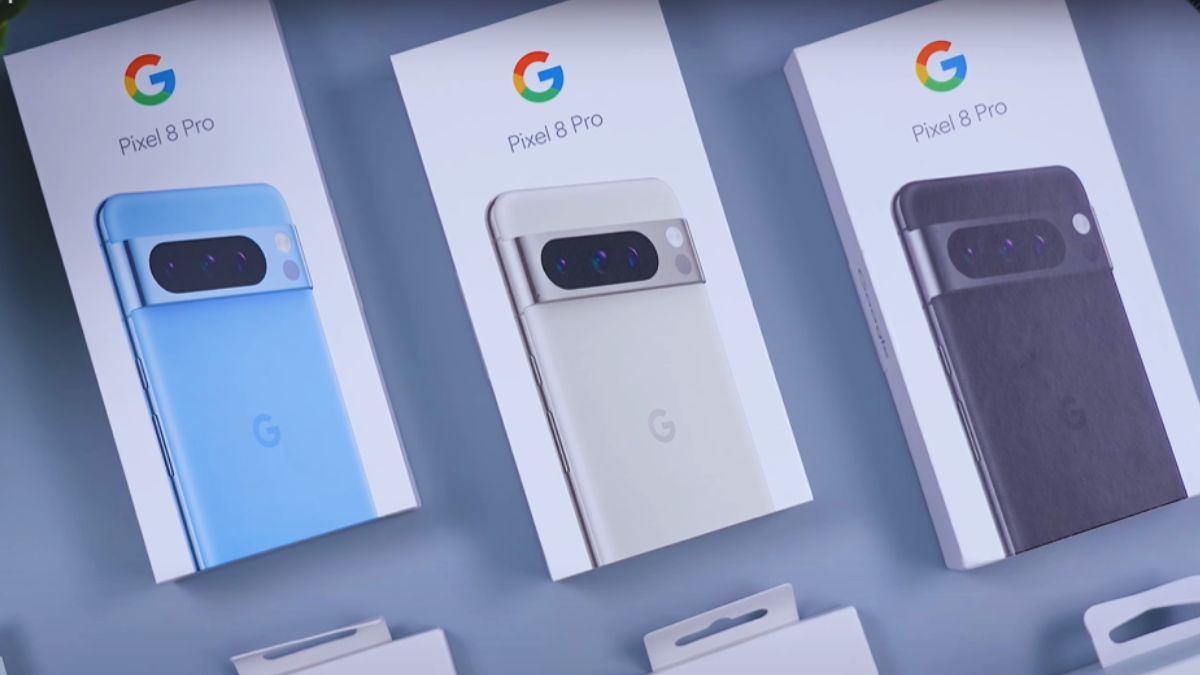
If you’re looking for a powerful and feature-packed smartphone, the Google Pixel 8 Pro Review is here to give you all the details. This Phone is released on October 12, 2023, and comes with Google’s new Tensor G3 chip and Android 14, promising seven years of updates. It brings an updated triple AI camera system that captures stunning photos and videos with a high-resolution display and a battery that easily lasts more than 24 hours, and enough power to handle heavy games and multitasking with ease. The Pixel 8 Pro truly combines speed, intelligence, and long-lasting performance in one sleek device. The Google pixel 8 Pro is available in three colors :

Google Pixel 8 Pro Review
The Google Pixel 8 Pro is available in three elegant colors — Bay (light blue), Obsidian (black), and Porcelain (white) — each highlighting its premium glass and aluminum design.
  1. Bay
  2. Obsidian
  3. Porcelain
  4. Mint ( added later )

Specifications

  • Screen: 6.7inch Super Actua display
  • Processor: Google Tensor G3
  • RAM: 12GB of RAM
  • Storage: 128, 256, 512GB or 1TB
  • Operating system: Android 14
  • Camera: 50MP + 48MP ultrawide + 48MP 5x telephoto, 10.5MP selfie
  • Battery : 5050mAh, 30W wired, PD3.0, PPS, 50% in 30 min (advertised), 23W wireless, Reverse wireless
  • Connectivity: 5G, eSIM, wifi 7, UWB, NFC, Bluetooth 5.3 and GNSS, USB-Type-C
  • Water resistance: IP68 (1.5m for 30 minutes)
  • Dimensions: 162.6 x 76.5 x 8.8mm
  • Weight: 213g

Camera – Experience Pro-Level Photography

Google Pixel 8 Pro Review
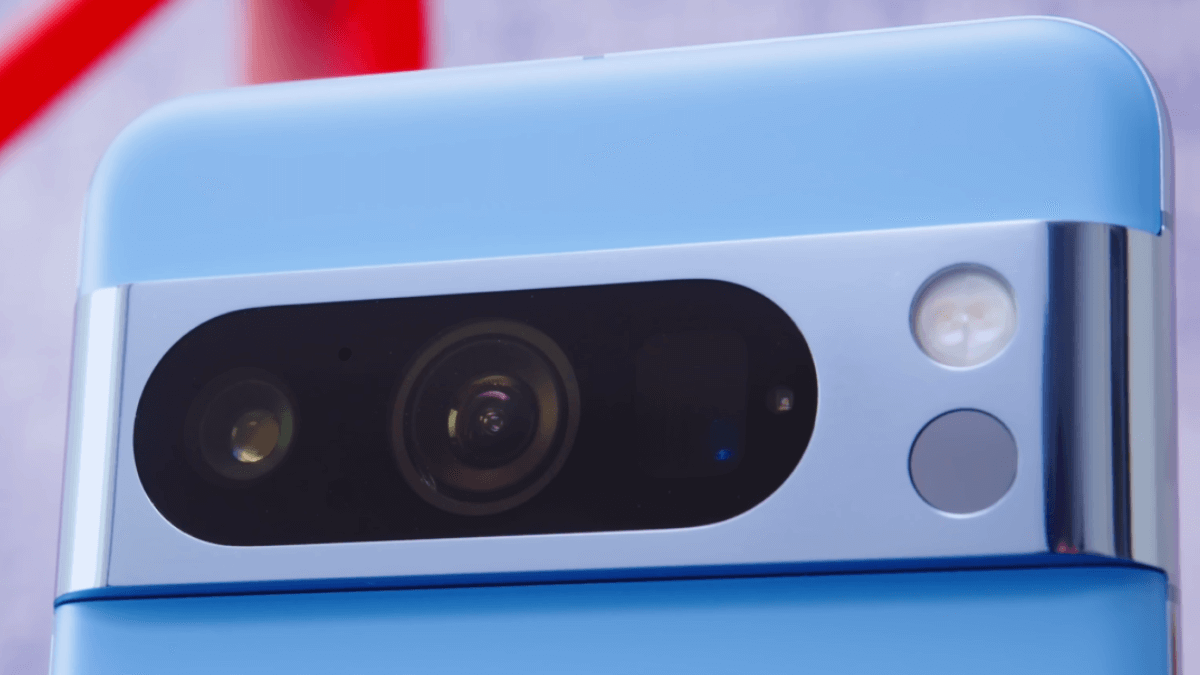
The triple camera system delivers professional-quality photos and videos with advanced AI processing, real tone accuracy, and exceptional low-light performance.

The Google Pixel 8 Pro takes smartphone photography to the next level with its powerful and intelligent camera system. It features a 50MP main camera with an f/1.7 aperture, optical image stabilization (OIS), and multi-zone laser autofocus, capturing sharp and vibrant photos even in low light. Alongside, the 48MP ultra-wide camera offers a 126° field of view, perfect for landscapes and group shots, while the 48MP telephoto lens with 5x optical zoom lets you capture distant subjects in stunning detail. For selfies, the 10.5MP front camera delivers clear and wide-angle shots, great for solo and group photos.

When it comes to video, the Pixel 8 Pro records in 4K at up to 60 fps and 1080p at up to 240 fps, supported by gyro-EIS and OIS for smooth and stable footage. While Selfie Camera records 4K at up to 60 fps and 1080p at up to 60 fps.

But what truly makes this camera special are its AI-powered features. The Magic Editor in Google Photos lets you easily move or resize people and objects or even change backgrounds with generative AI. The Best Take feature combines multiple shots to ensure everyone in a group photo looks perfect, and the Audio Magic Eraser removes unwanted background noise from your videos. Together, these smart tools make the Pixel 8 Pro one of the most advanced and user-friendly camera phones available today.

Display – Vivid Colors and Stunning Clarity

Google Pixel 8 Pro Review
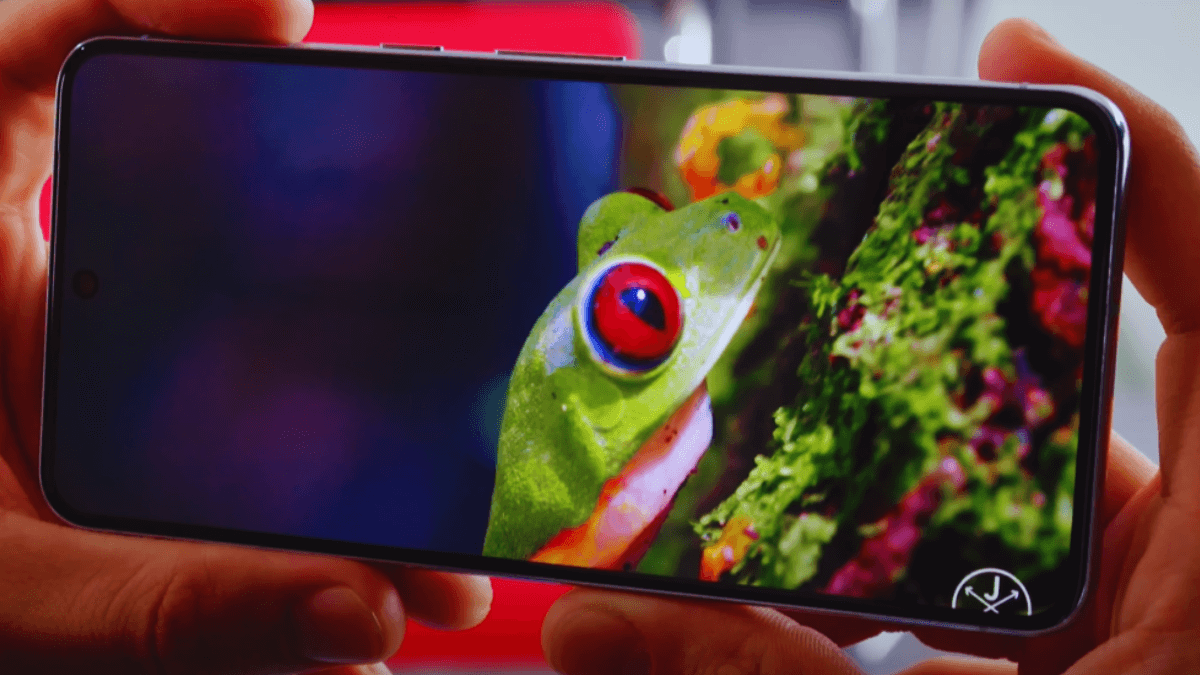
The Google Pixel 8 Pro features a vibrant Super Actua display with ultra-bright HDR visuals and a 120Hz adaptive refresh rate for a smooth viewing experience.

The Google Pixel 8 Pro features a stunning 6.7-inch Super Actua display that delivers bright, clear, and vibrant visuals in any lighting condition. With an impressive peak brightness of 2,400 nits, the screen stays easy to see even under direct sunlight. It also supports a 120 Hz refresh rate, making every scroll, video, and game feel silky smooth and responsive.

The front glass is protected by Gorilla Glass Victus 2, which provides excellent durability and scratch resistance, helping the screen stay safe from daily wear and accidental drops. Overall, the Pixel 8 Pro’s display combines sharp detail, vivid colors, and strong protection—perfect for watching videos, gaming, or everyday use.

Build & Design – Premium Feel, Smart Look

The Google Pixel 8 Pro has a sleek and premium design, featuring a glass front and back protected by Gorilla Glass Victus 2 and a strong aluminum frame for added durability. Despite its solid build, it maintains a slim profile with a thickness of just 8.8 mm, making it comfortable to hold and use. The phone is also IP68 certified, meaning it is resistant to dust and can survive underwater up to 1.5 meters for 30 minutes, giving you peace of mind against spills, splashes, or unexpected rain. With its combination of style, strength, and protection, the Pixel 8 Pro looks and feels like a true flagship device.

Battery and charging

The Google Pixel 8 Pro is powered by a strong 5050 mAh battery that easily keeps you going throughout the day. According to Google, it can last over 24 hours with normal use, and even longer if you turn on Extreme Battery Saver mode. The phone supports 30 W fast wired charging, allowing it to reach 50% in just about 30 minutes (with a compatible charger). It also offers 23 W wireless charging using the Pixel Stand (2nd Gen) and even includes reverse wireless charging, so you can power up your earbuds or other devices directly from your phone. The USB Type-C charger makes it convenient to charge and connect with modern accessories, giving the Pixel 8 Pro a perfect mix of speed, flexibility, and endurance.

Price

The Google Pixel 8 Pro was launched with prices starting at $999 for the 128GB model, $1,059 for 256GB, $1,179 for 512GB, and $1,399 for the 1TB version. The 1TB model is only available in Obsidian color and can be bought from the Google Store.

These were the prices at launch, but the current price may be different, depending on the storage option, location, and country. You can check the official Google Store for the latest pricing.

Price Comparison: Old vs New Pixel Models

  • For comparison with the Pixel 7 Pro, the Pixel 8 Pro 128GB at $999 is $100 more expensive than the Pixel 7 Pro 128GB at $899.
  • For comparison with the Pixel 9 Pro, the Pixel 8 Pro 128GB at $999 launched at the same price of $999.
  • For comparison with the Pixel 10 Pro, the Pixel 8 Pro 128GB at $999 launched at the same price of $999.

Pros and cons of Google pixel 8 Pro

Pros

  • 7 years of software updates
  • Good camera with 5 and 10x optical zoom
  • Large screen
  • Decent battery life
  • Recycled aluminium
  • impressive AI features

Cons

  •  No Card Slot

Conclusion 

Thank you for reading this post on the Google Pixel 8 Pro Review. This flagship smartphone truly showcases Google’s innovation — from its stunning Super Actua display and powerful triple camera system to its smart AI features powered by the Tensor G3 chip. Whether you’re passionate about photography, love smooth performance, or simply want a premium Android experience, the Pixel 8 Pro stands out as one of the best choices in 2025. I hope this review helps you make the best choice for your next smartphone.

Posted on Leave a comment

iPhone 14 Pro Max Settings Guide: Master Your Device Like a Pro

iPhone 14 Pro Max Settings Guide

iPhone 14 Pro Max Settings Guide

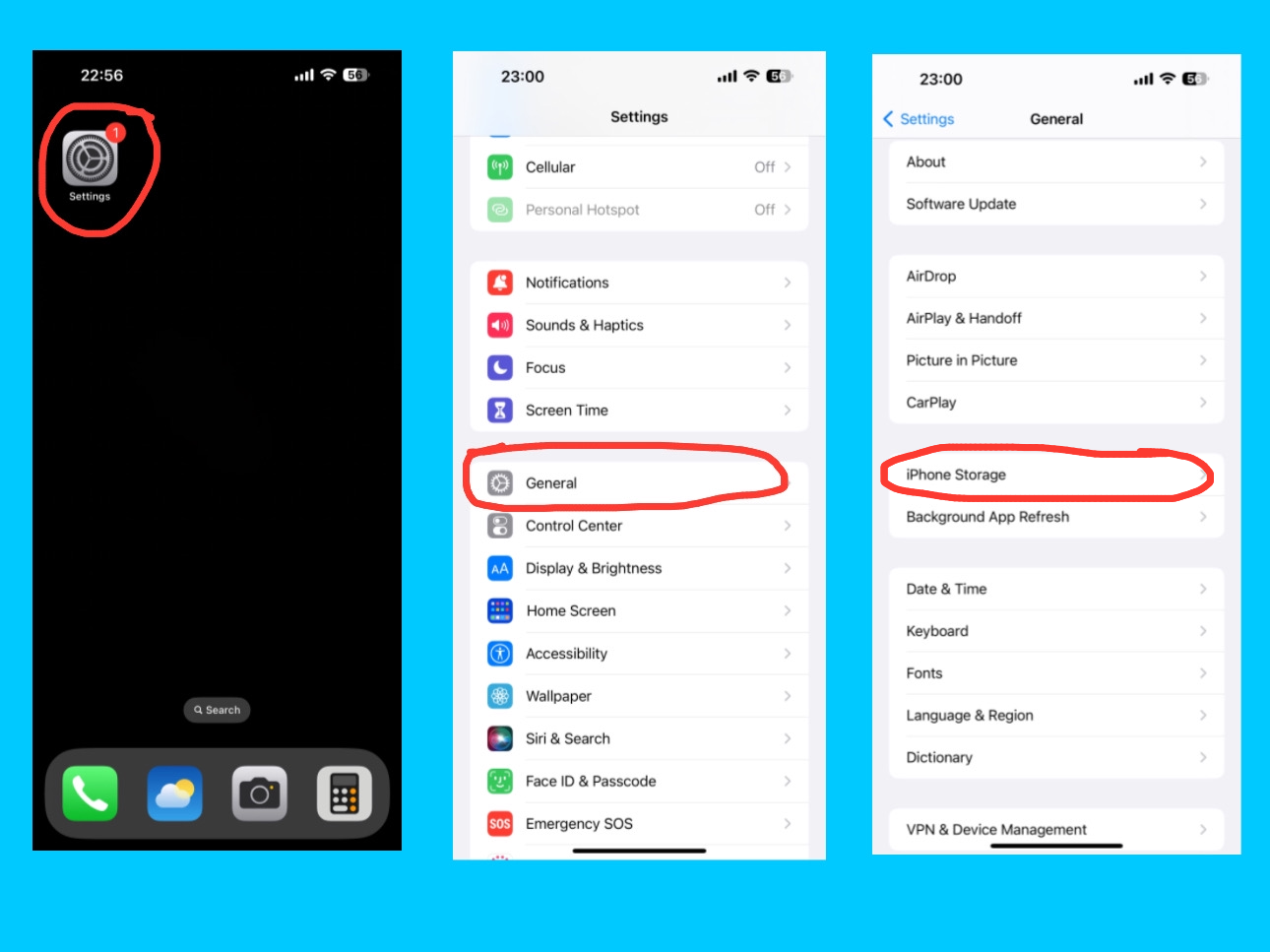
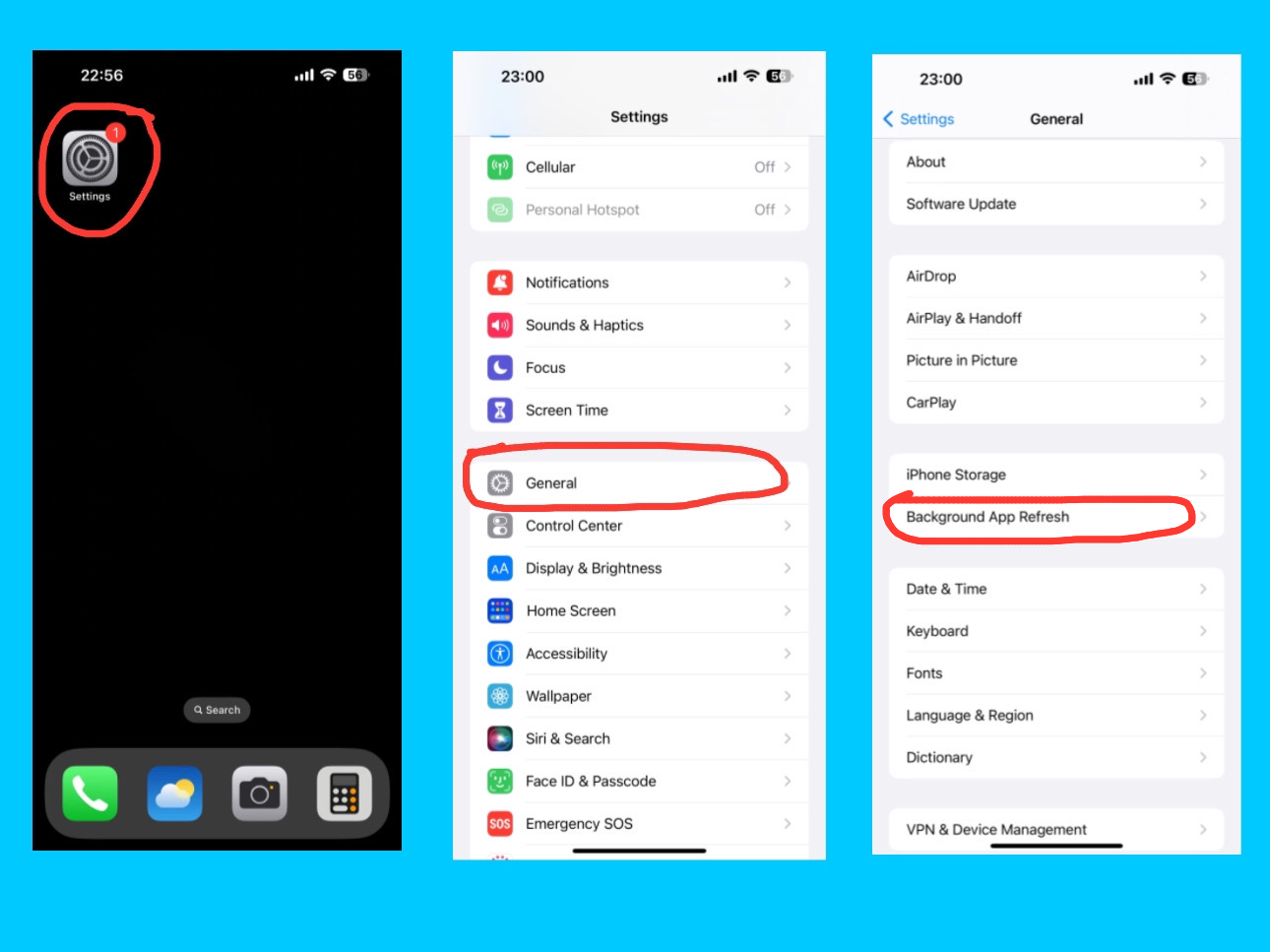
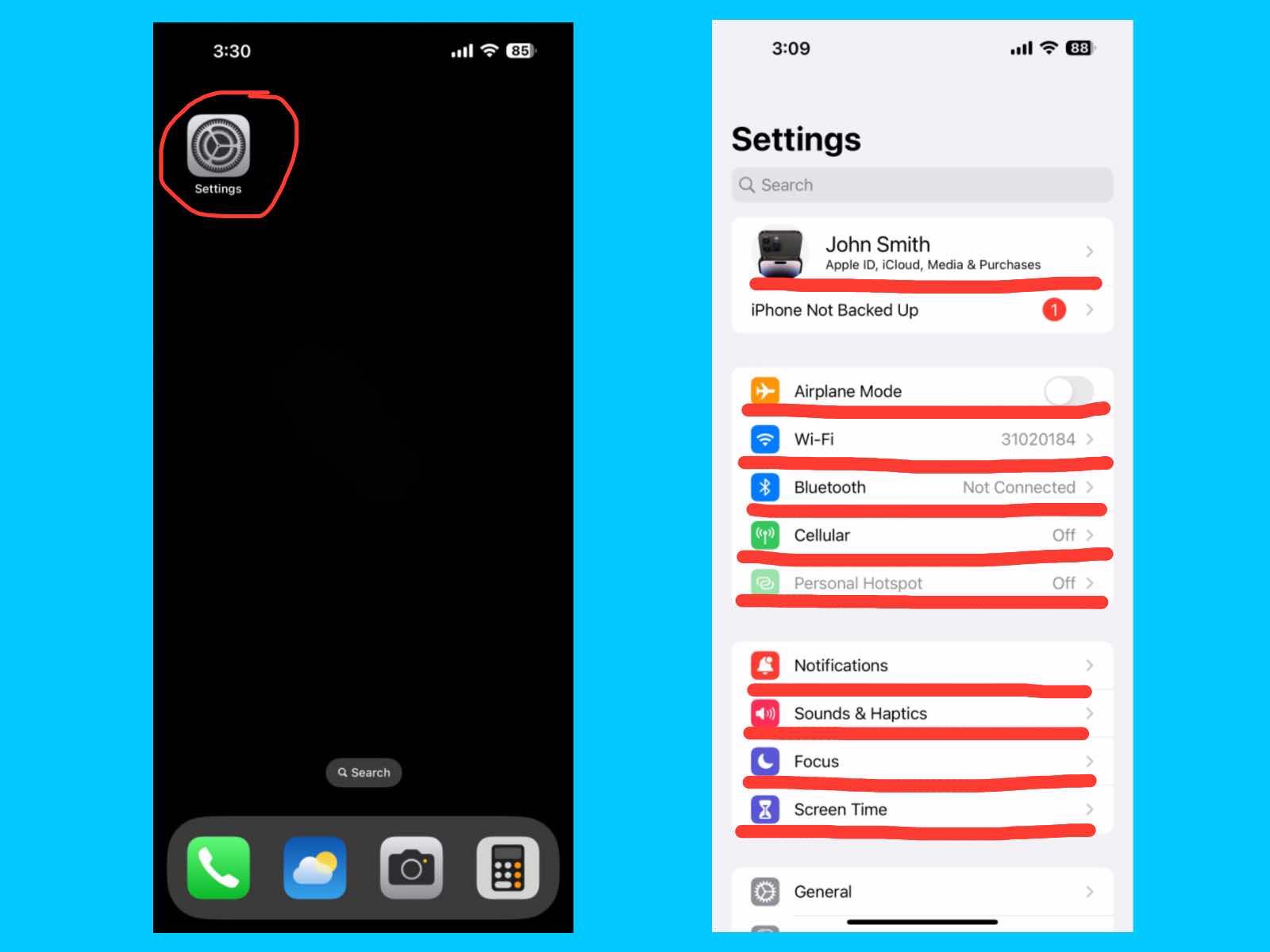
The iPhone 14 Pro Max is packed with powerful features and smart settings that let you personalize your device, stay organized, and protect your data. From managing your Apple ID and iCloud to controlling notifications, Focus modes, and Screen Time, knowing how to adjust these settings can make your iPhone experience smoother and more productive. In this iPhone 14 Pro Max Settings Guide, we’ll talk all the important settings upto Screen Time  so you can get the most out of your iPhone 14 Pro Max. If you are also using an iPhone 15, iPhone 16, or iPhone 17 series, you can access similar settings on those devices as well.

iPhone 14 Pro Max Settings Guide
iPhone 14 Pro Max setting features

Apple ID, iCloud, Media & Purchase

iPhone 14 Pro Max Settings Guide
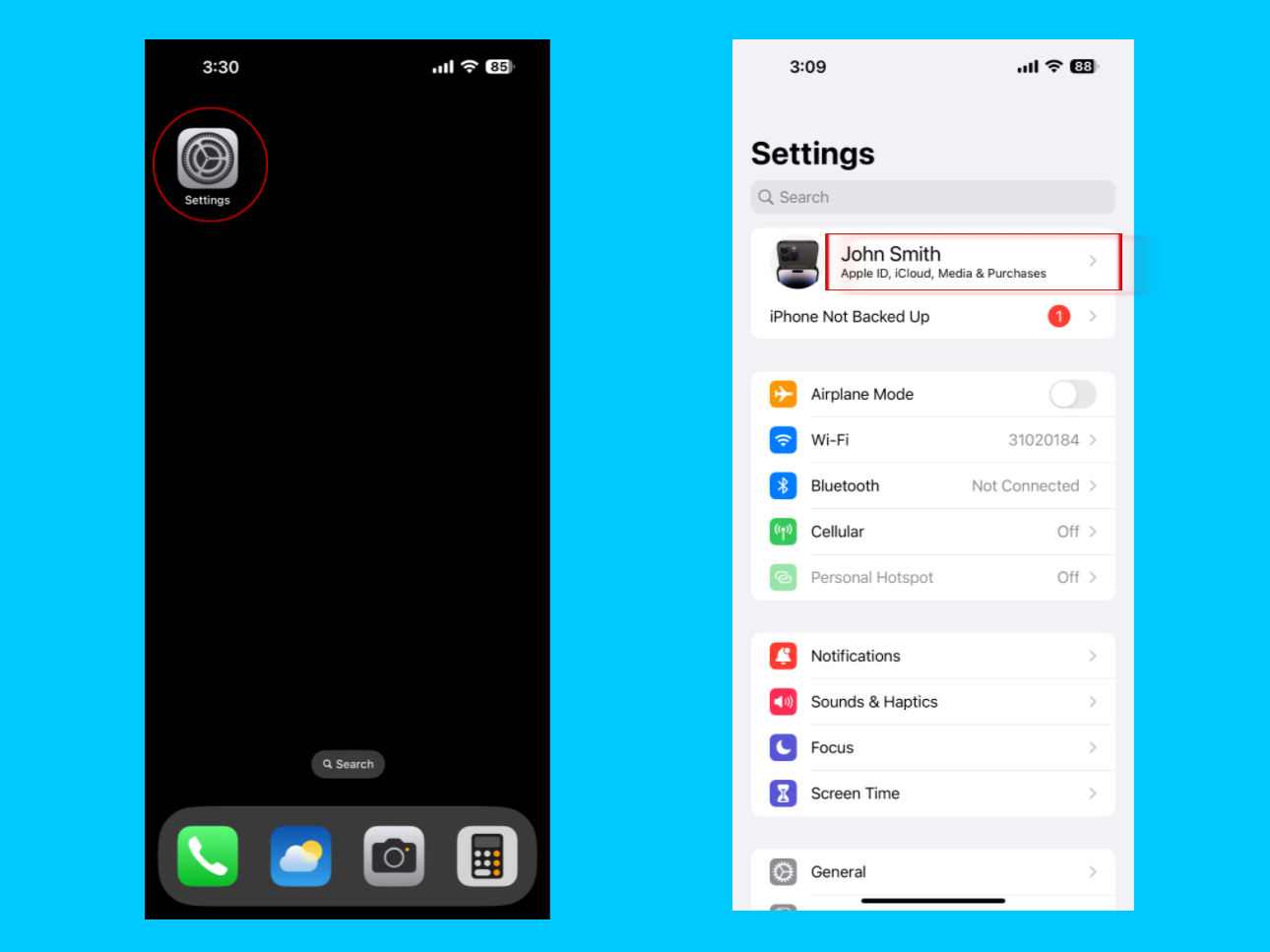
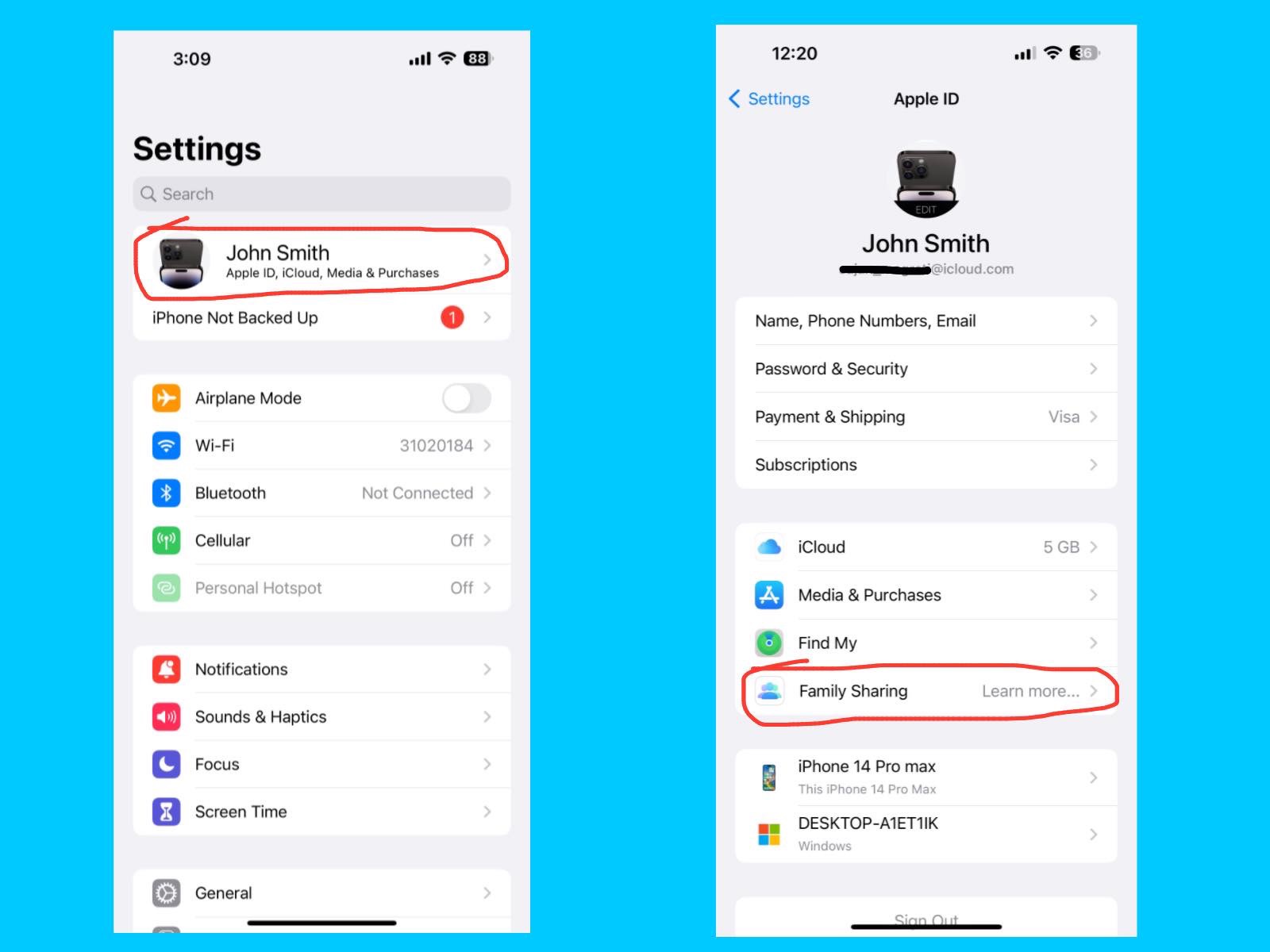
Settings – Apple ID, iCloud, Media & Purchases

The Apple ID, iCloud, Media & Purchases section on your iPhone 14 Pro Max is where you manage everything connected to your Apple account. From here, you can update personal information, change your password, and manage devices linked to your Apple ID. The iCloud option lets you back up photos, contacts, messages, and app data safely in the cloud, so you can access them from any Apple device. Under Media & Purchases, you can manage your App Store, Apple Music, and Apple TV+ subscriptions, as well as review or cancel purchases. This section also helps you share media, apps, and subscriptions with family members through Family Sharing.
Name, Phone Numbers, Email

iPhone 14 Pro Max Settings Guide
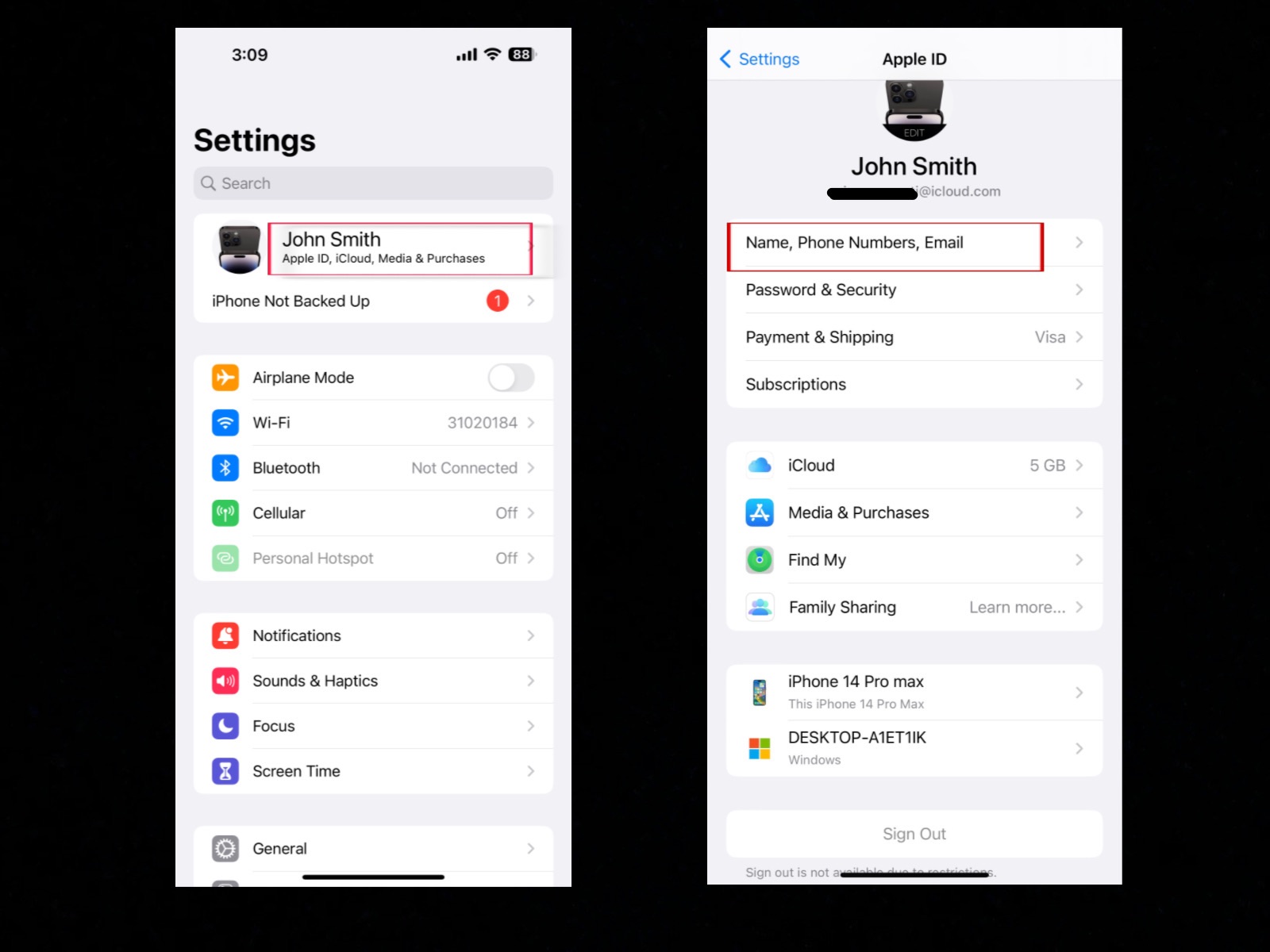
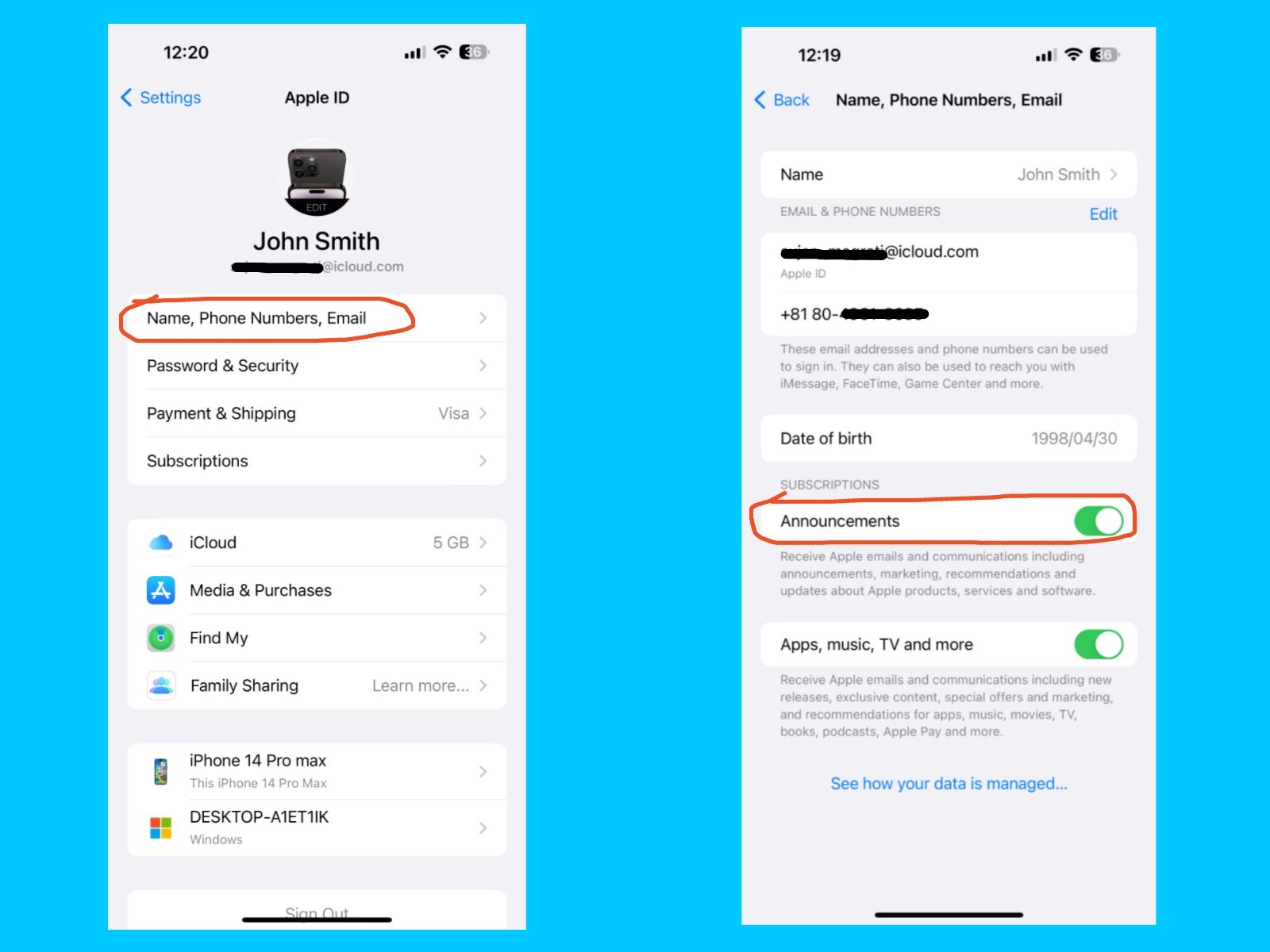
Settings – Apple ID, iCloud, Media & Purchases – Name, Phone Numbers, Email

This section in your iPhone settings shows the personal details linked to your Apple ID. Here you can update your name, Date of birth, add or change your phone numbers, and manage the email addresses connected to your account. You have to add one Apple ID to activate your phone.

Apple ID :

Apple ID is your personal account that you use for everything on your iPhone. With just one Apple ID, you can sign in to all Apple services like the App Store, iCloud, Apple Music, and more. It stores your information such as email, phone number, payment details, and keeps your Apple devices connected. so Always use a secure password and enable two-factor authentication to protect your account.

  • Name: The full name you registered with your Apple ID.
    You can always change your name as your choice.
  • Phone Numbers: The numbers Apple can use to reach you for FaceTime, iMessage, or account verification.
  • Email: The email addresses linked to your Apple ID for sign-in, recovery, or receiving updates.

You need an Apple ID to use Apple services like iCloud, the App Store, FaceTime, and iMessage. Adding a phone number is optional, but it is useful for verifying your account, using FaceTime and iMessage, and recovering your account if needed.

So, Always keep your primary phone number and recovery email up to date, so you don’t lose access to your Apple ID if you forget your password or change your phone.

Announcements

iPhone 14 Pro Max Settings Guide
Settings – Name, Phone Numbers, Email – Announcements

You can receive Apple emails with announcements, marketing, and recommendations. You can also get updates about Apple products, services, and software to stay informed and enjoy the latest offers related to your Apple ID, iCloud, and Apple services. When it’s turned on, Apple may send emails or notifications about new features, product launches, and recommendations.

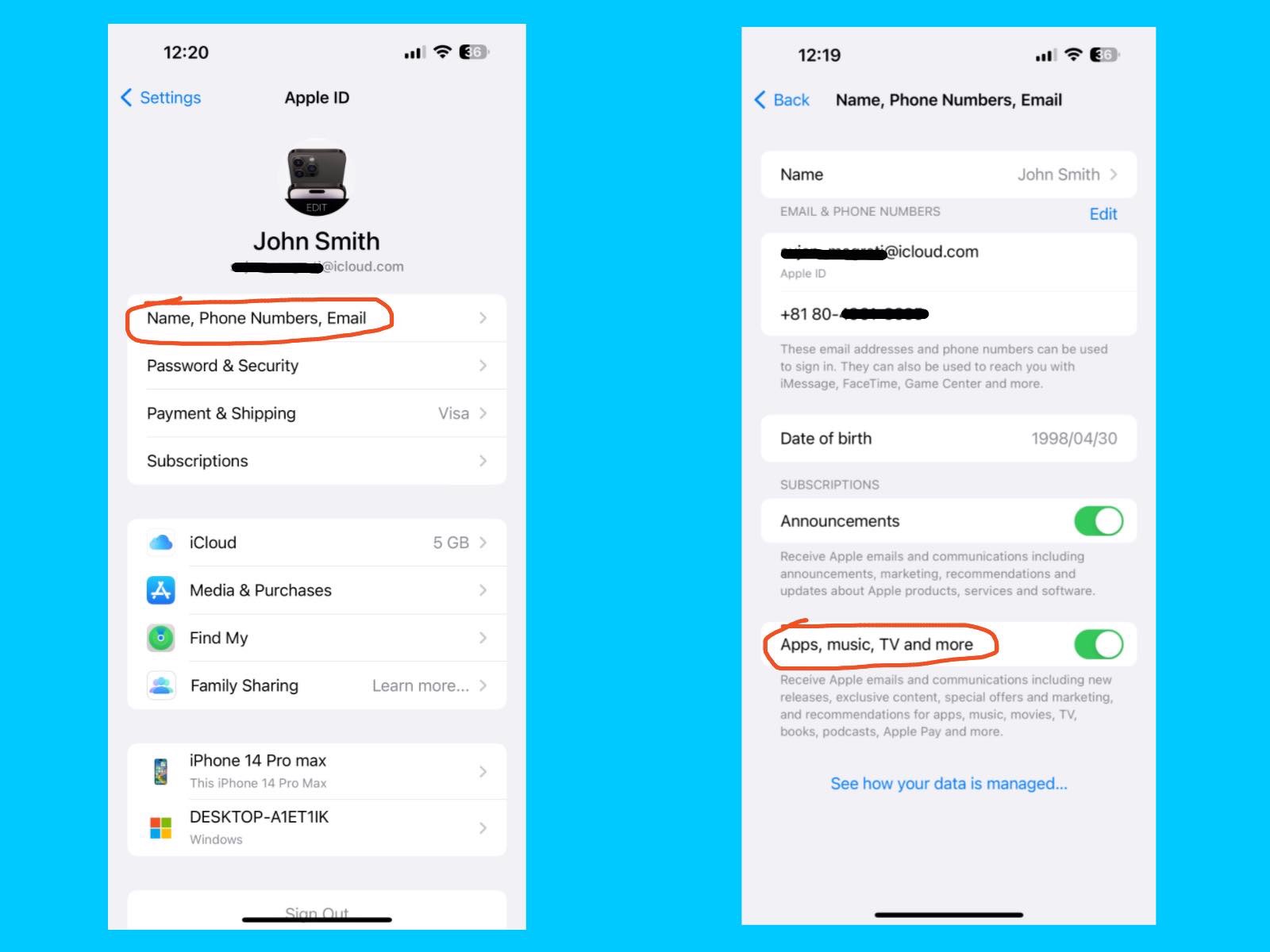
Apps, Music, TV, and More

iPhone 14 Pro Max Settings Guide
Settings – Name, Phone Numbers, Email – Apple, music, TV and more

You can get Apple emails with updates, special offers, and recommendations. You can stay informed about new products, apps, music, movies, books, and more. With these emails, you can easily discover the latest from Apple and enjoy exclusive content and deals.

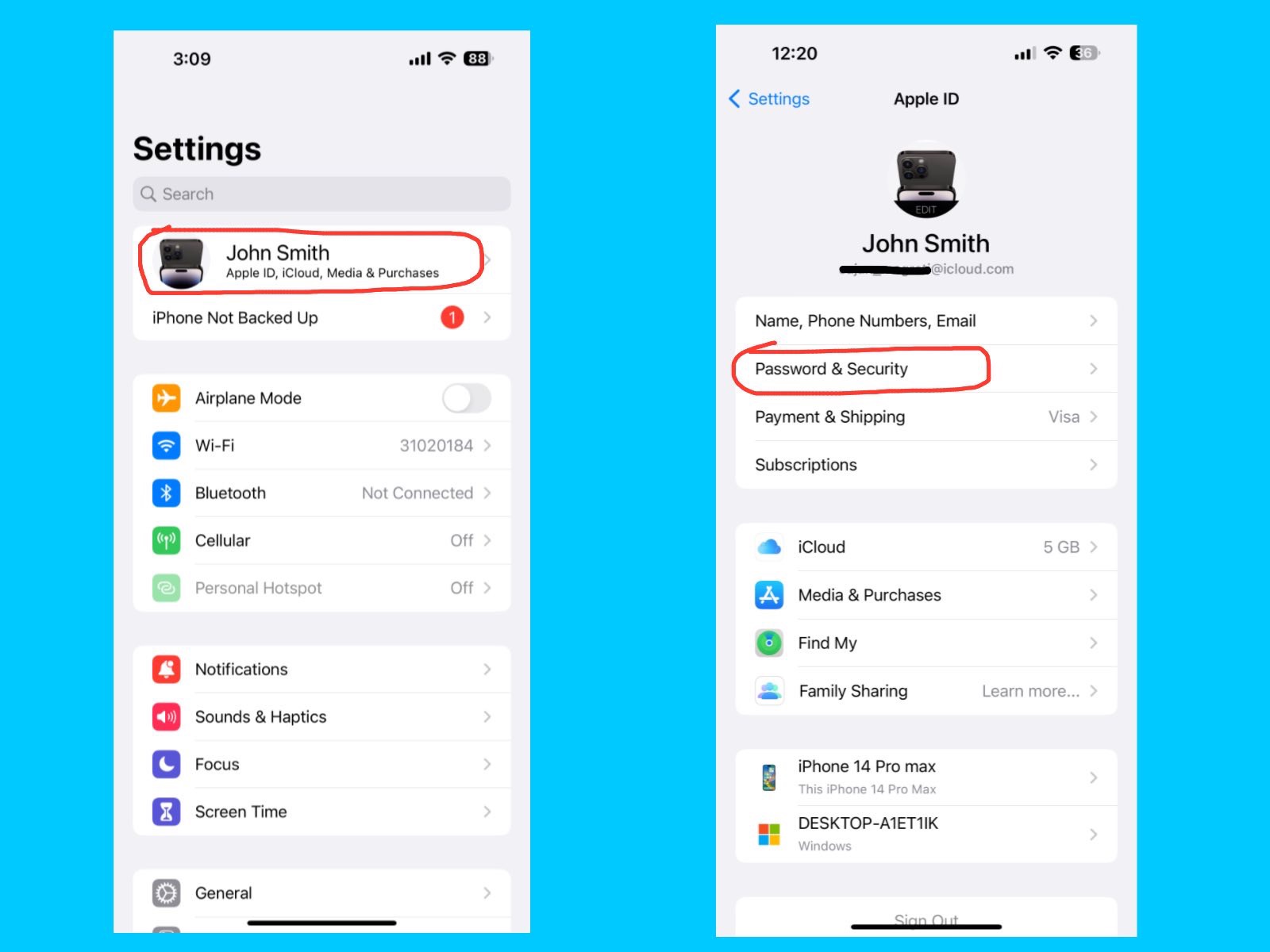
Password & Security

iPhone 14 Pro Max Settings Guide
Settings – Apple ID, iCloud, Media & Purchases – Password & Security

The Password & Security section helps you protect your Apple ID and personal data. Here, you can manage your password, enable extra security measures, and control how Apple verifies it’s really you.

Key features :

  • Change Password:
    You can update your Apple ID password whenever needed.
  • Two-Factor Authentication (2FA):
    This feature adds an extra layer of security by requiring a code when signing in from a new device.
  • Trusted Phone Numbers & Devices:
    You can set up phone numbers or devices that can receive verification codes.
  • Account Recovery:
    It helps you regain access if you forget your password or get locked out. You can add a friend or family member as a recovery contact for your account. The person you choose must be at least 13 years old and have an Apple device. You can also create a 28-character Recovery code like MN98-UH14-6G4U-NURP-9X3J-MQ88-HB5H, which helps you access your account.
  • Legacy Contact
    The Legacy Contact feature lets you choose a trusted person, such as a family member or close friend, who can access your Apple account and personal data if something happens to you. This includes photos, messages, files, and other information stored in iCloud. Apple provides a special access key that your Legacy Contact can use after your death, ensuring your important memories and information are passed on safely.
  • Automatic Verification 
    The Automatic Verification feature on your iPhone helps confirm your identity automatically when signing in to apps, websites, or Apple services. It works in the background, so you don’t need to enter verification codes manually, making logging in faster and smoother. Apple keeps this process private, ensuring your passwords and codes stay secure. This feature turned on for convenience, but make sure your device is protected with a passcode or Face ID so only you can use it.

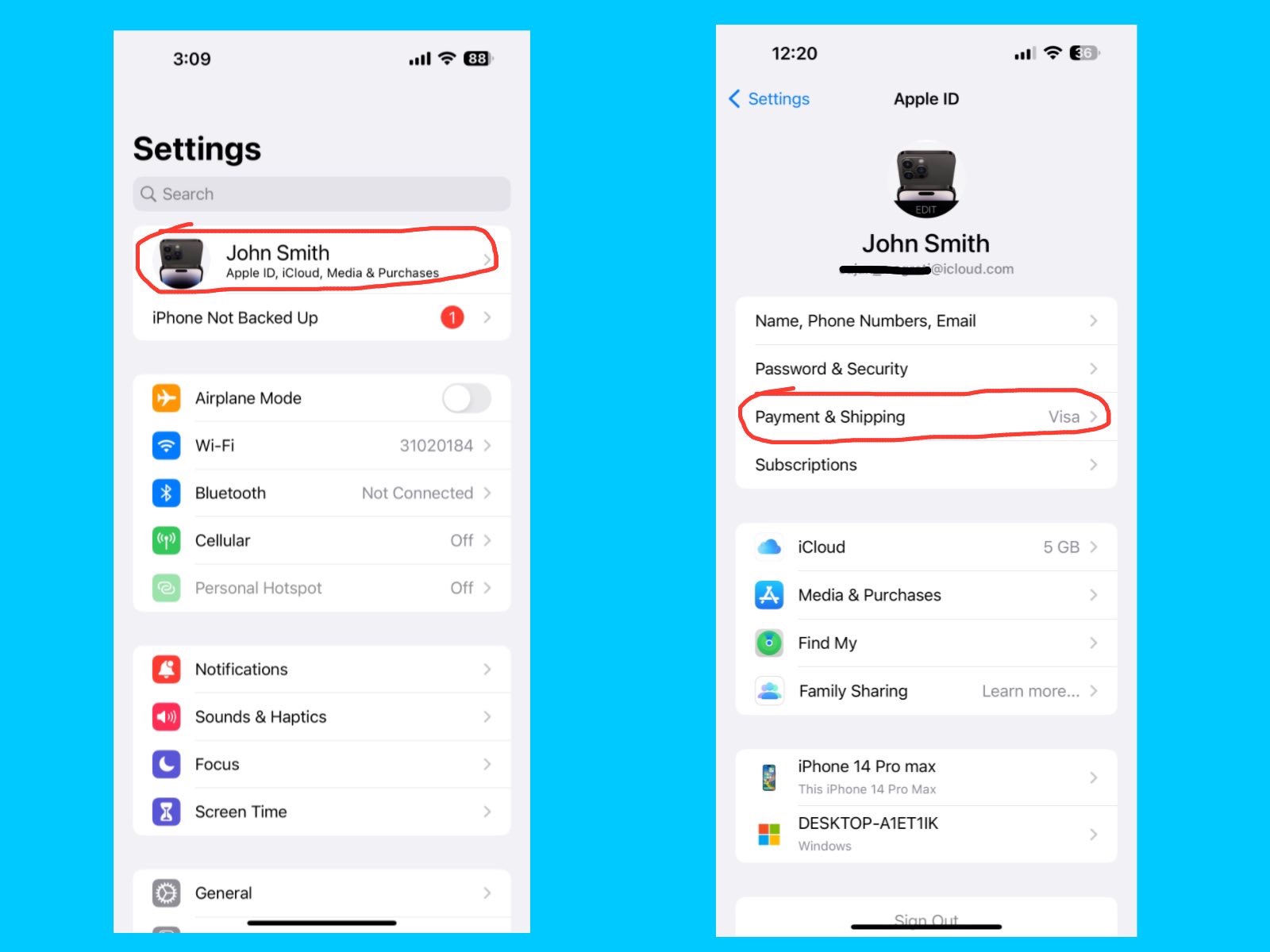
Payment & Shipping 

iPhone 14 Pro Max Settings Guide
Settings – Apple ID, iCloud, Media & Purchases – Payment & Shipping

The Payment & Shipping section on your iPhone lets you manage the payment methods and delivery addresses linked to your Apple ID. It is used for purchases on the App Store, iTunes Store, Apple Books, and Apple online store. Here, you can add, remove, or update credit/debit cards or Apple Pay, and manage your billing and shipping addresses for products you order from Apple. Keeping this information up to date ensures smooth checkout and avoids failed purchases or subscription interruptions.

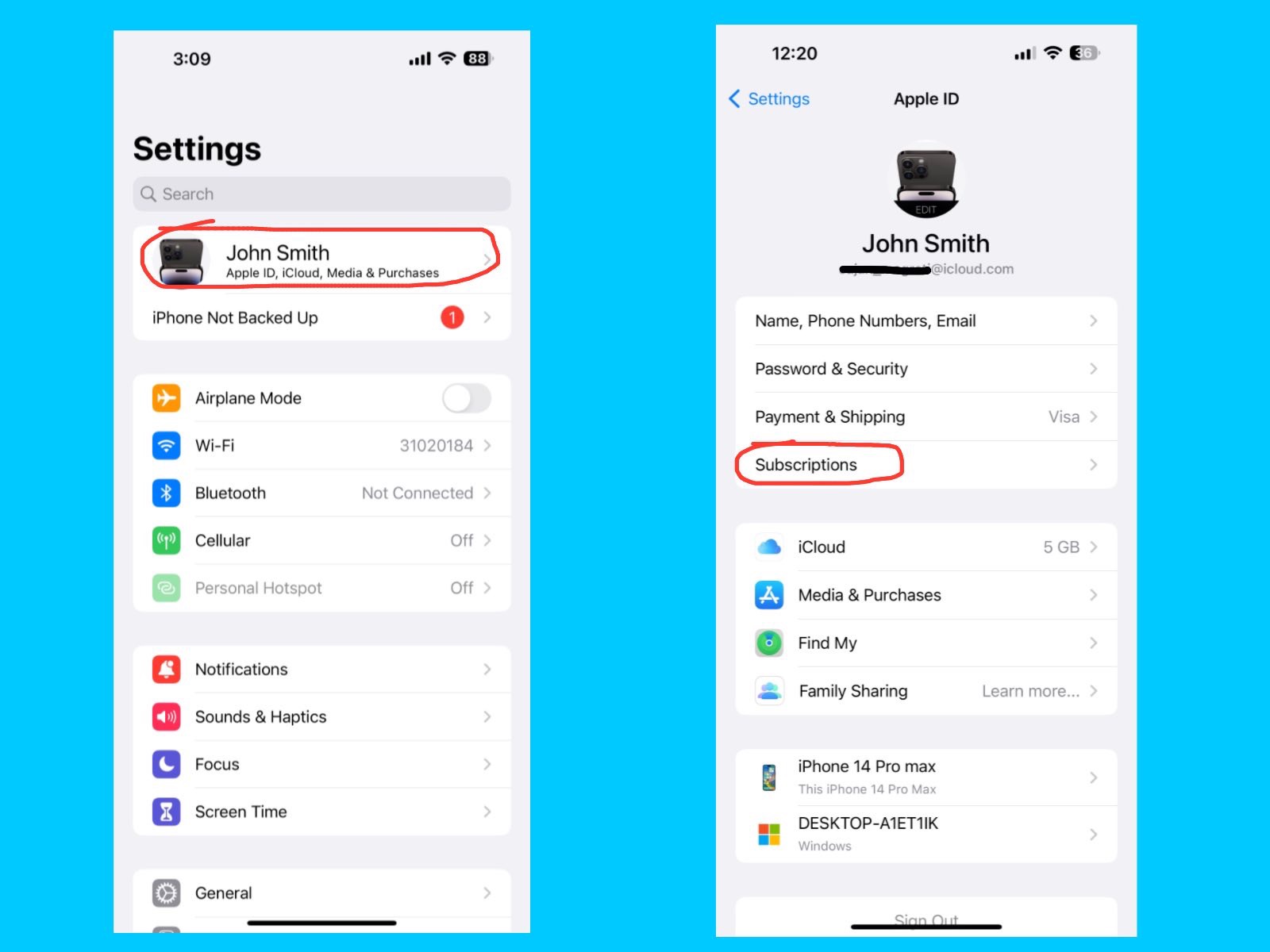
Subscriptions

iPhone 14 Pro Max Settings Guide
Settings – Apple ID, iCloud, Media & Purchases – Subscriptions

The Subscriptions section lets you manage all your active subscriptions linked to your Apple ID, such as Apple Music, Apple TV+, Apple Arcade, or third-party apps from the App Store. Here, you can view, change, or cancel any subscription and see billing details for each service. Keeping this section organized helps you avoid unwanted charges and ensures you’re only paying for the services you actually use.

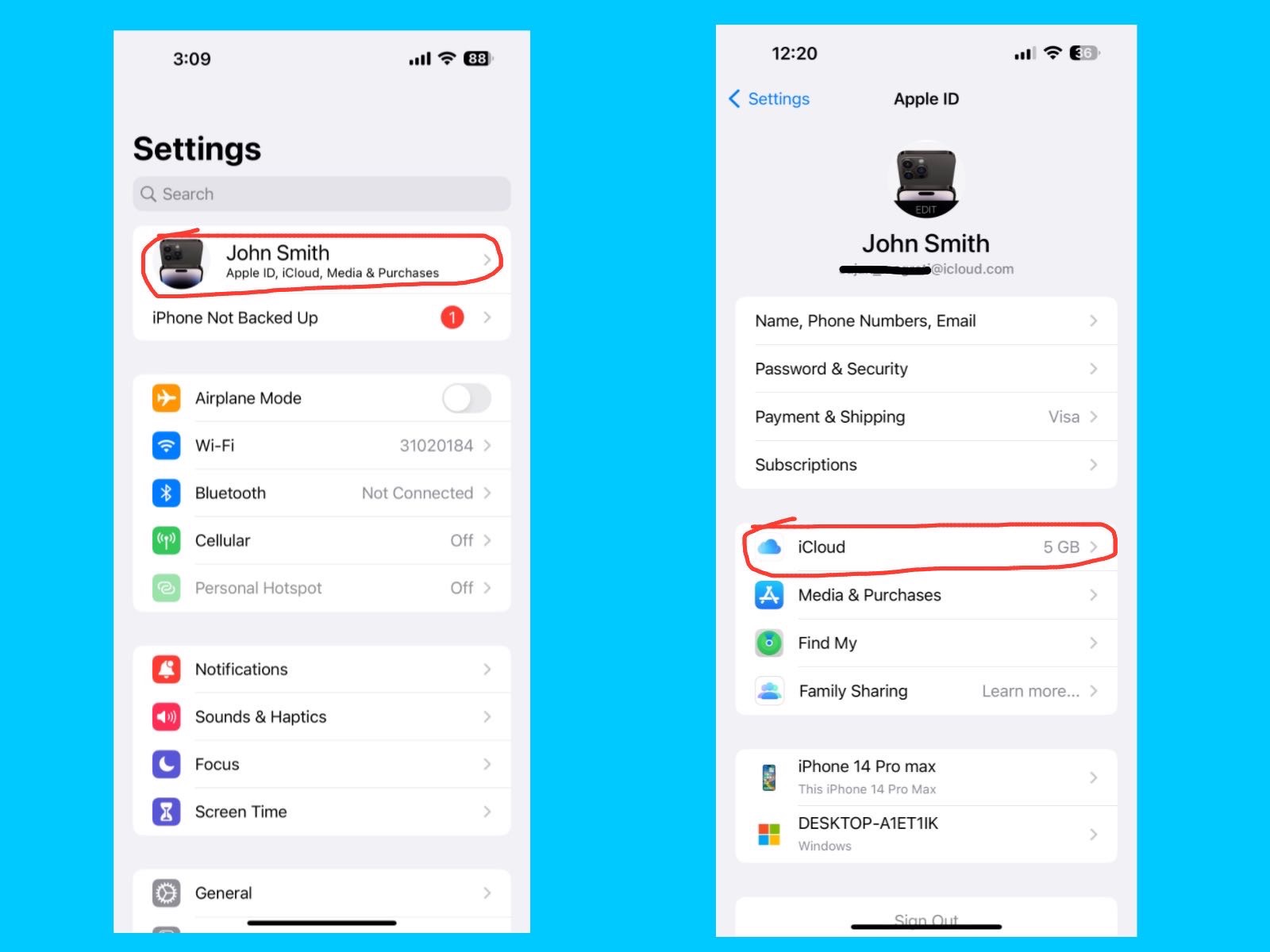
iCloud

iPhone 14 Pro Max Settings Guide
Settings – Apple ID, iCloud, Media & Purchases – iCloud

iCloud is Apple’s cloud storage service. It automatically saves your photos, videos, contacts, notes, backups, and app data online. This means if you lose your iPhone or switch to a new one, you can easily restore everything. The iPhone 14 Pro Max comes with 5GB of free iCloud storage. You may need to upgrade (50GB, 200GB, or 2TB plans) if you store lots of photos or videos.

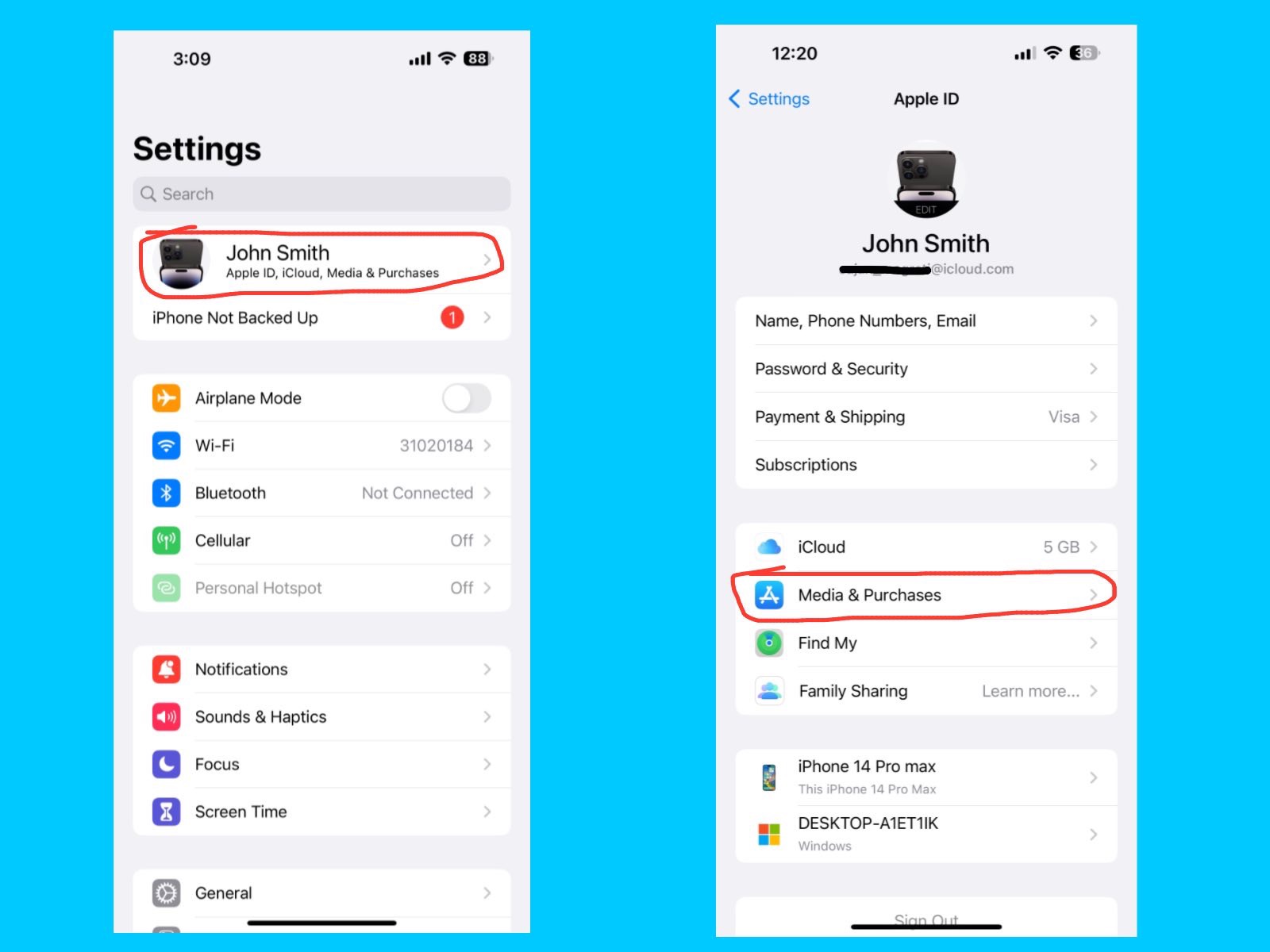
Media & Purchases

iPhone 14 Pro Max Settings Guide
Settings – Apple ID, iCloud, Media & Purchases – Media & Purchases

This setting controls everything related to the App Store, iTunes Store, Apple Books, and Apple Music purchases. You can manage your payment methods, view your purchase history, and handle subscriptions all in one place. If you share purchases with family, turn on Family Sharing so multiple users can enjoy apps, music, and iCloud storage under a single plan.

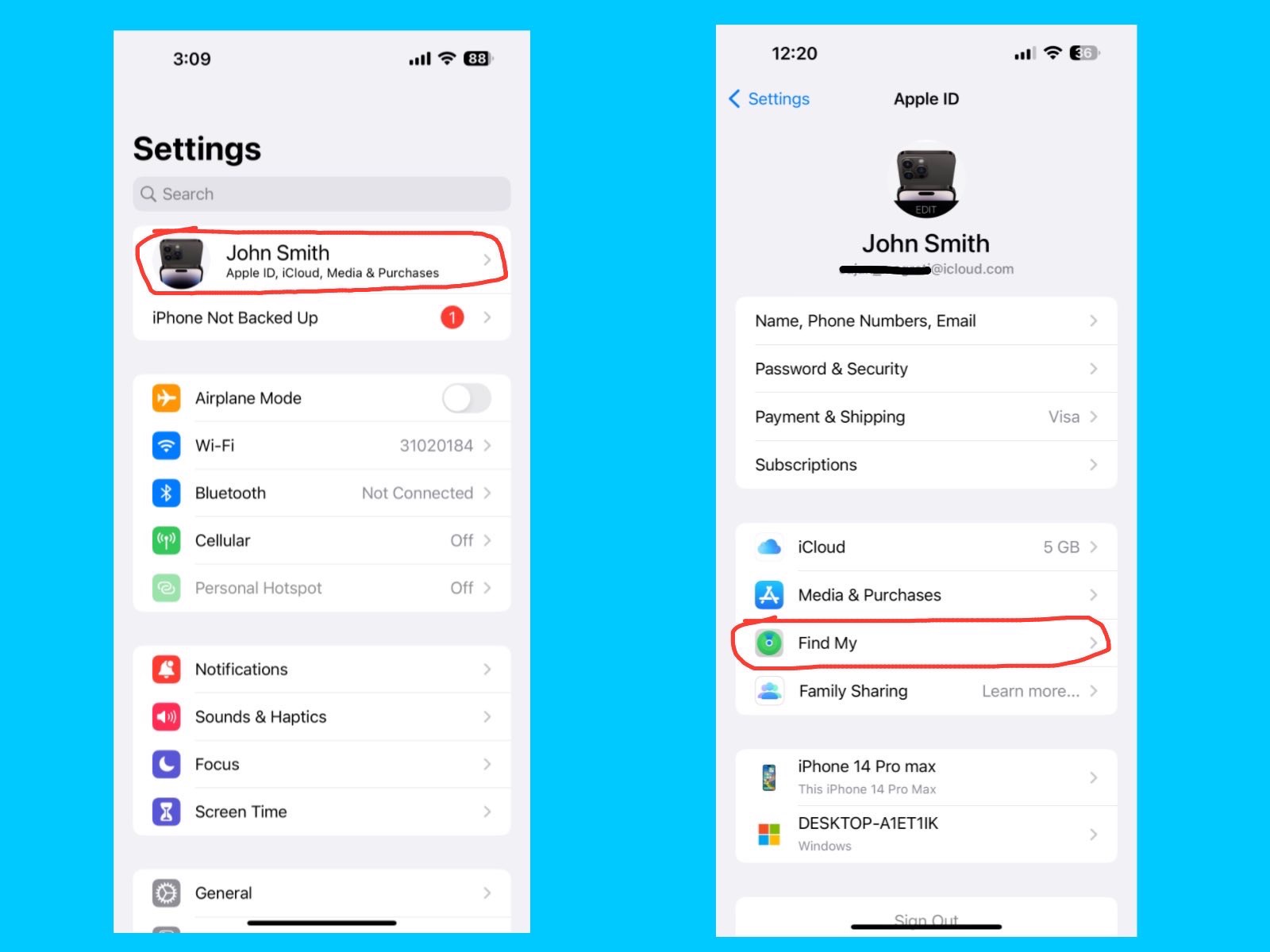
Find My 

iPhone 14 Pro Max Settings Guide
Settings – Apple ID, iCloud, Media & Purchases – Find My

The Find My feature helps you locate your iPhone, other Apple devices, and even friends or family who share their location with you. You can also lock or erase your device remotely if it’s lost or stolen, keeping your personal data safe.  So, always keep Find My iPhone turned on, as it is essential for tracking your device and protecting your information.

Family Sharing

iPhone 14 Pro Max Settings Guide
Settings – Apple ID, iCloud, Media & Purchases – Family Sharing

Family Sharing lets you share Apple services, purchases, and subscriptions with your family members without sharing accounts. You can share App Store apps, Apple Music, Apple TV+, iCloud storage, and more. It also allows parents to set screen time limits and approve kids’ purchases. so, Family Sharing makes it easy and affordable for multiple people to enjoy Apple services under one plan while keeping each account separate.

Airplane Mode

iPhone 14 Pro Max Settings Guide
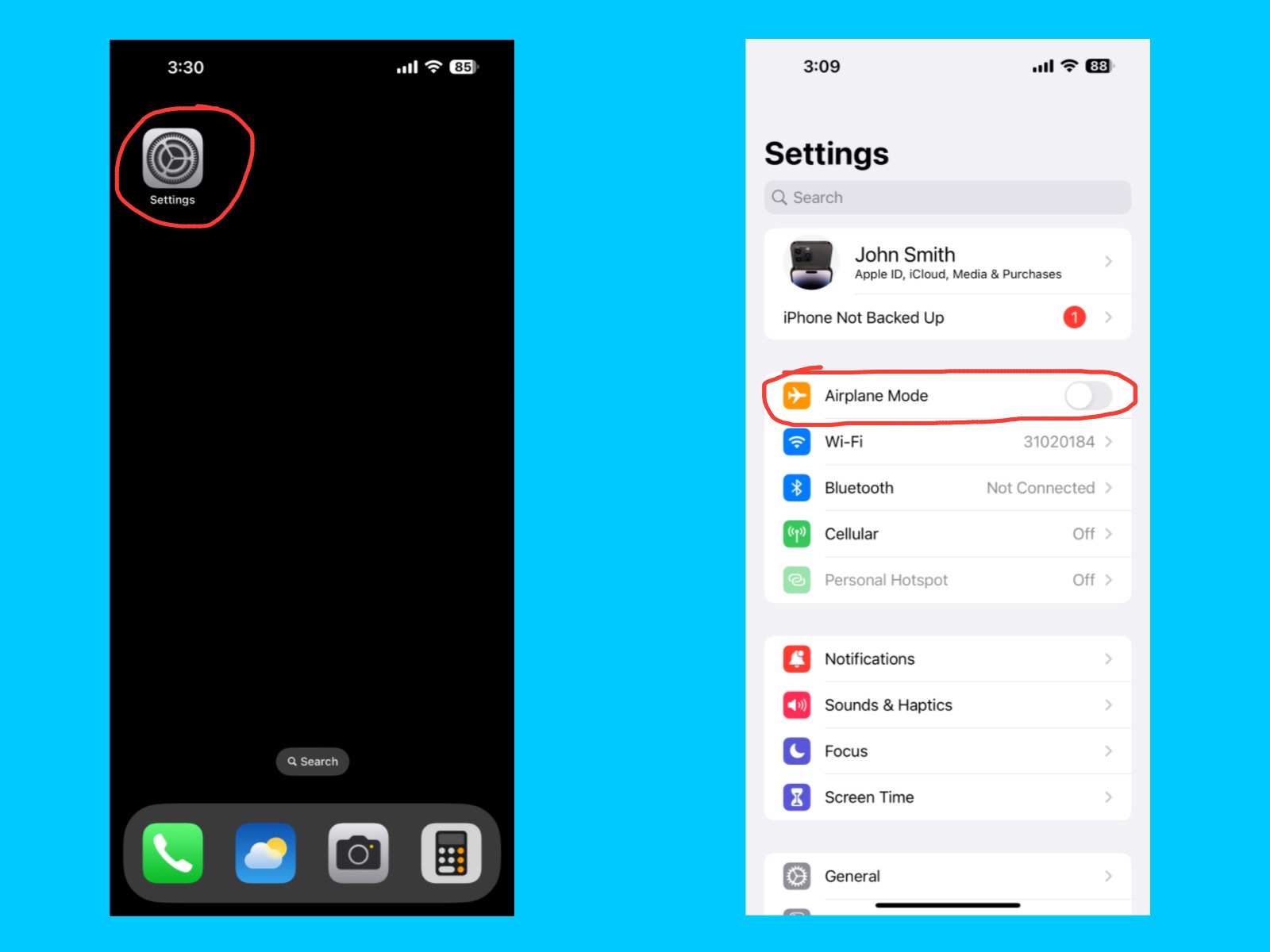
Settings – Airplane Mode

Airplane Mode temporarily turns off all wireless connections on your iPhone, including cellular, Wi-Fi, Bluetooth, and GPS. It’s useful when you’re on a flight, in areas with poor signal, or want to save battery. You can also manually turn Wi-Fi or Bluetooth back on while Airplane Mode is active if needed.

Wi-Fi 

iPhone 14 Pro Max Settings Guide
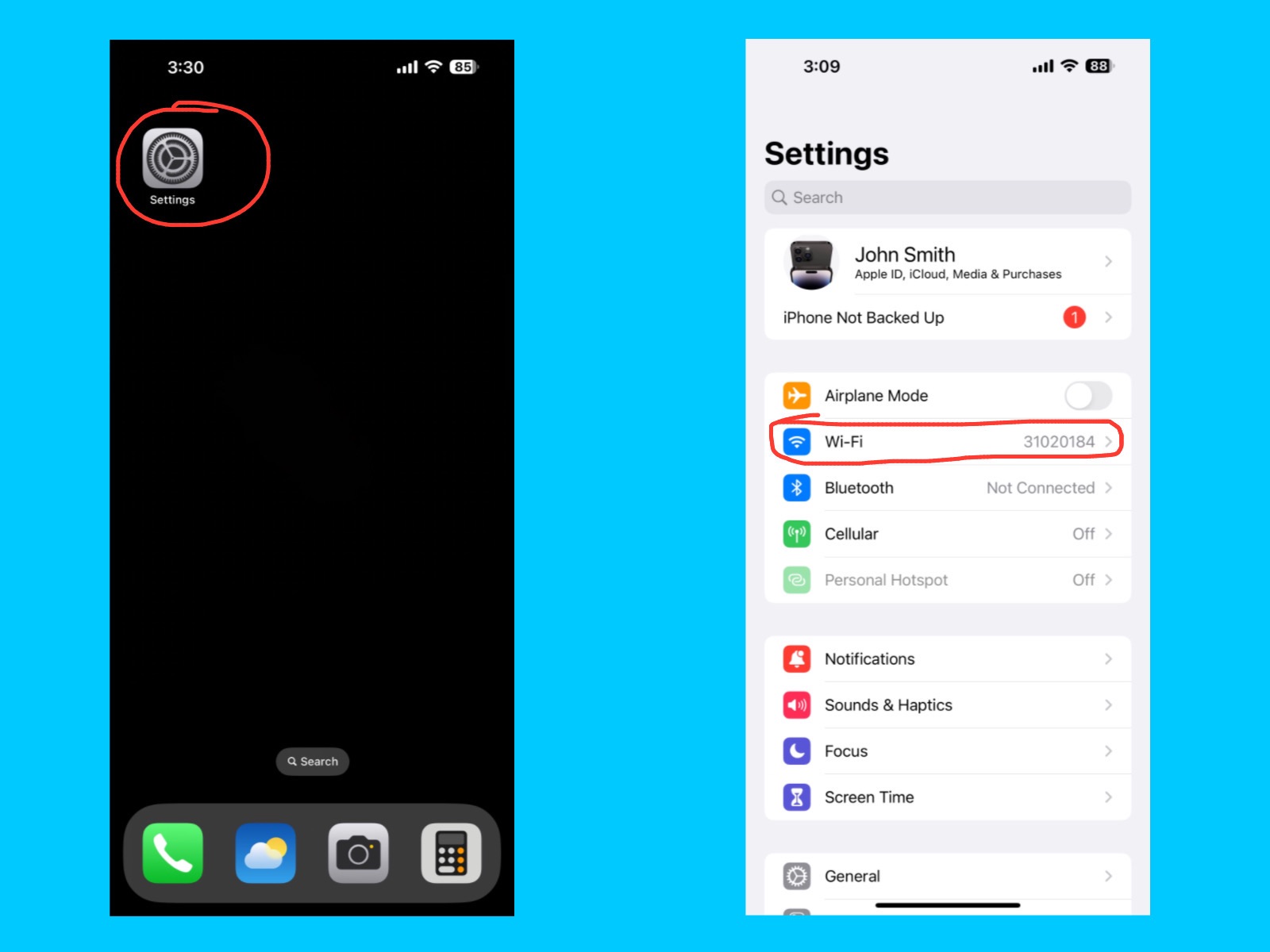
Settings – Wi-Fi

The Wi-Fi setting lets your iPhone connect to wireless internet networks for browsing, streaming, downloading apps, and more. You can choose a network, enter passwords, and manage saved networks here. Using Wi-Fi also helps save cellular data and can make downloads and streaming faster.

Bluetooth

iPhone 14 Pro Max Settings Guide
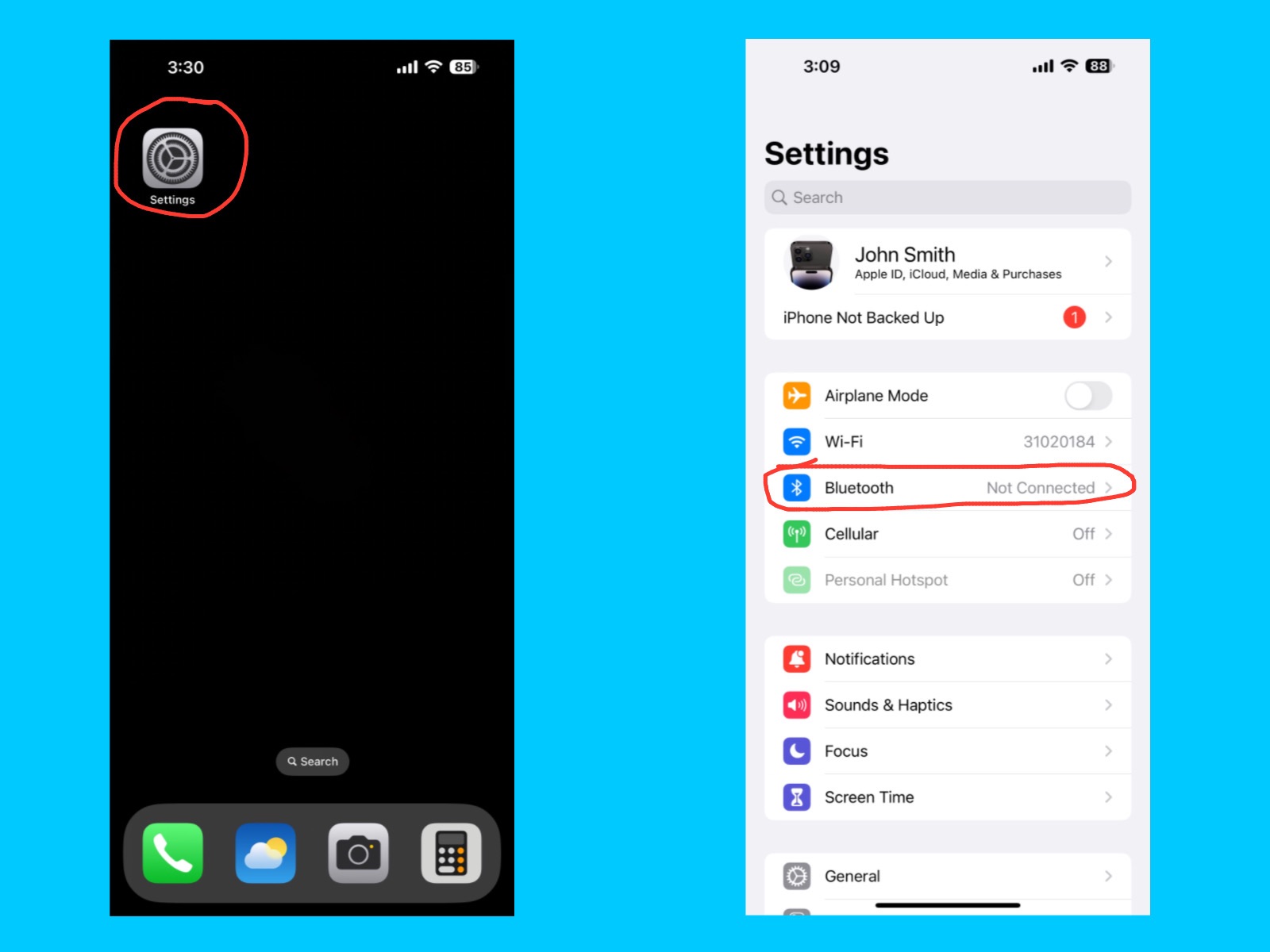
Settings – Bluetooth

The Bluetooth feature on your iPhone 14 Pro Max allows you to connect wirelessly to a variety of devices such as AirPods, speakers, smartwatches, keyboards, and car systems. You can turn it on or off by going to Settings → Bluetooth, or quickly from the Control Center. Once enabled, your iPhone will automatically detect nearby Bluetooth devices so you can pair with them easily. Bluetooth makes it simple to share files, stream music, take calls hands-free, and connect accessories without using cables, providing a fast and convenient wireless experience.

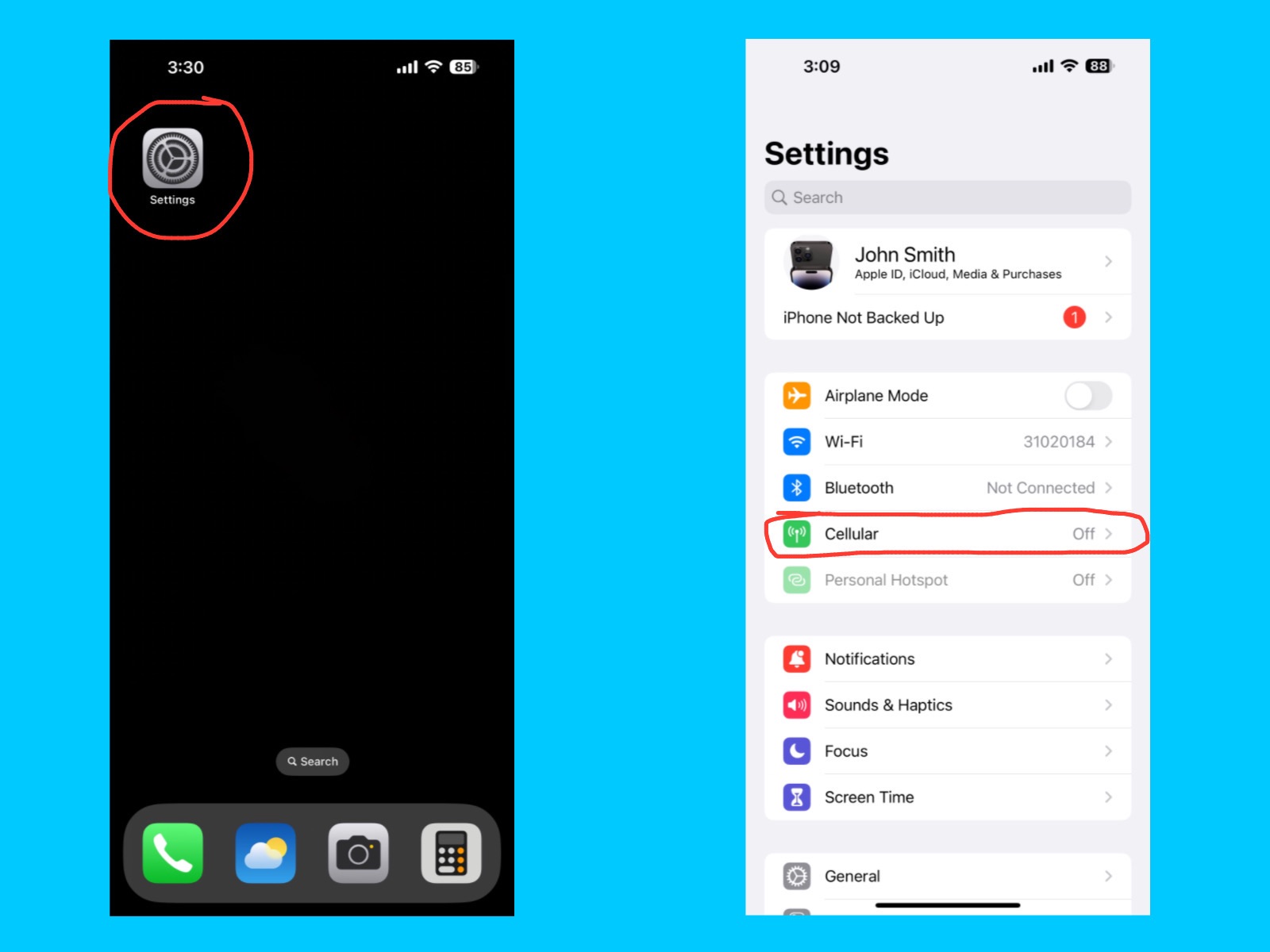
Cellular

iPhone 14 Pro Max Settings Guide
Settings – Cellular

The Cellular setting lets your iPhone connect to your mobile network for calls, messages, and internet access when Wi-Fi is unavailable. Here, you can turn cellular data on or off, manage data usage, enable roaming, and check which apps are using your mobile data.

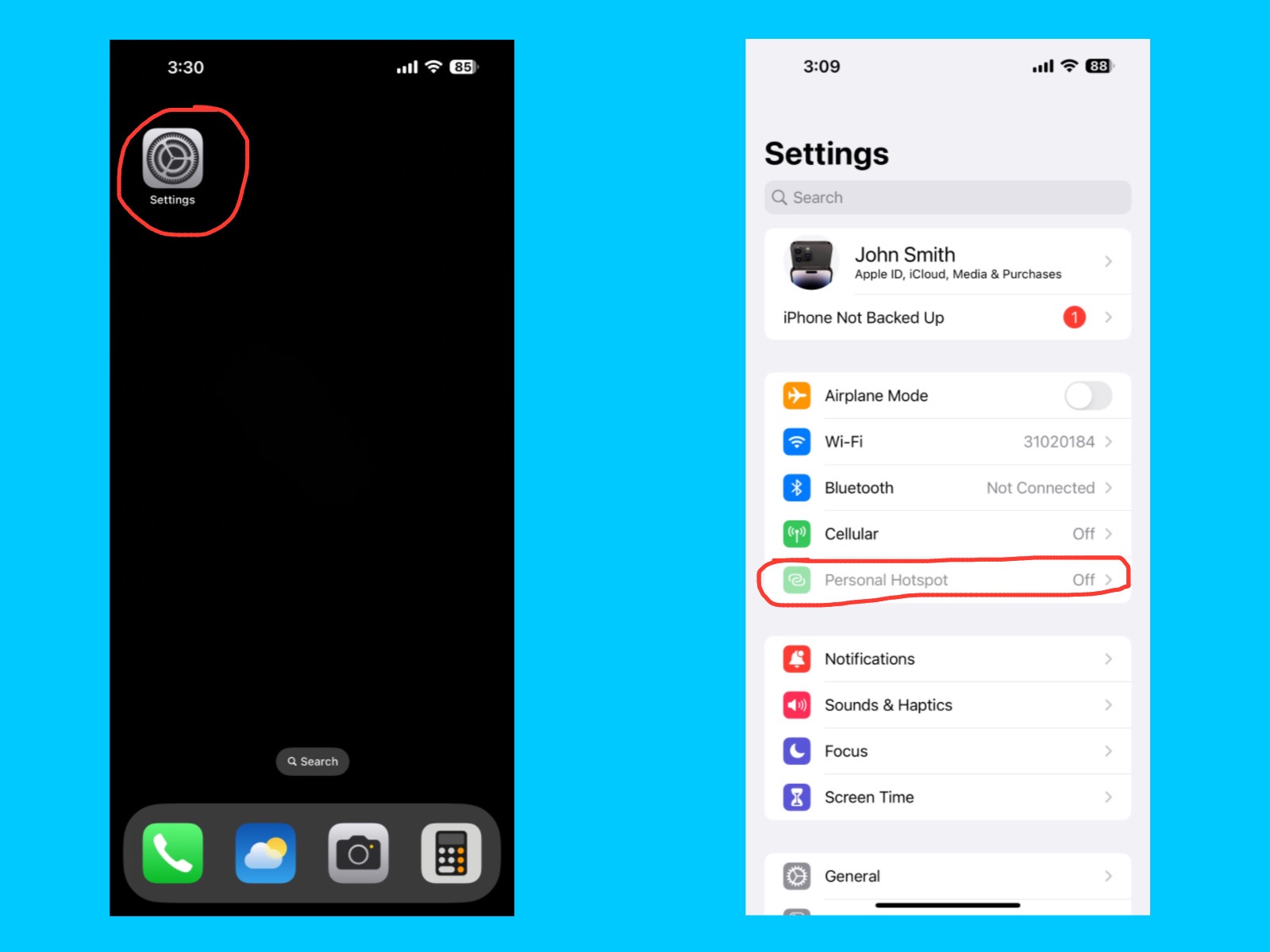
Personal Hotspot

iPhone 14 Pro Max Settings Guide
Settings – Personal Hotspot

The Personal Hotspot feature lets your iPhone share its cellular internet connection with other devices, like laptops, tablets, or friends’ phones. This turns your iPhone into a mini Wi-Fi router, allowing other devices to connect using Wi-Fi, Bluetooth, or USB.

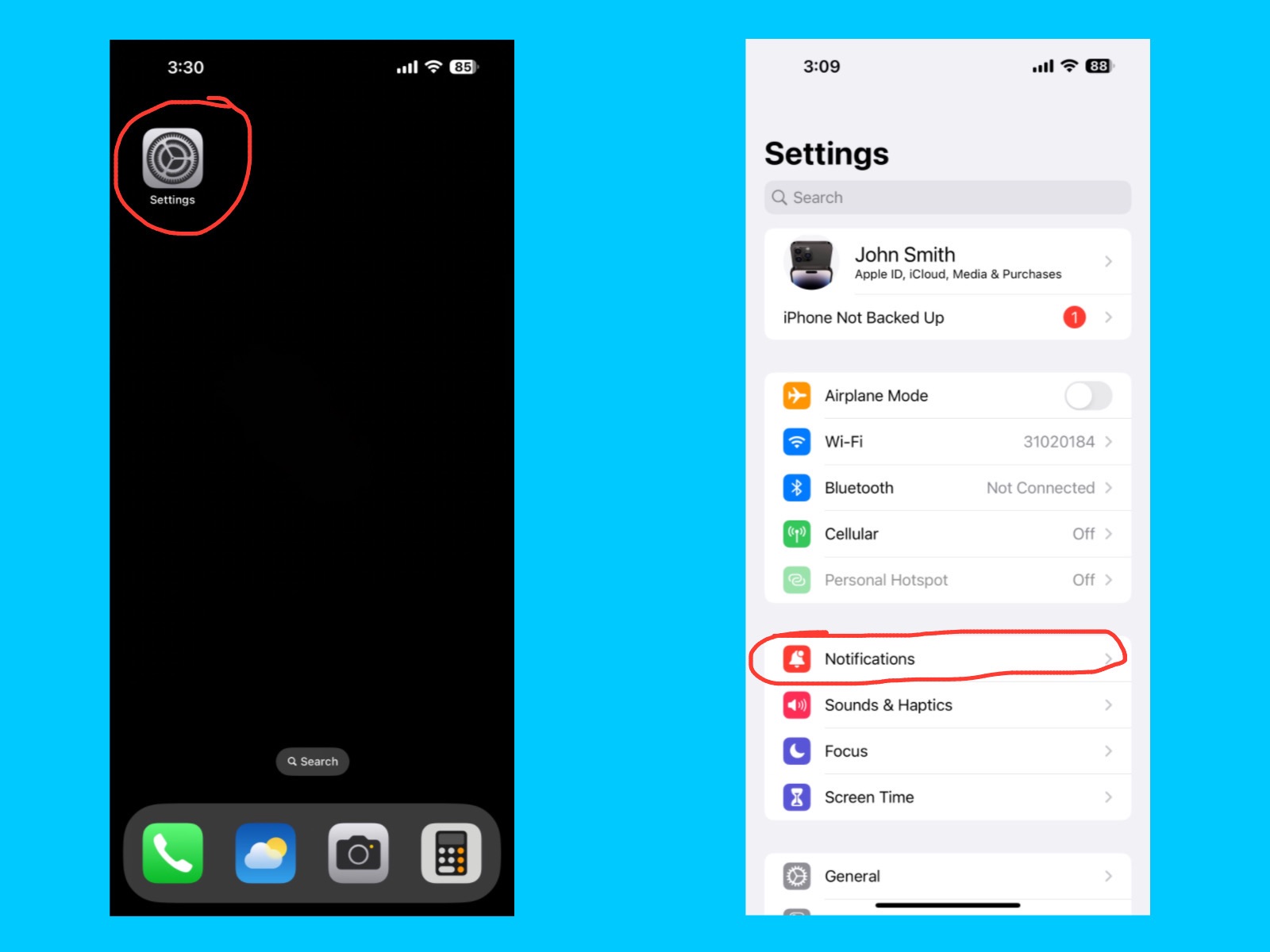
Notifications

iPhone 14 Pro Max Settings Guide
Settings – Notifications

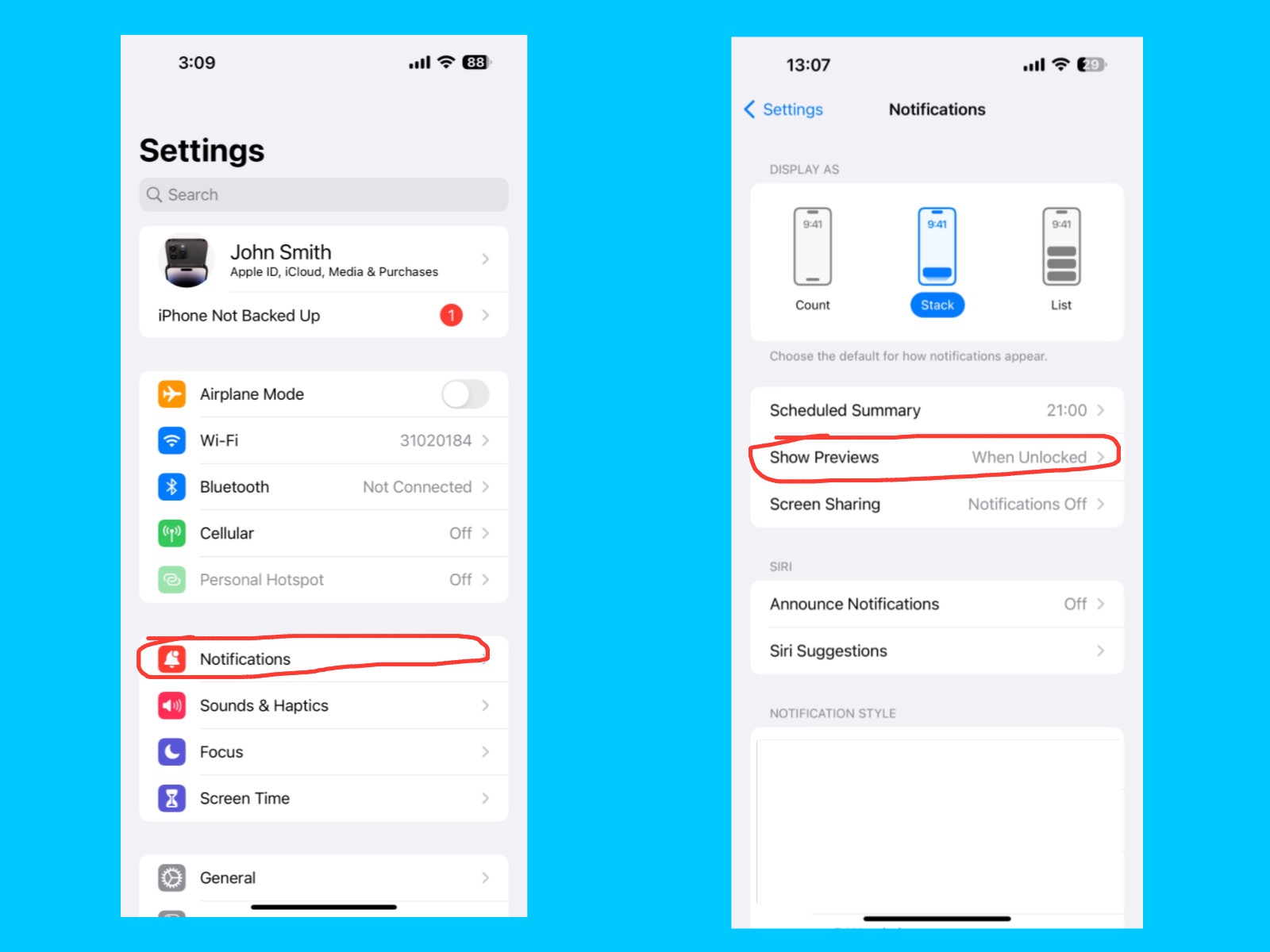
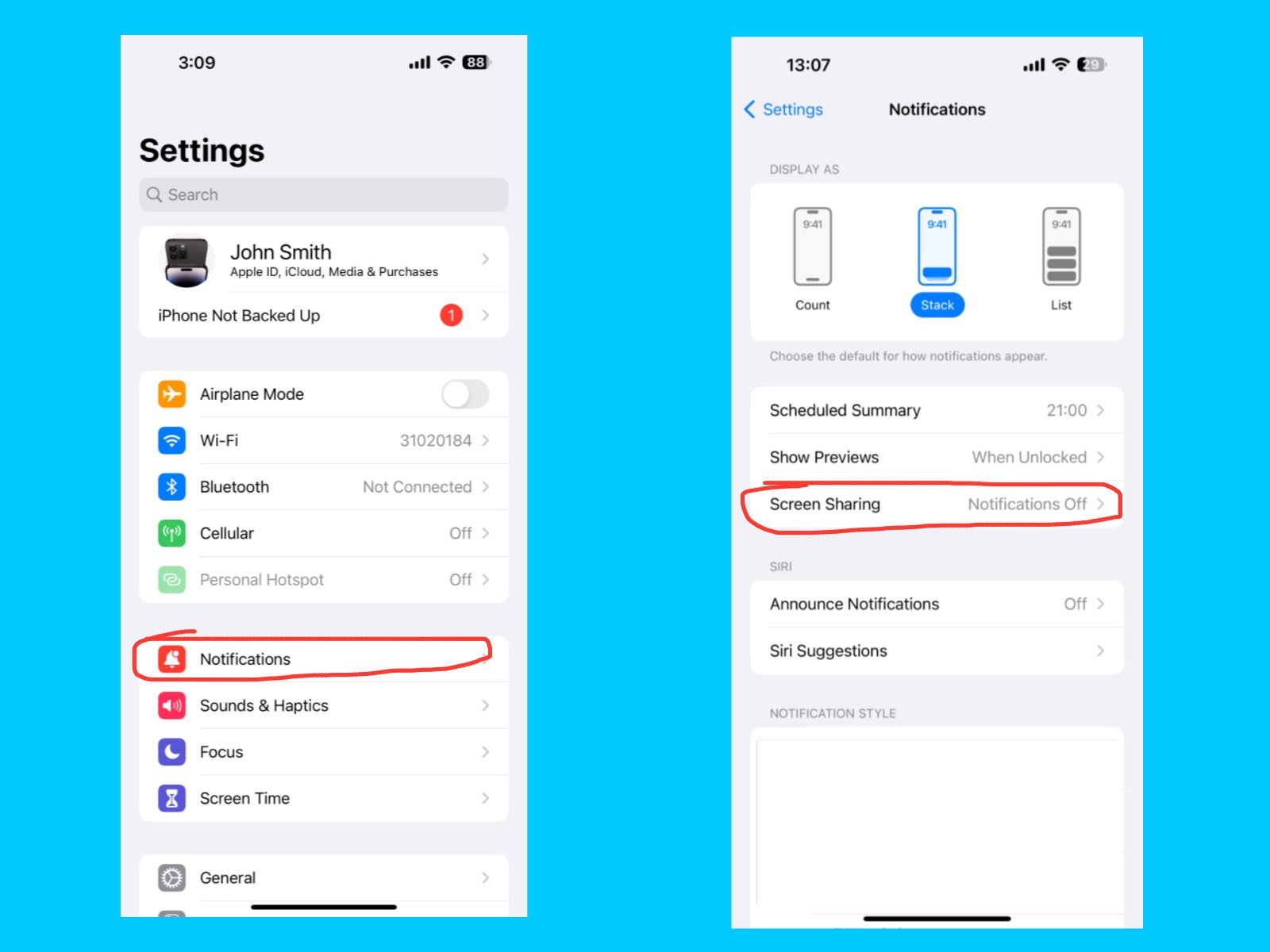
The Notifications setting lets you control how apps alert you with banners, sounds, badges, or alerts on your iPhone. You can customize notifications for each app, choose to show them on the Lock Screen, and decide whether to allow sounds or vibrations.

In the Notifications settings, you can choose how your notifications appear on the Lock Screen. You can display them as a count, a stack, or a list, making it easier to see what’s important at a glance and stay organized.

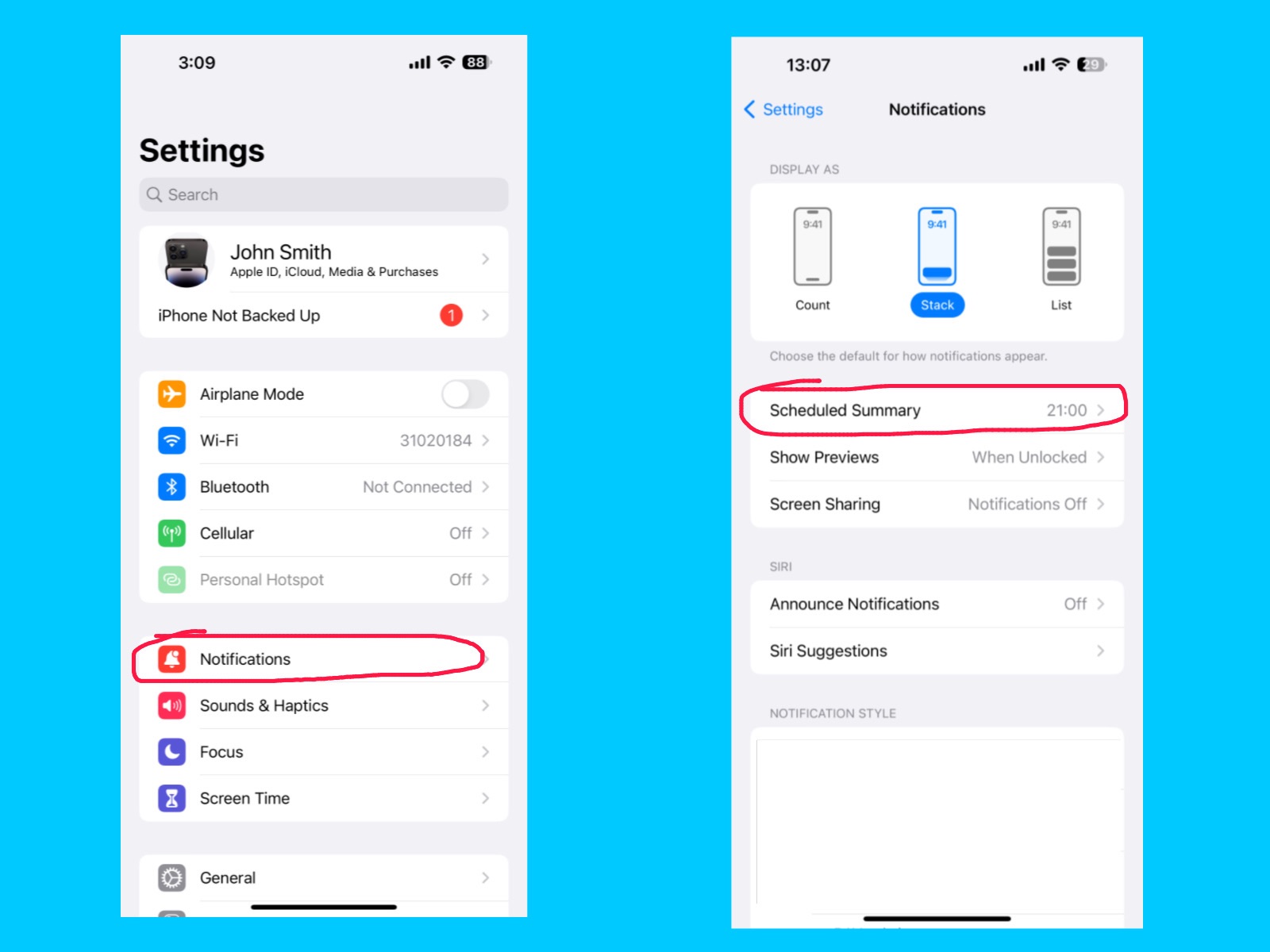
Scheduled Summary

iPhone 14 Pro Max Settings Guide
Settings -Notifications – Scheduled Summary

The Scheduled Summary feature lets you collect non-urgent notifications and deliver them at specific times instead of showing them immediately. This helps reduce distractions throughout the day and allows you to check notifications all at once when it’s convenient.

Show Preview

iPhone 14 Pro Max Settings Guide
Settings – Notifications – Show Previews

On your iPhone 14 Pro Max, the Show Previews setting lets you control how much of your notifications appear on the Lock Screen. You can find it under Settings → Notifications → Show Previews. There are three options: Always (shows full message even when locked), When Unlocked (shows details only after unlocking), and Never (hides message content completely). For better privacy, choose When Unlocked, so message details appear only after Face ID recognizes you.

Screen Sharing

iPhone 14 Pro Max Settings Guide
Settings – Notifications – Screen Sharing

The Screen Sharing feature lets you share your iPhone screen with others during calls or meetings. This is useful for presentations, troubleshooting, or showing content like photos and apps in real time.

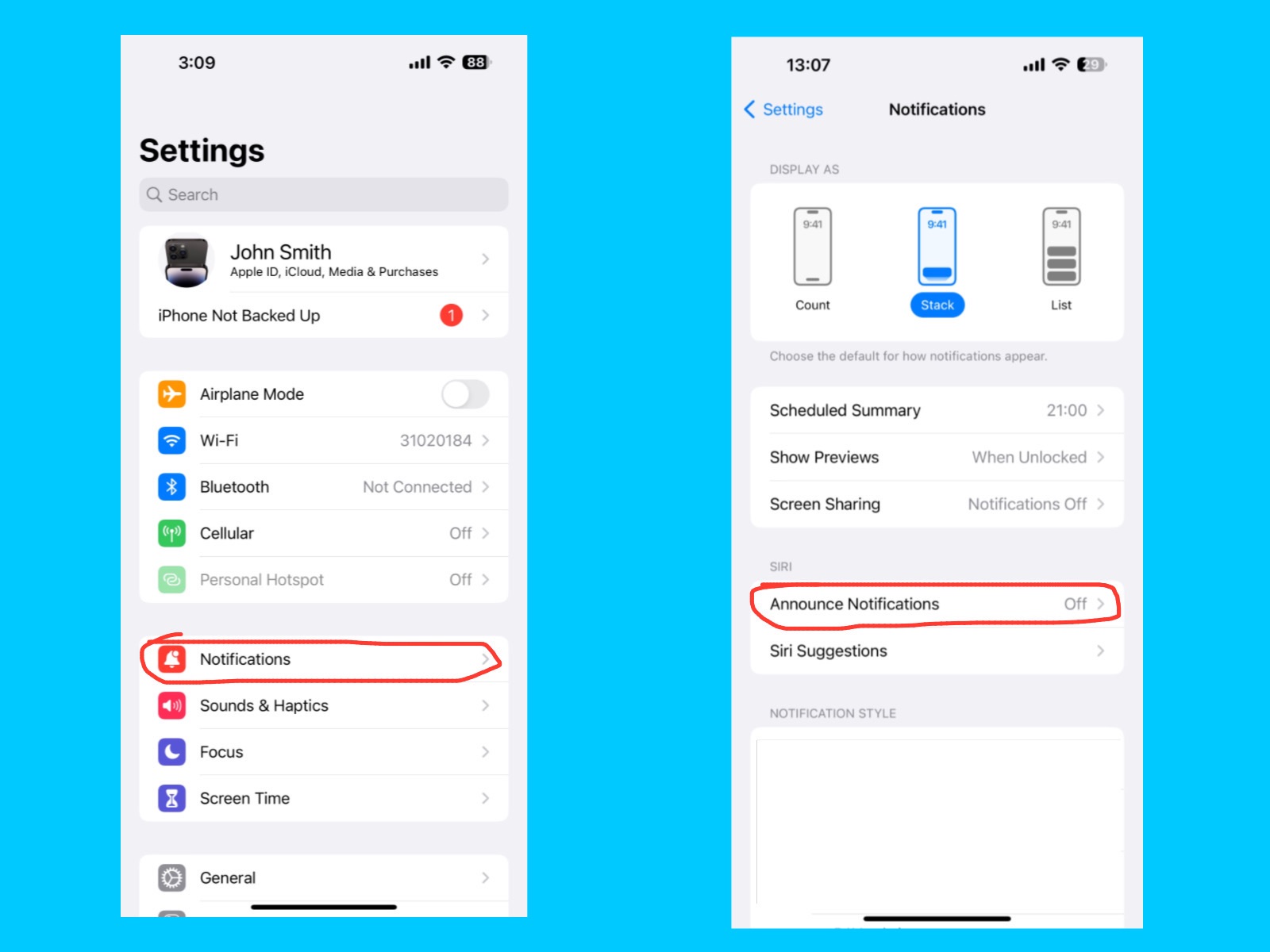
Announce Notifications

iPhone 14 Pro Max Settings Guide
Settings – Notifications – Announce Notifications

The Announce Notifications feature allows Siri to read incoming notifications aloud through your AirPods, Beats headphones, or CarPlay. This is useful when you’re driving, exercising, or otherwise busy, so you can hear important messages without looking at your iPhone.

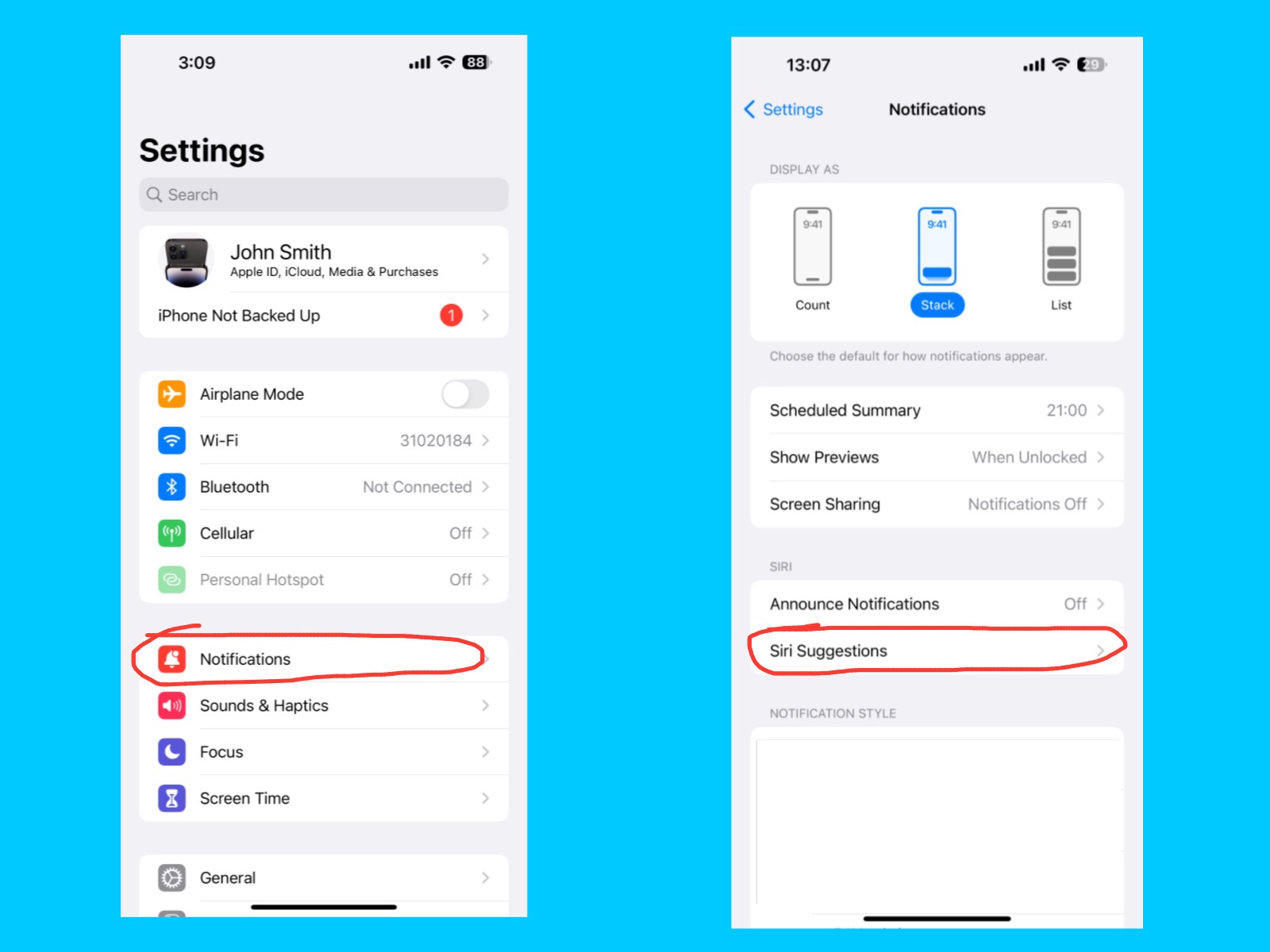
Siri suggestions 

iPhone 14 Pro Max Settings Guide
Settings – Notifications – Siri Suggestions

The Siri Suggestions feature gives you personalized app and action recommendations based on how you use your iPhone. Siri can suggest shortcuts, apps, or actions on the Lock Screen, Home Screen, Search, or in Share Sheets to help you get things done faster. For example, if you often open YouTube in the morning, Siri might suggest the YouTube app on your Lock Screen or Home Screen. It can also suggest shortcuts, like calling a friend you contact every day or opening your favorite playlist, to help you do things faster.

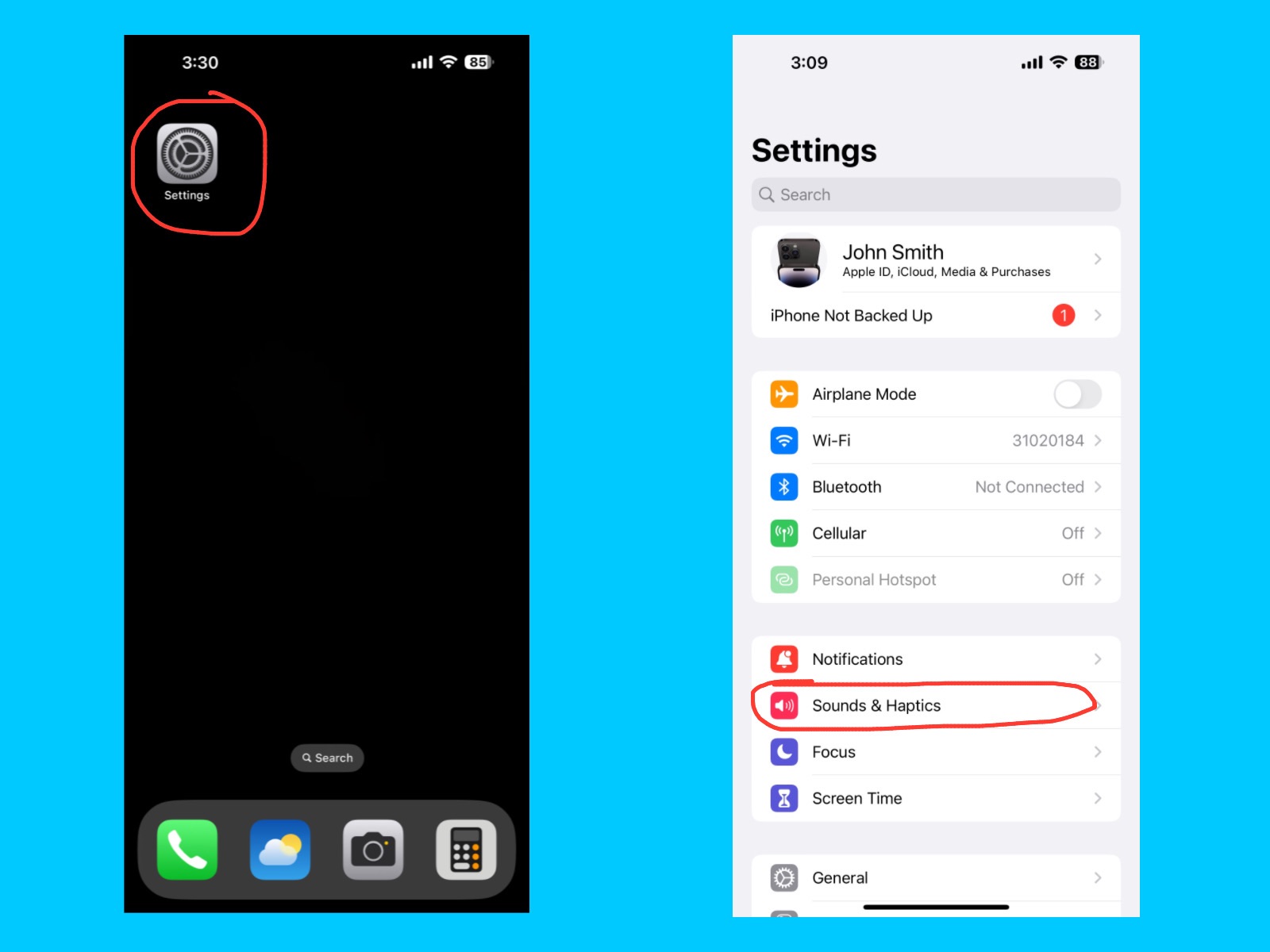
Sounds & Haptics

iPhone 14 Pro Max Settings Guide
Settings – Sounds & Haptics

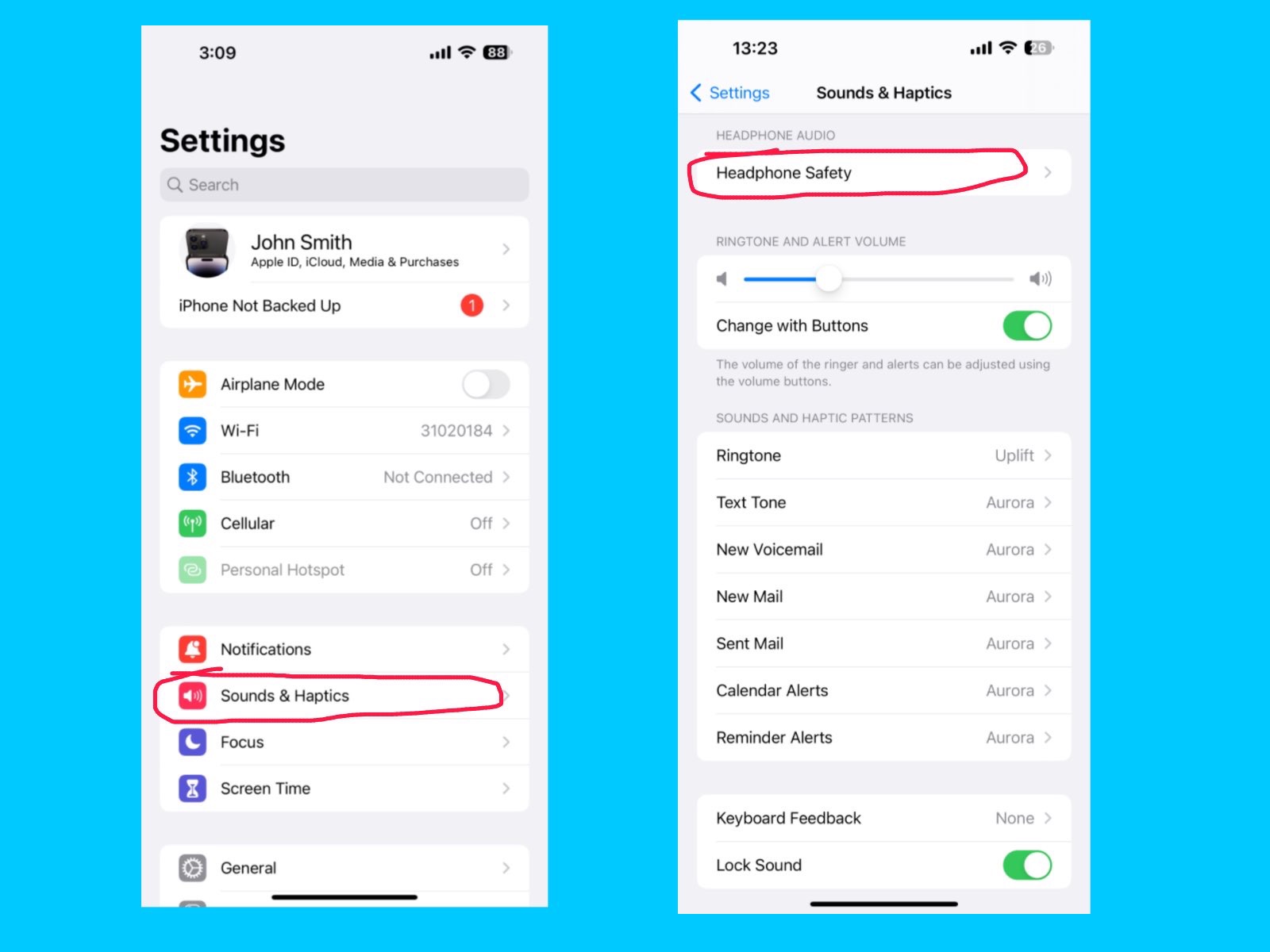
The Sounds & Haptics setting lets you adjust ringtones, alert tones, and vibration patterns on your iPhone. You can control the volume for calls, notifications, and system feedback, as well as turn vibration on or off.
[ Haptics means touch feedback that your iPhone gives when you do something. For example, Feeling a small vibration when you tap a button, Or a stronger vibration when you receive a notification. ]

Headphone Safety

iPhone 14 Pro Max Settings Guide
Settings – Sounds & Haptics – Headphone Safety

The Headphone Safety feature helps protect your hearing by monitoring the volume of your headphones. If the sound is too loud for a long time, your iPhone can reduce the volume automatically or give you a warning. This feature turned on to listen safely and prevent long-term hearing damage, especially when using AirPods or other headphones for extended periods.

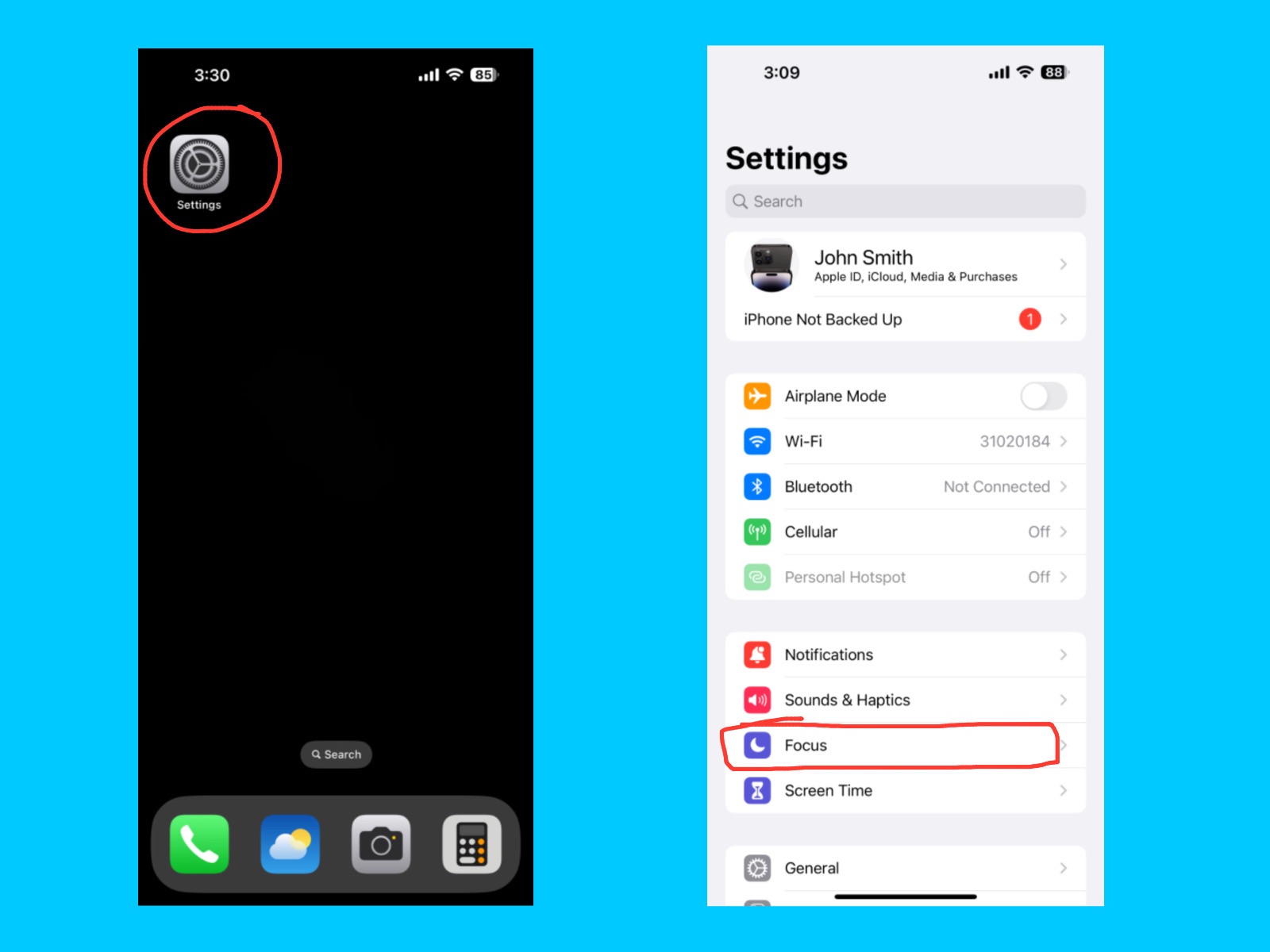
Focus 

iPhone 14 Pro Max Settings Guide
Settings – Focus

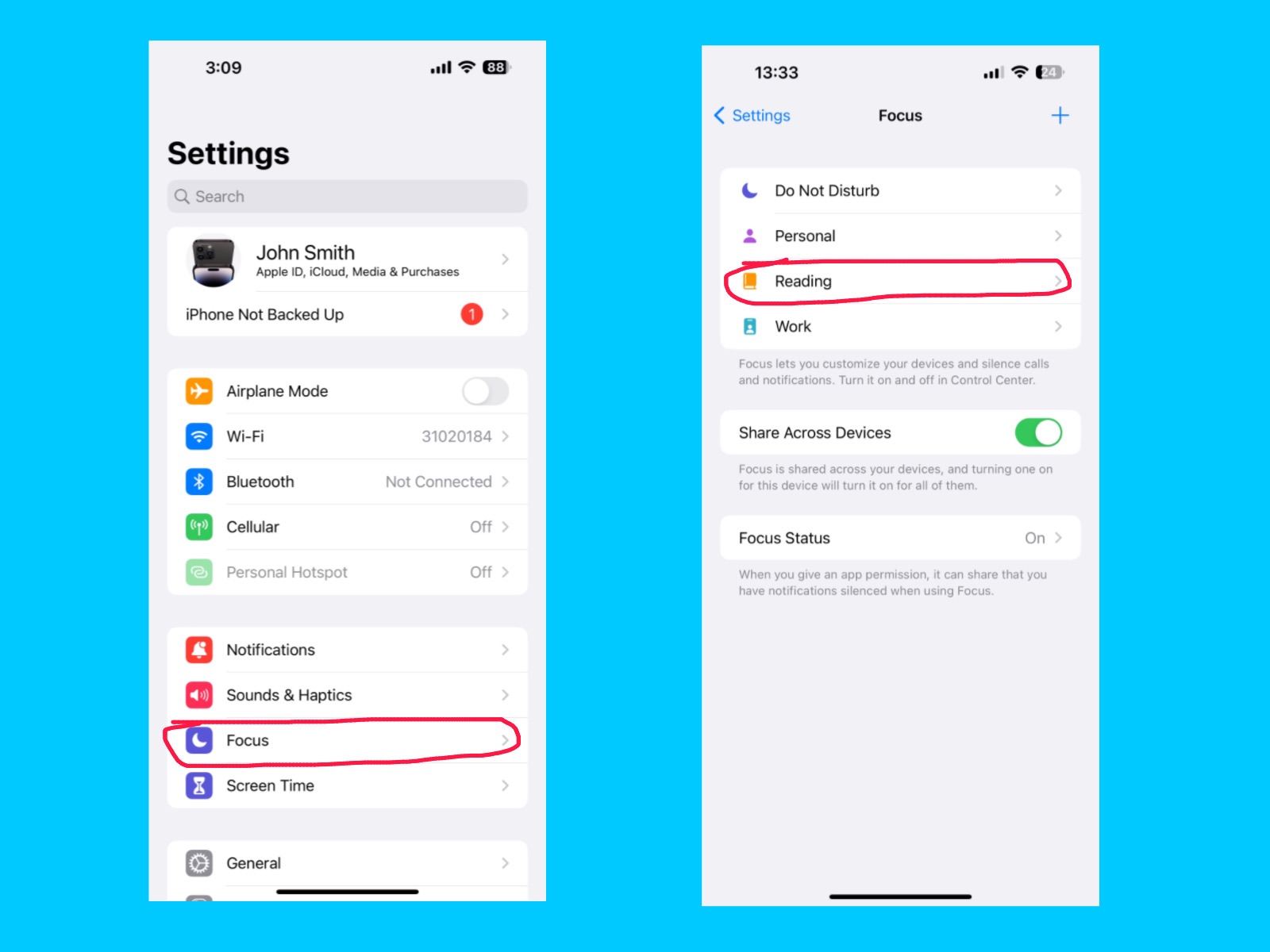
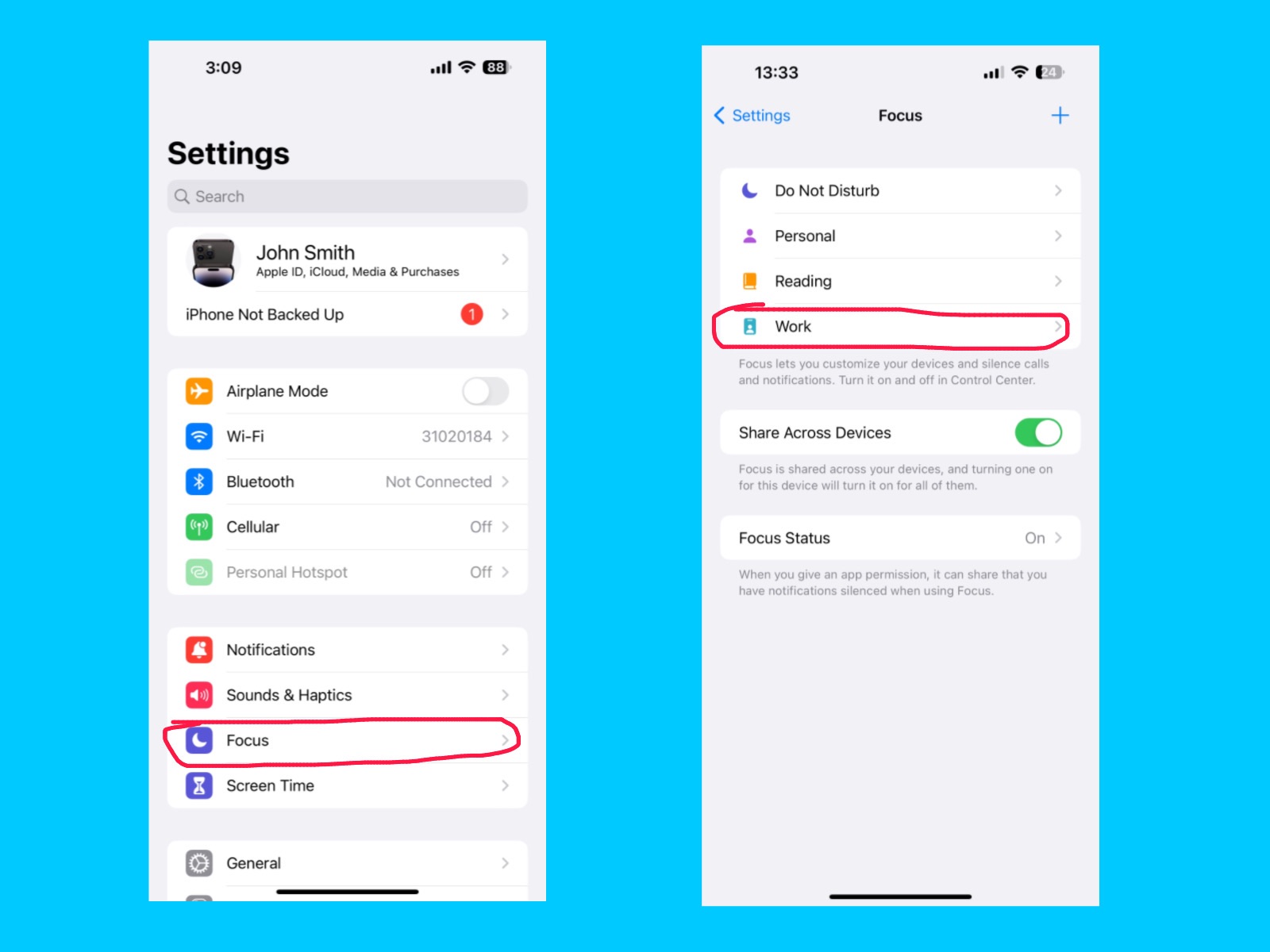
The Focus feature helps you stay concentrated by controlling which notifications, calls, and apps can alert you at specific times. You can create different Focus modes like Work, Personal, Sleep, or Driving, and customize which people or apps can send notifications during each mode. You can use Focus feature to reduce distractions and improve productivity, while still allowing important notifications to come through.

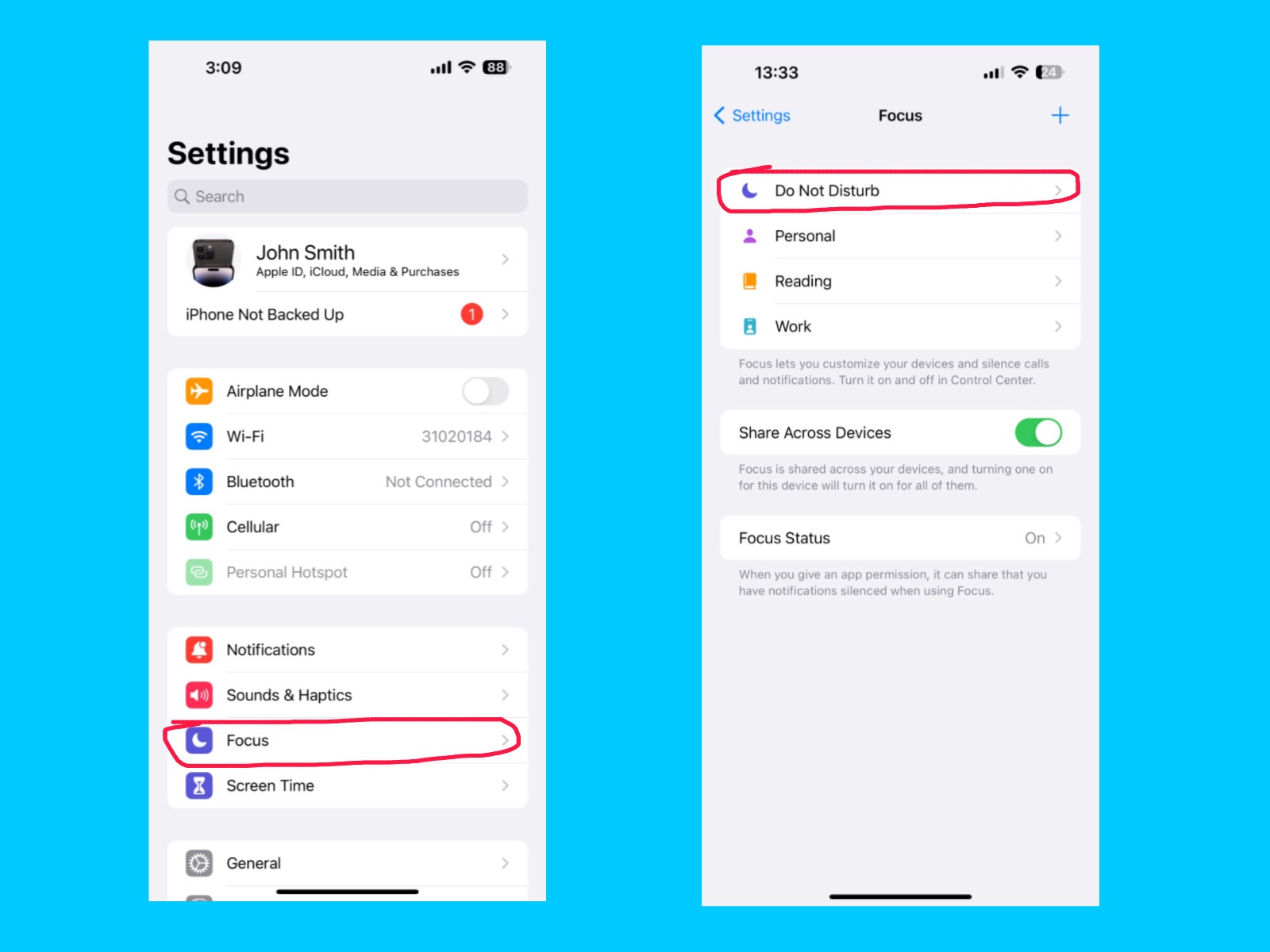
Do Not Disturb

iPhone 14 Pro Max Settings Guide
Settings – Focus – Do Not Disturb

The Do Not Disturb feature lets you silence calls, alerts, and notifications temporarily so you can focus, sleep, or relax without interruptions. You can schedule it for certain times or turn it on manually, and choose exceptions for important contacts or apps. You can use Do Not Disturb during meetings, study time, or bedtime to avoid distractions while still receiving essential alerts from people you trust.

With this feature, notifications from selected people and apps will be allowed, while all others will be silenced.

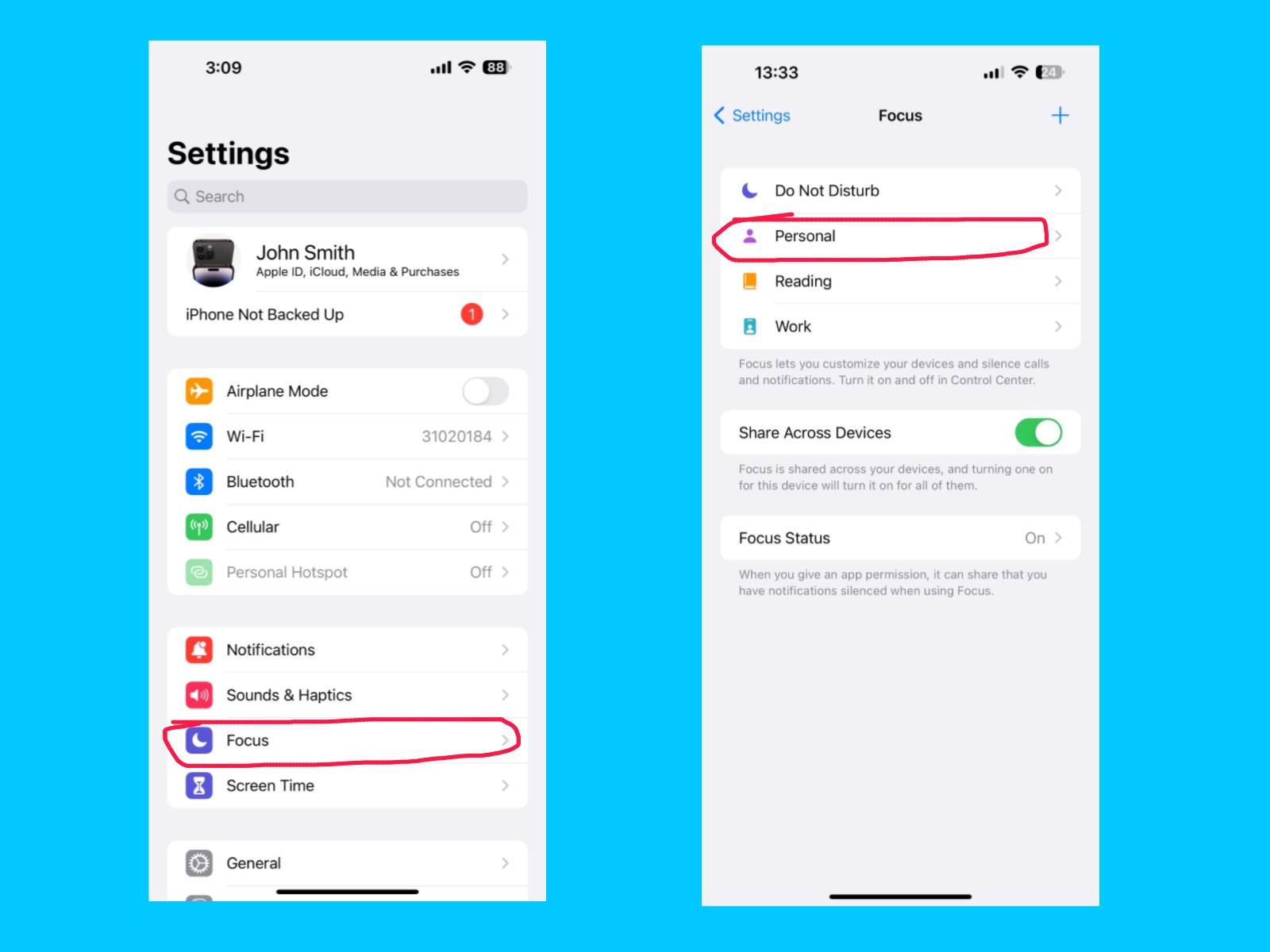
Personal 

iPhone 14 Pro Max Settings Guide
Settings – Focus – Personal

You can silence notifications by selecting specific people or apps. Additionally, you can customize your Lock Screen or Home Screen to help limit distractions and stay focused throughout the day.

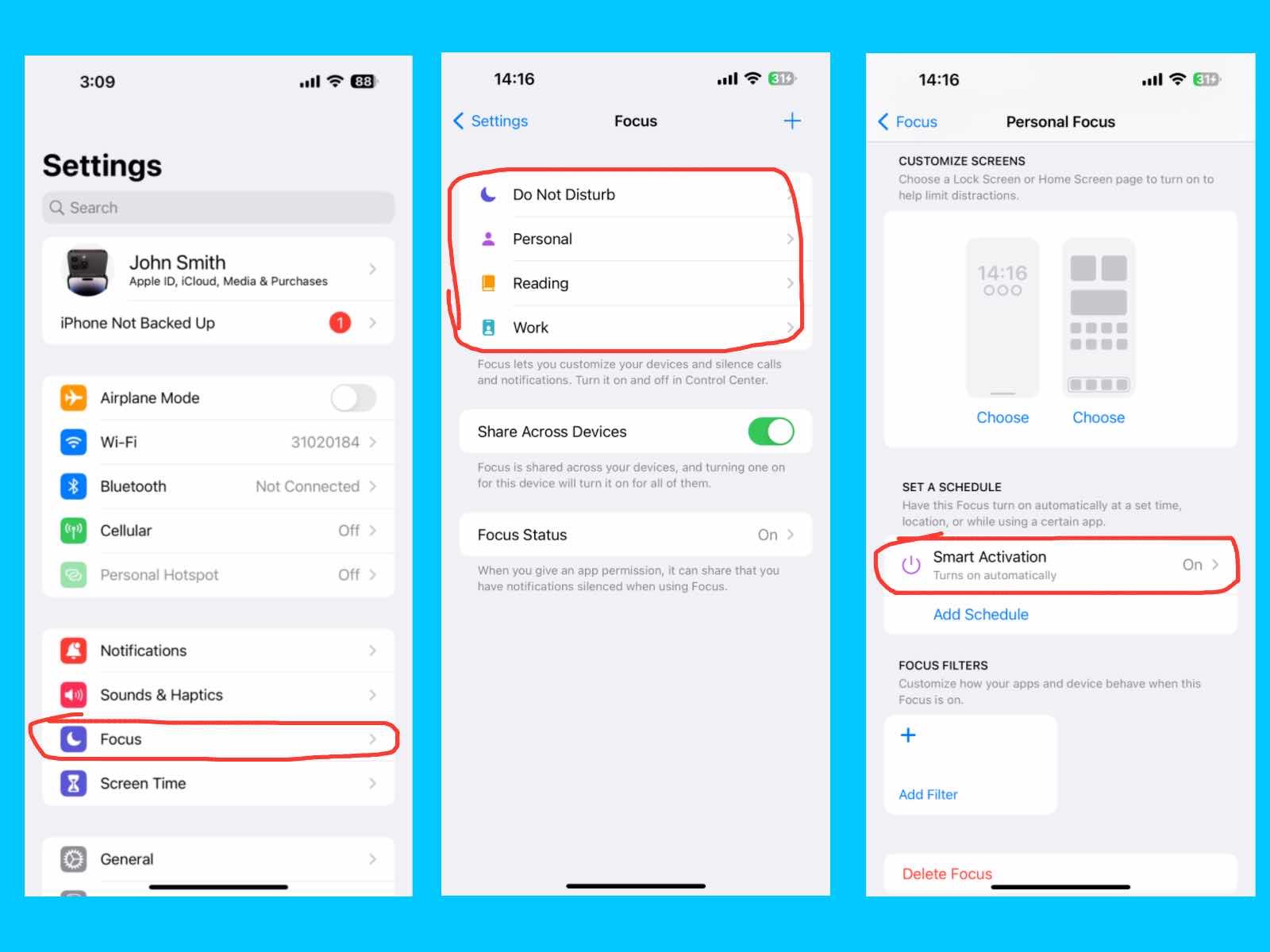
Smart Activation

iPhone 14 Pro Max Settings Guide
Settings – Focus – Personal / Reading / Work – Smart Activation

The Smart Activation feature automatically turns on your Personal Focus mode based on your activity, location, or app usage. For example, it can activate Work Focus when you arrive at the office or Personal Focus when you’re at home. You can use Smart Activation to automatically reduce distractions without manually switching Focus modes throughout the day.

Reading 

iPhone 14 Pro Max Settings Guide
Settings – Focus – Reading

The Reading option helps you customize your reading experience on your iPhone by adjusting text size, display colors, and background in apps like Books, Safari, or other reading apps. You can also reduce interruptions by choosing only the notifications you want to receive. You can use Reading settings to reduce eye strain, especially during long reading sessions or at night. These feature also have a smart activation option

Work

iPhone 14 Pro Max Settings Guide
Settings – Focus – Work

The Work Focus mode helps you stay productive by limiting distractions during your work hours. You can choose which people and apps are allowed to send notifications while silencing all others. This feature can also automatically turn on Focus mode at a set time, location, or while using a certain app. You can customize your Lock Screen and Home Screen to show only the apps and widgets you need for work. You can use Work Focus to maintain concentration and improve productivity during office hours or study time. These feature also have a smart activation option.

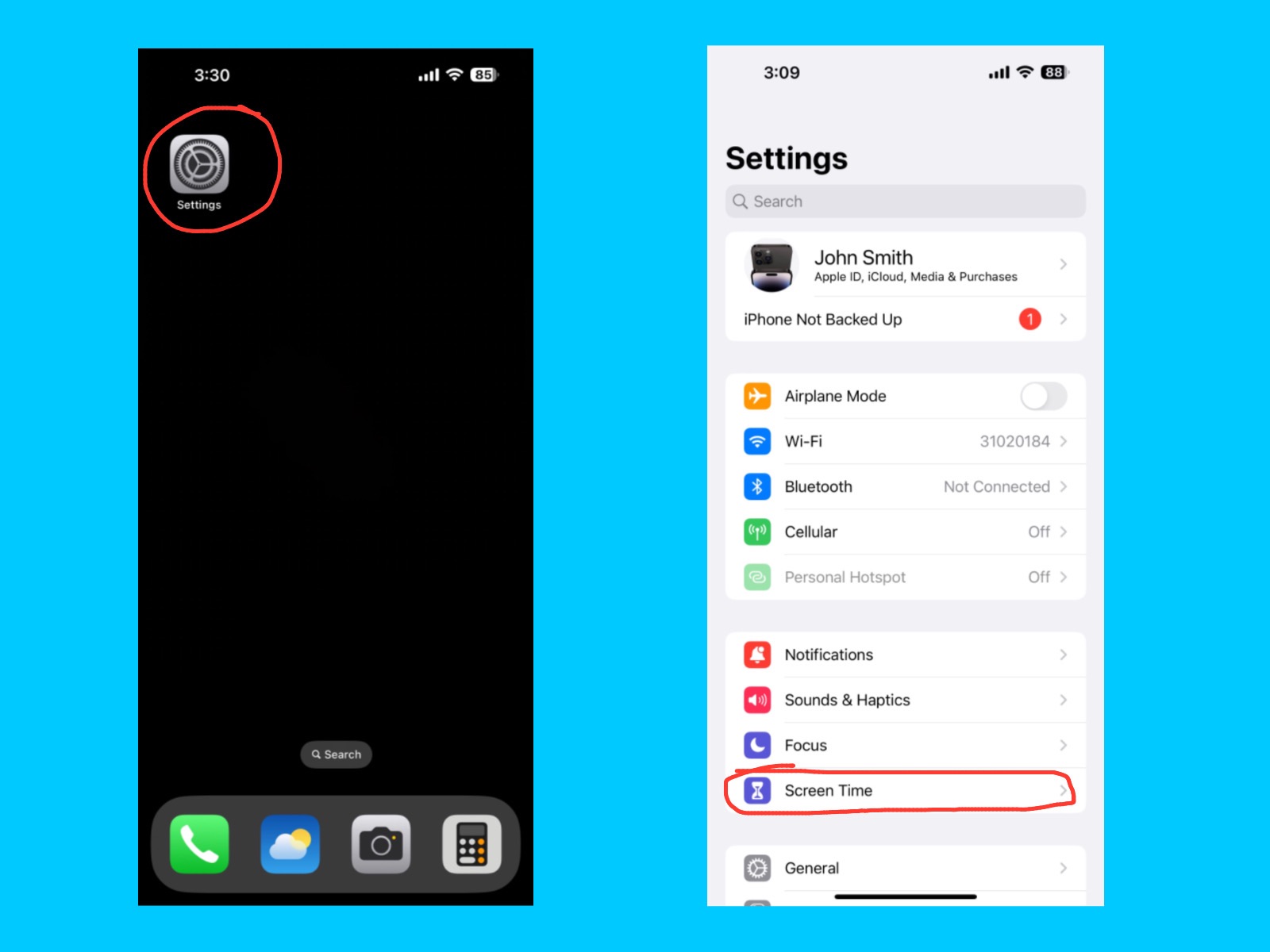
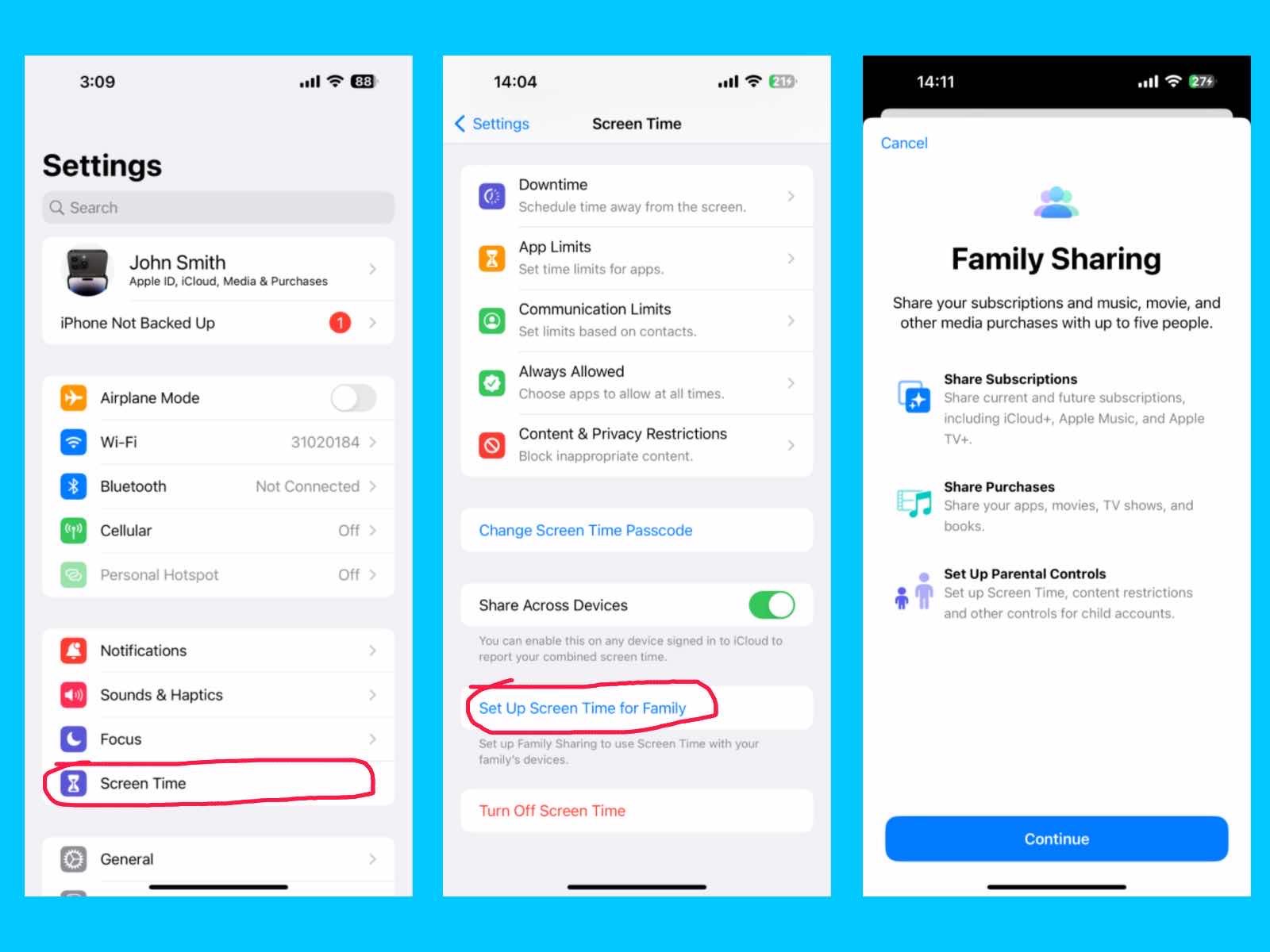
Screen Time

iPhone 14 Pro Max Settings Guide
Settings – Screen Time

The Screen Time feature lets you monitor and manage how you use your iPhone. You can see how much time you spend on apps, websites, and categories, and set daily limits to reduce distractions. It also allows you to set downtime and app restrictions for yourself or your family. You can use Screen Time to balance your device usage, improve productivity, and encourage healthy habits for you or your kids.

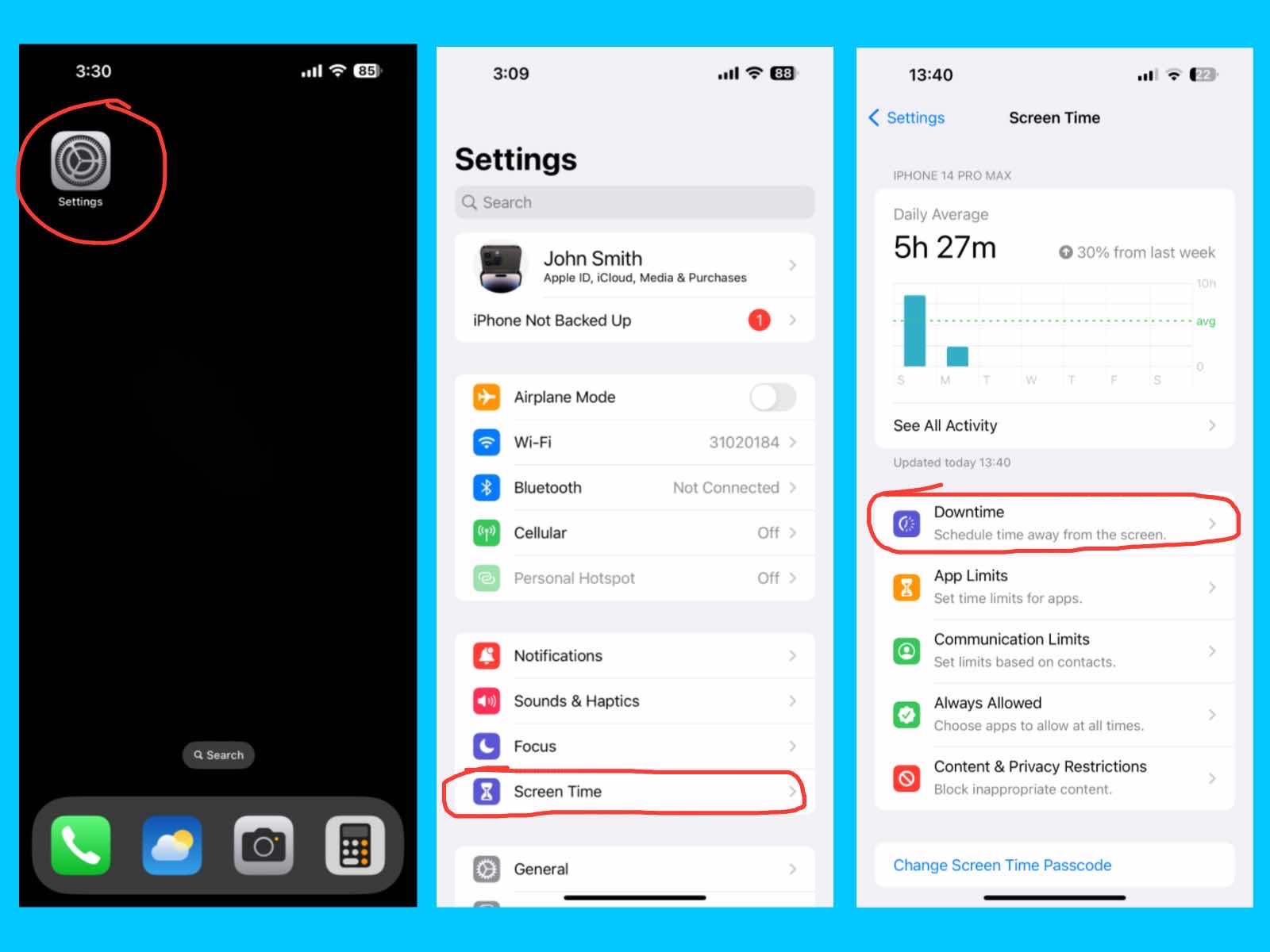
Downtime

iPhone 14 Pro Max Settings Guide
Settings – Screen Time – Downtime

This feature lets you schedule times when only certain apps and phone calls are allowed. It is useful for sleep, study, or family time to help you avoid distractions.

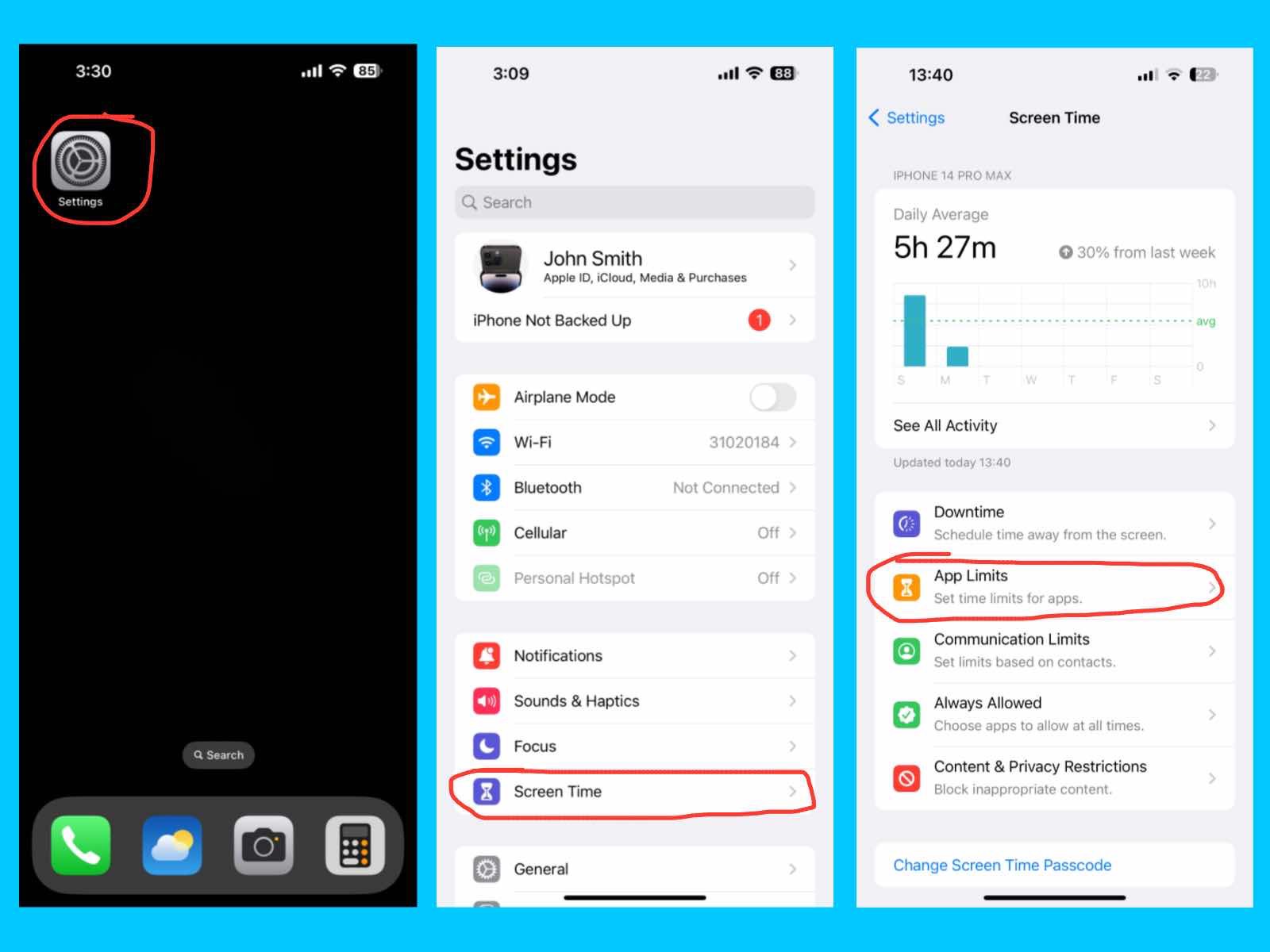
App Limits

iPhone 14 Pro Max Settings Guide
Settings – Screen Time – App Limits

This feature lets you set daily time limits for specific apps or app categories. It helps you manage screen time and prevents overuse of social media, games, or other apps.

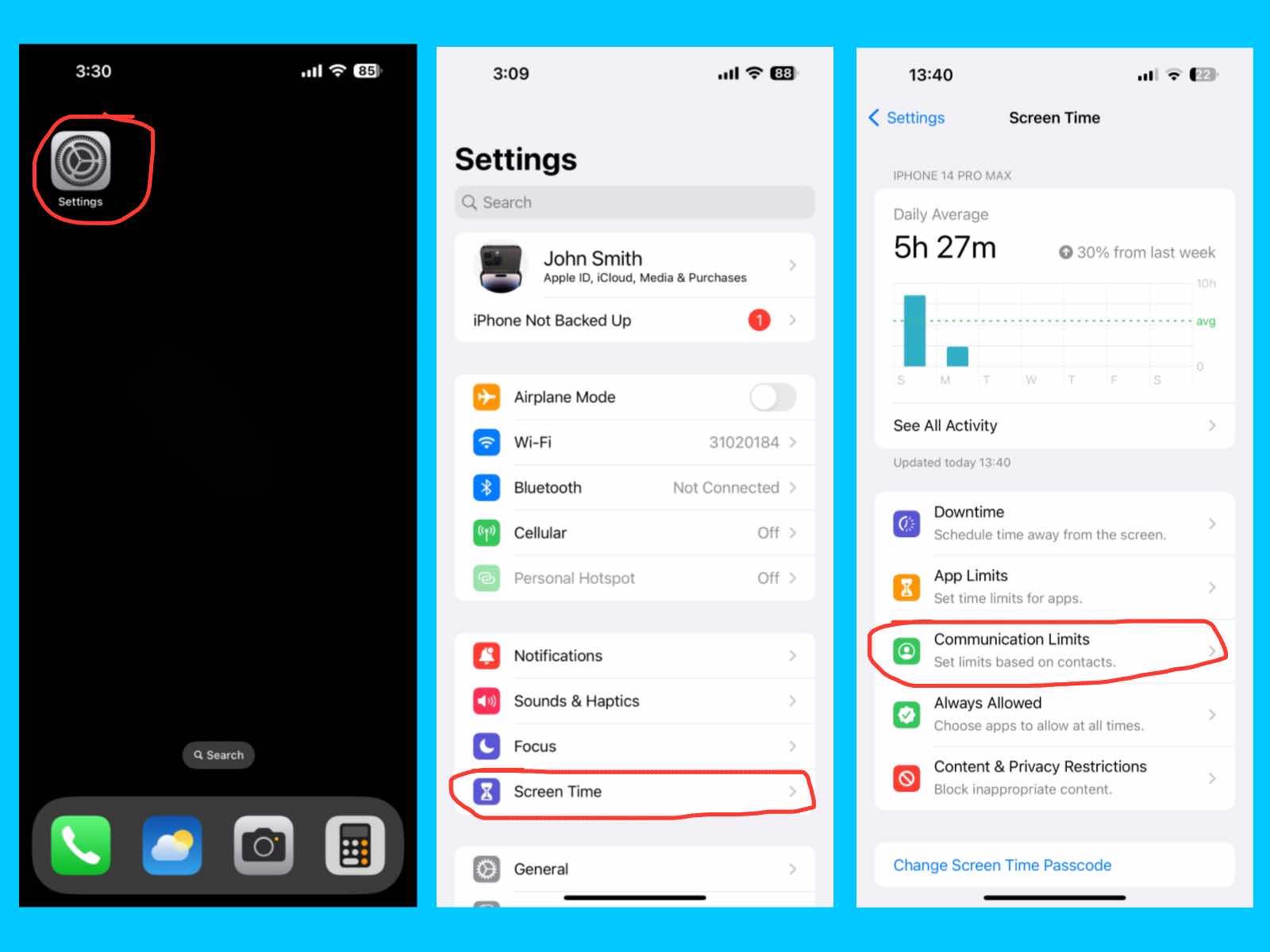
Communication Limits

iPhone 14 Pro Max Settings Guide
Settings – Screen Time – Communication Limits

This feature lets you control who you or your child can call, message, or FaceTime during allowed screen time or downtime. It helps keep communication safe and focused.

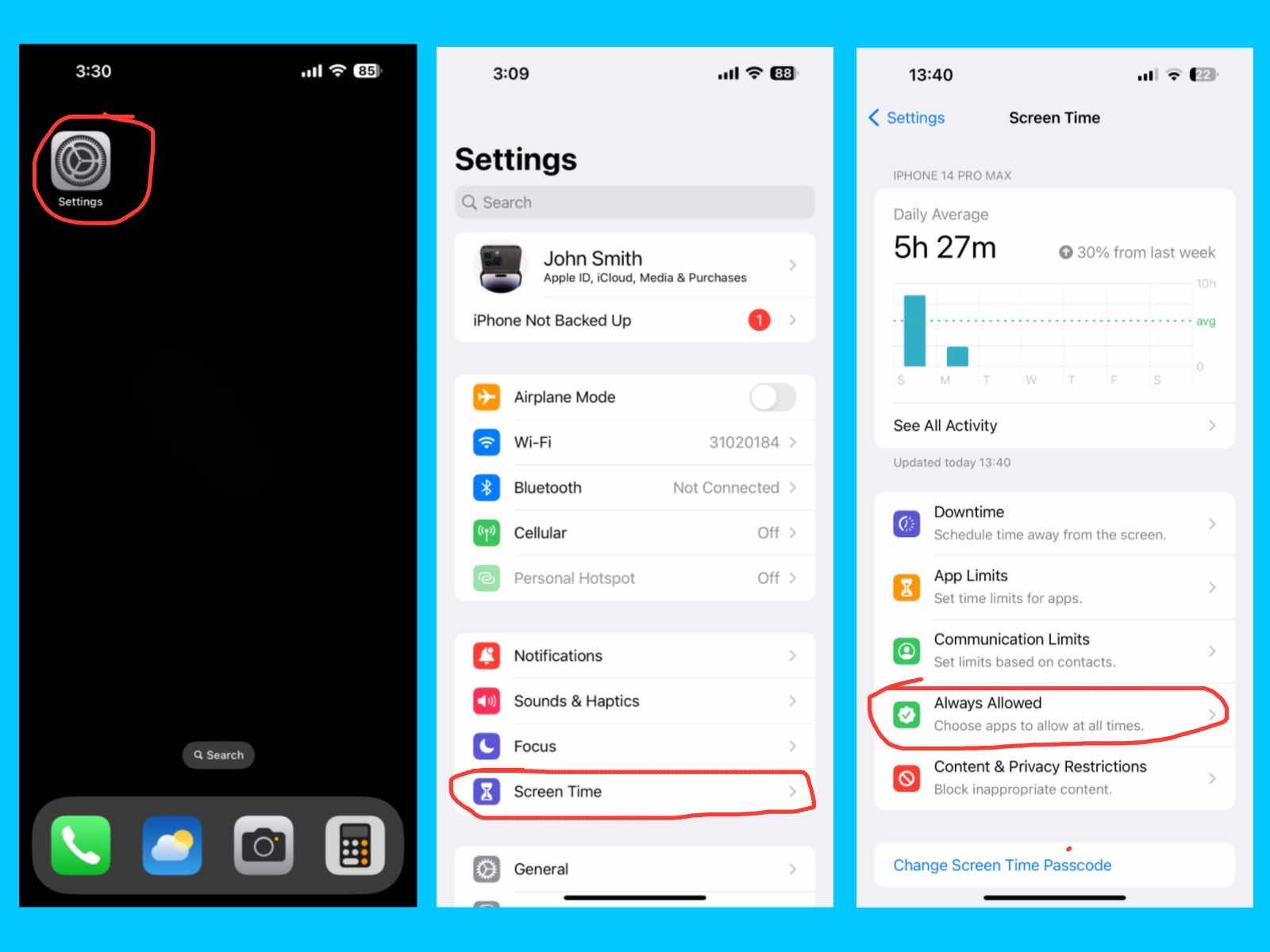
Always Allowed

iPhone 14 Pro Max Settings Guide
Settings – Screen Time – Always Allowed

This feature lets you choose apps that are always accessible, even during downtime or when app limits are reached. Common examples include Phone, Messages, or educational apps.

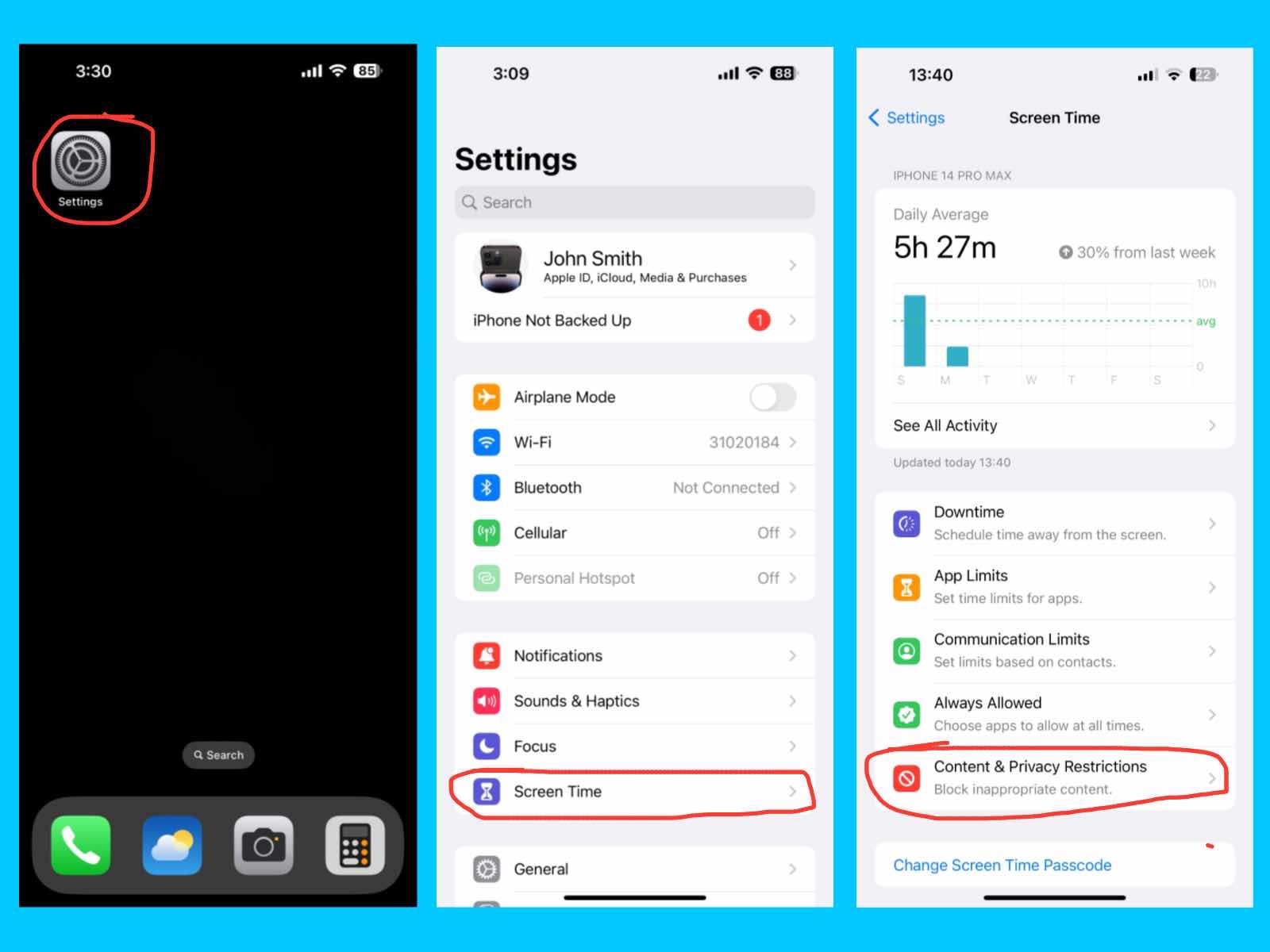
Content & Privacy Restrictions

iPhone 14 Pro Max Settings Guide
Settings – Screen Time – Content & Privacy Restrictions

This feature lets you restrict explicit content, purchases, downloads, and privacy settings. It helps parents control what kids can access and protects sensitive information.

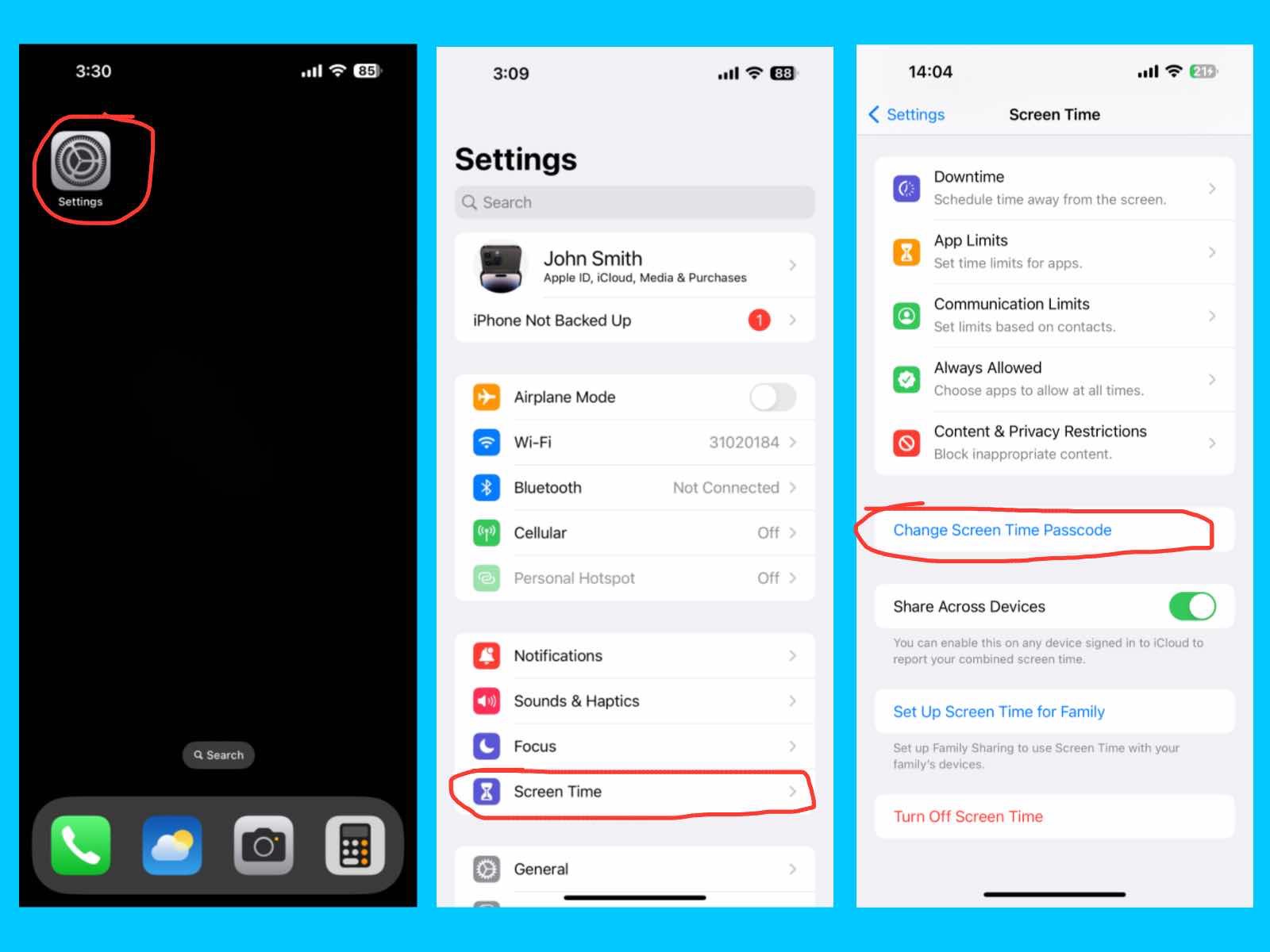
Change Screen Time Passcode

iPhone 14 Pro Max Settings Guide
Settings – Screen Time – Change Screen Time Passcode

The Change Screen Time Passcode option lets you update or reset the passcode used to secure your Screen Time settings. You can use a unique passcode different from your device passcode to ensure that only you (or a trusted parent) can modify app limits, downtime, or content restrictions, especially if you share your iPhone with family members.

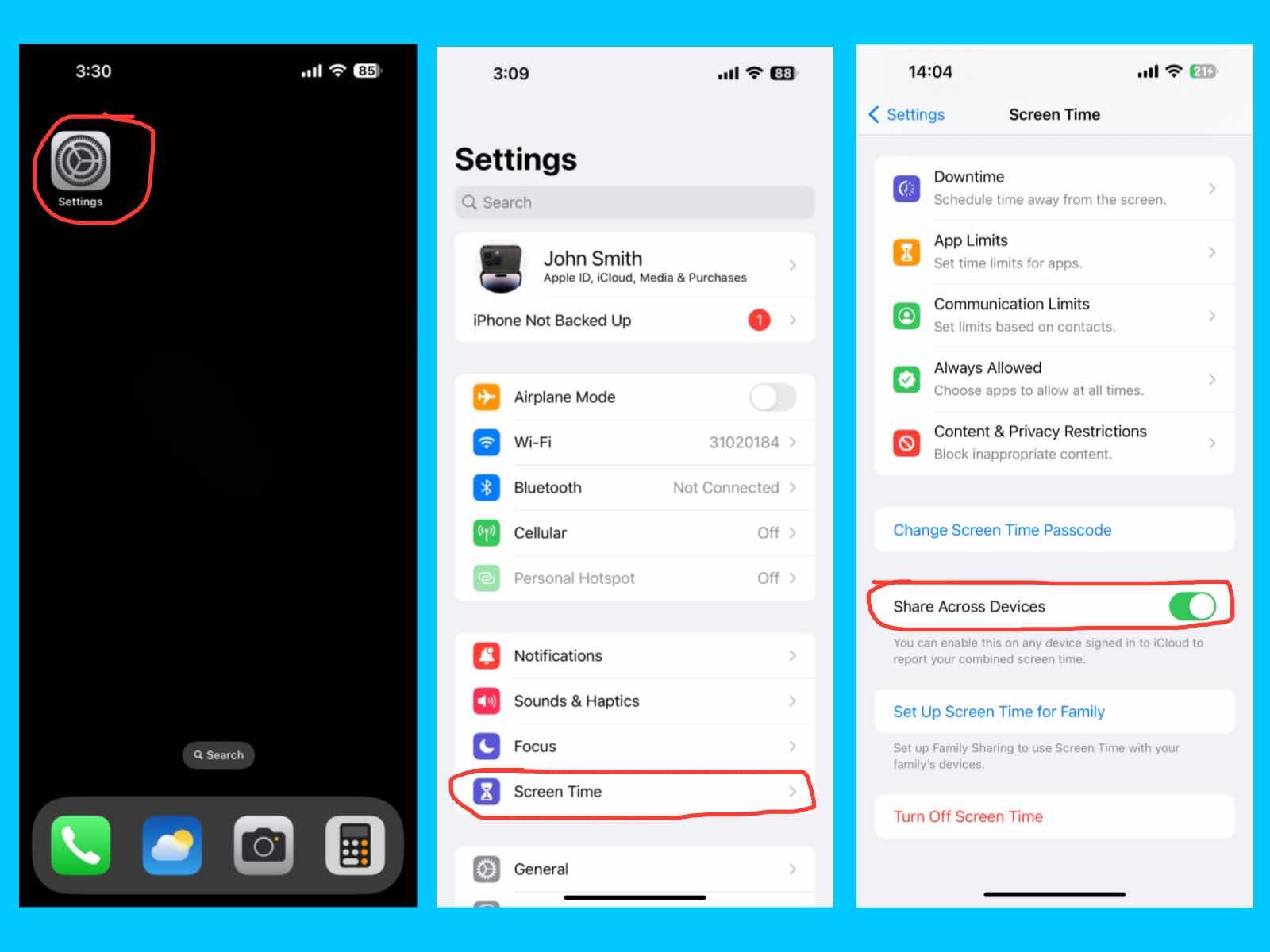
Share Across Devices

iPhone 14 Pro Max Settings Guide
Settings – Screen Time – Share Across Devices

The Share Across Devices feature lets your Screen Time settings and usage data sync across all Apple devices signed in with the same Apple ID. This ensures that limits, downtime, and app usage reports are consistent on your iPhone, iPad, and Mac, giving you a complete view of your device usage.

Set up Screen Time for Family

iPhone 14 Pro Max Settings Guide
Settings – Screen Time – Set Up Screen Time for Family

The Set Up Screen Time for Family feature on your iPhone 14 Pro Max helps you manage and monitor how your family members use their devices. It’s perfect for parents who want to set limits and promote healthy screen habits. With Family Sharing, you can also share your subscriptions and media with up to five people. This includes sharing iCloud+, Apple Music, Apple TV+, and other current or future subscriptions. You can even share your apps, movies, TV shows, and books across family members. Plus, you can set Screen Time limits, content restrictions, and other controls for child accounts to keep everything safe and balanced.

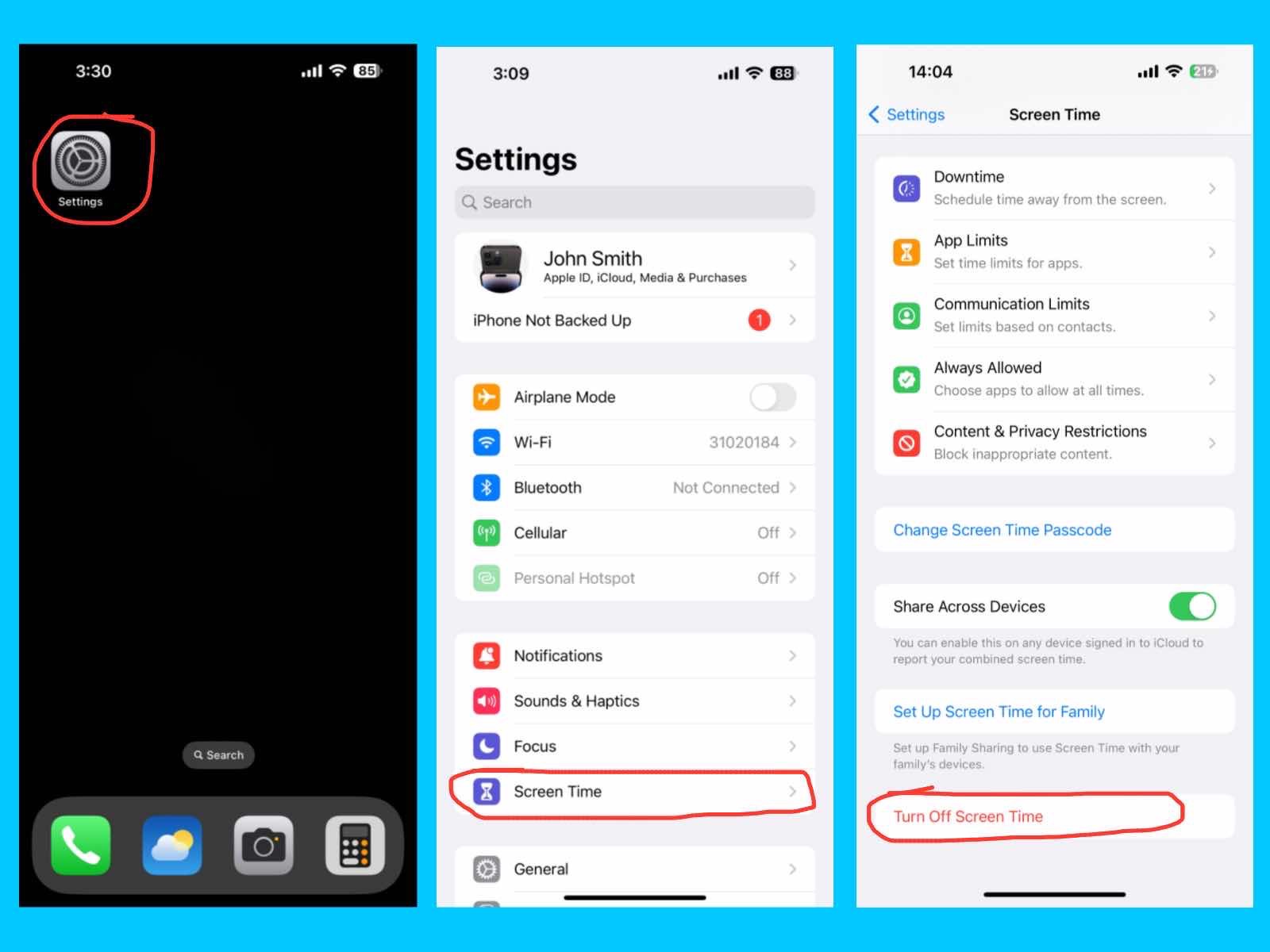
Turn Off Screen Time

iPhone 14 Pro Max Settings Guide
Settings – Turn Off Screen Time

The Turn Off Screen Time option lets you completely disable all Screen Time features on your iPhone. This removes app limits, downtime schedules, and content restrictions, giving you full access to your apps and device. Only turn off Screen Time if you no longer want usage tracking or limits, as this will remove all monitoring and controls previously set.
Conclusion

In this blog post, I explored the key settings of the iPhone 14 Pro Max, including Apple ID, iCloud, media and purchases, Airplane Mode, Wi-Fi, Bluetooth, Cellular, Notifications, Sounds & Haptics, Focus, and Screen Time. If you are the user of the Apple then, Understanding these settings helps you customize your iPhone, stay productive, protect your data, and manage your device efficiently. By adjusting these features to fit your needs, you can enjoy a smoother, more personalized iPhone experience.

Posted on Leave a comment

iPhone 17 Pro Max Review: Is Apple’s Flagship Worth the Upgrade?

iPhone 17 Pro Max Review

Apple introduced the iPhone 17 Pro Max on September 9, 2025, and many people are calling it the most advanced iPhone ever. It comes with the super-fast A19 Pro chip, Apple Intelligence, and new vapor cooling technology, giving smooth and powerful performance for gaming, multitasking, and heavy apps. The phone has a big 6.9-inch Super Retina XDR Display with strong scratch-resistant glass, a triple 48MP rear camera setup, and an 18MP Center Stage front camera for high-quality photos and videos. With the longest battery life ever on an iPhone and the highest storage options up to 2TB, the iPhone 17 Pro Max sets a new standard in speed, display, and camera quality. In this iPhone 17 Pro Max Review, I explain why it is Apple’s most advanced smartphone yet.

iPhone 17 Pro Max Review
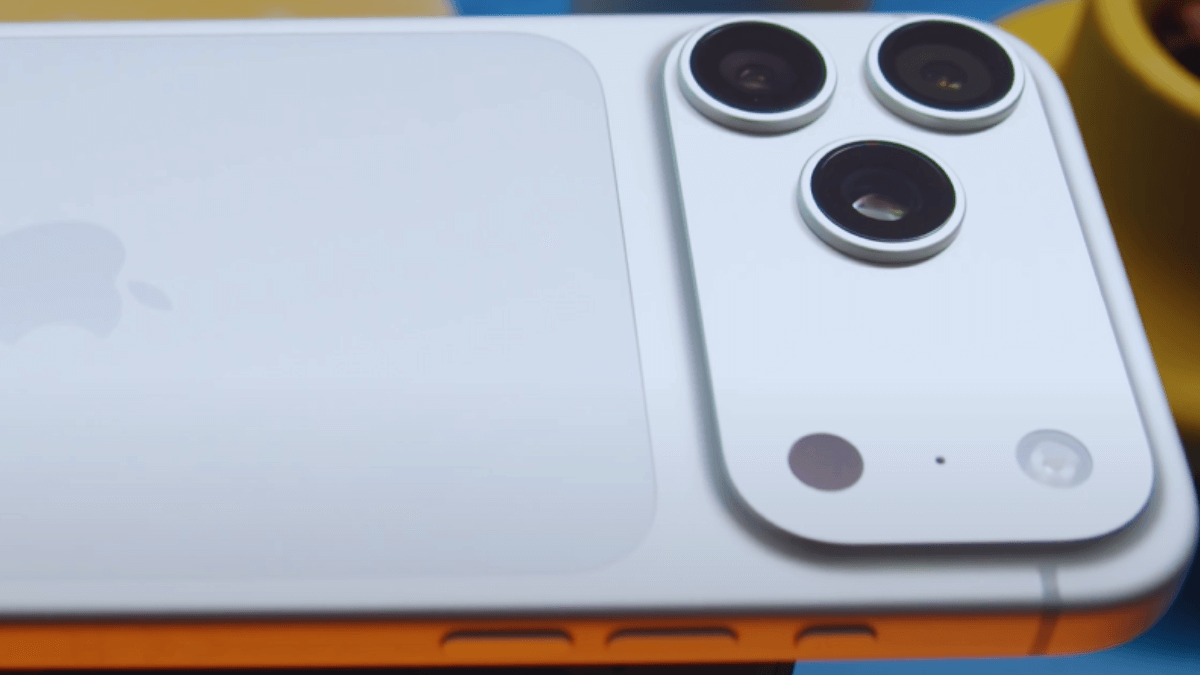
the iPhone 17 Pro Max: premium design with triple 48MP cameras, and A19 Pro chip performance

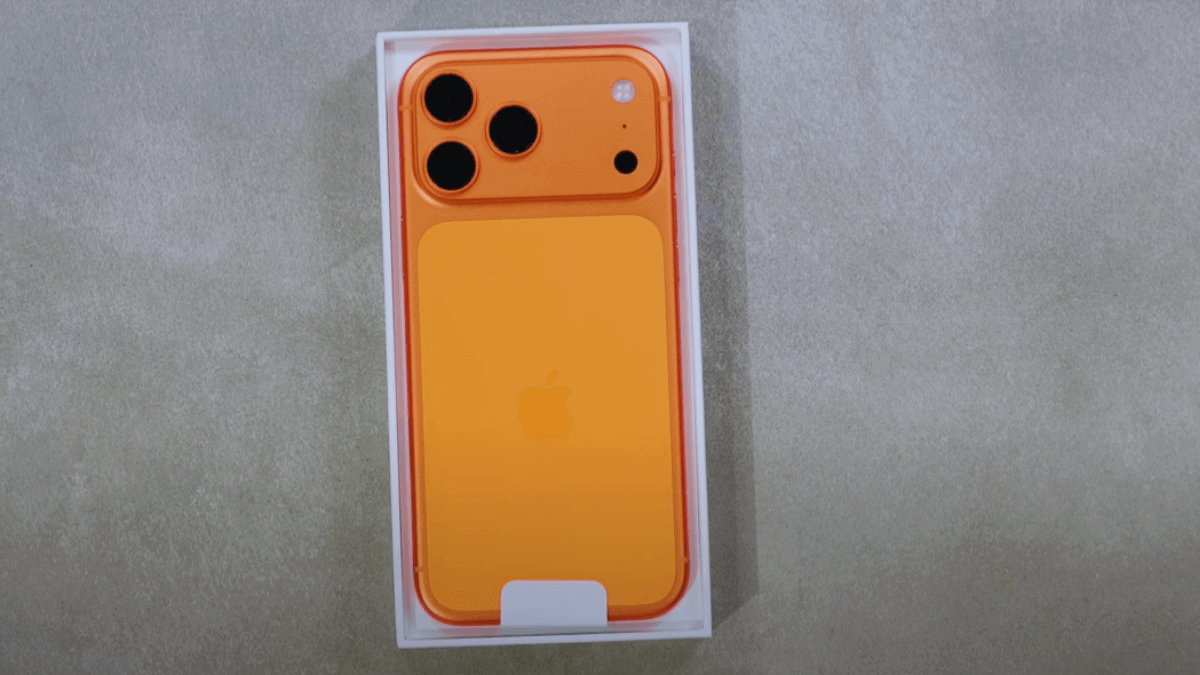
The iPhone 17 Pro Max is available in three colors:

  1. silver
  2. cosmic orange
  3. Deep blue

Specifications

  • Operating System: iOS 26
  • Chipset: A19 Pro chip
  • GPU: Apple GPU (6-core GPU with Neural Accelerator)
  • Screen: 6.9-inch Super Retina XDR OLED display with 120Hz ProMotion, up to 3000 nits peak brightness
  • RAM: 12 GB
  • Storage: 256 GB, 512 GB, 1 TB, 2 TB
  • Camera: 48MP Main + 48MP Ultra Wide + 48MP Telephoto (rear), 18MP Front Camera
  • Dimensions: 6.42 × 3.07 × 0.35 inch (163.4 × 78.0 × 8.75 mm)
  • Connectivity: 5G, Wi-Fi 7, Bluetooth 6, USB-C charging
  • Weight: 233 gram (8.15 ounces)

Camera – Triple 48MP Magic

iPhone 17 Pro Max Review
The iPhone 17 Pro Max features a professional-grade triple camera setup: 48MP main, 48MP ultra-wide, and telephoto lenses for stunning photos and videos.

The iPhone 17 Pro Max takes smartphone photography to a new level with its powerful camera setup. On the back, it has three 48MP cameras – a main, ultra-wide, and telephoto lens – giving you professional-quality shots in almost any situation.

The main 48MP camera comes with a 24/48 mm focal length (1x/2x), ƒ/1.78 aperture, and advanced quad-pixel technology for bright, detailed photos even in low light. The 48MP ultra-wide camera offers a 13 mm focal length (0.5x/macro) and ƒ/2.2 aperture, making it perfect for landscapes or close-up macro shots. The 48MP telephoto lens is even more impressive, with 100/200 mm focal length (4x/8x), ƒ/2.8 aperture, and support for up to 8x optical-quality zoom, allowing you to capture distant subjects clearly.

On the front, the 18MP AutoFrame camera makes selfies and video calls smarter by automatically adjusting the frame to fit you in, giving flexible ways to capture photos and videos. and The iPhone 17 Pro Max comes with a convenient camera control button for effortless photography

Display – Bright, Clear, and Ultra Smooth

iPhone 17 Pro Max Review
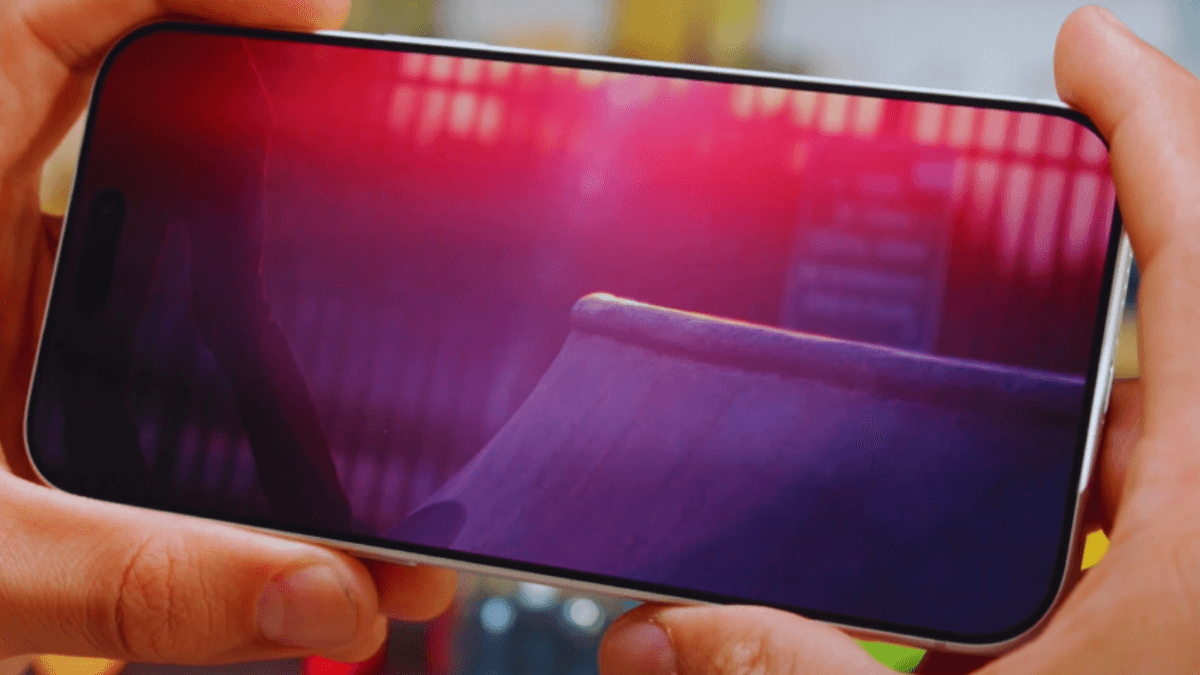
Experience stunning visuals on the iPhone 17 Pro Max with its Super Retina XR OLED display, 120Hz ProMotion, and peak brightness up to 3,000 nits

The iPhone 17 Pro Max has a big 6.9-inch Super Retina XDR screen that looks sharp and colorful, with a resolution of 2868 × 1320 pixels. It feels super smooth to use thanks to the 120Hz ProMotion display, which makes scrolling and tapping more responsive. The screen also gets really bright—up to 3000 nits—so you can see it clearly even in strong sunlight, and it has a new anti-reflection coating to cut down on glare.

To keep it safe, Apple added Ceramic Shield on the back, which is 4x stronger against cracks, and the new Ceramic Shield 2 on the front, which is 3x better at resisting scratches.

Battery – Bigger Battery, Longer Life

The iPhone 17 Pro Max packs a powerful 5,088 mAh battery, giving you up to 39 hours of video playback, the longest ever on an iPhone. Charging is fast too—using a high-wattage adapter, you can get 50% charge in just 20 minutes. It also supports wireless charging up to 30W, plus this Phone  also features MagSafe charging and Qi2 wireless charging up to 25W, so you have plenty of convenient ways to power up.

And with the new USB-C port supporting USB 3, you can enjoy data transfers up to 20x faster than before. Compared to other models, the Pro Max lasts the longest, with the iPhone 17 Pro at 33 hours, the standard iPhone 17 at 30 hours, and the iPhone Air at 27 hours.

Build & Design – Sleek and Stylish

iPhone 17 Pro Max Review
Phone 17 Pro Max Build and Design

The iPhone 17 Pro Max is built strong and stylish. It has a size of 6.42 × 3.07 × 0.35 inches (163.4 × 78.0 × 8.75 mm) and weighs 233 grams. The back is made of glass with a stainless steel frame, and the front is protected by the new Ceramic Shield 2, which is more scratch resistant. For the first time, Apple used a unibody aluminum frame, which is lighter than titanium and also helps the phone stay cool and save battery. Inside, a vapor chamber with deionized water keeps the powerful A19 Pro chip from overheating.

The phone also has an action button, a camera control button, and comes with IP68 water and dust resistance, meaning it can stay in 6 meters of water for up to 30 minutes. Like recent models, it has no SIM card slot and only supports eSIM.

Same Price with Higher Specs and Features

According to the official Apple website, the iPhone 17 Pro Max comes with multiple storage options to suit every user. The 256GB model starts at $1,199, the 512GB version is $1,399, the 1TB variant costs $1,599, and the top-of-the-line 2TB model is priced at $1,999.

Whether you need enough space for photos, videos, or apps, Apple offers a storage option that fits your needs perfectly, making the iPhone 17 Pro Max a powerful and flexible flagship choice.
iPhone 16 Pro Max vs iPhone 17 Pro Max: Key Differences

  • The iPhone 17 Pro Max runs on the latest A19 Pro chip, which is faster and more power-efficient, while the iPhone 16 Pro Max comes with the A18 Pro chip.
  • Both the iPhone 16 Pro Max and 17 Pro Max feature a 6.9-inch OLED display with 1–120Hz ProMotion support. The key difference is brightness: the 17 Pro Max reaches up to ~3000 nits peak brightness, while the 16 Pro Max peaks at ~2000 nits, improving outdoor visibility.
  • The iPhone 17 Pro Max has a vapor-chamber cooling system, which helps it maintain better performance during heavy tasks like gaming or video editing, with less slowdown compared to the 16 Pro Max.
  • The iPhone 17 Pro Max has a triple 48MP camera setup (main, ultra-wide, and telephoto), while the iPhone 16 Pro Max features a 48MP main and ultra-wide camera and a 12MP telephoto lens.
  • The iPhone 17 Pro Max has a better front (selfie) camera with 18MP and features like Center Stage for auto-framing, while the iPhone 16 Pro Max has a 12MP front camera.
  • The iPhone 17 Pro Max has a larger battery at about 5,088 mAh, compared to around 4,685 mAh in the iPhone 16 Pro Max.
  • The iPhone 17 Pro Max offers better battery life, with up to around 39 hours of video playback, compared to about 33 hours on the iPhone 16 Pro Max.
  • The iPhone 17 Pro Max offers up to 2TB of storage, while the iPhone 16 Pro Max is limited to a maximum of 1TB.
  • The iPhone 17 Pro Max comes with 12GB of RAM, while the iPhone 16 Pro Max has 8GB of RAM.
  • The iPhone 17 Pro Max supports faster 40W wired charging, letting you reach about 50% in 20 minutes, while the iPhone 16 Pro Max charges more slowly.
  • The 256GB iPhone 16 Pro Max costs $1,199, and the iPhone 17 Pro Max also starts at the same price, even though it comes with many upgrades.

Final thought

Thank you for reading this iPhone 17 Pro Max Review. I have covered everything in detail, from its powerful triple 48MP camera, stunning Super Retina XR OLED display, long-lasting battery, to its high-end specifications and premium design. Whether you’re a photography enthusiast, a gamer, or someone who just wants a reliable and stylish smartphone, the iPhone 17 Pro Max offers a complete package that stands out in every aspect. I hope you can make a good choice when deciding if this flagship is the right fit for you.


Posted on Leave a comment

iPhone 17 Pro Review: Apple’s Most Powerful iPhone Yet

iPhone 17 Pro review displaying the phone’s design, colors, and advanced camera setup.

Apple officially announced the iPhone 17 Pro, featuring the fastest chip, longest battery life, and the most cinematic camera setup, on September 9, 2025, and released it on September 19. Before buying, you can find all the information you need in this iPhone 17 Pro review. This powerful smartphone comes with the new A19 Pro chip, build for Apple intelligence and vapor cooling, giving it high-speed performance for advanced gaming and demanding tasks. It features a 6.3-inch Super Retina XDR display, high scratch-resistant glass, and a triple 48MP Pro camera along with an improved 18MP front camera that supports Center Stage.

The iPhone 17 Pro is designed to be Apple’s most advanced model yet, offering a bigger display, more powerful cameras, and smoother performance than other models. It also delivers excellent battery life, with up to 33 hours of video playback. In this post, I will discuss its specifications, camera, display, price, features, and more. But first, let’s take a look at the colors available for this phone.

iPhone 17 Pro Review showing all official colors – Deep Blue, Cosmic Orange, and Silver
The iPhone 17 Pro in all official colors – Silver, Cosmic Orange, Deep Blue from left to right. Image credit: Apple Inc.
  1. Siver
  2. Cosmic Orange
  3. Deep Blue

Specifications 

  • Operating System: iOS 26
  • Chipset: A19 Pro chip (3nm)
  • GPU: Apple GPU with 6-core graphics and Neural Accelerator
  • Screen: 6.3-inch Super Retina XDR OLED with 120Hz ProMotion, up to 3000 nits peak brightness
  • RAM: 12 GB
  • Storage: 256 GB, 512 GB, 1 TB
  • Camera: 48MP Main + 48MP Ultra Wide + 48MP Telephoto (rear), 18MP Front Camera
  • Dimensions: 5.89 × 2.81 × 0.31 inch (149.6 × 71.5 × 7.95 mm)
  • Connectivity: 5G, Wi-Fi 7, Bluetooth 6, Thread, USB-C charging
  • Weight: 206 gram (6.63 ounces)

Camera – Highly Cinematic Camera Setup

iPhone 17 Pro review showing the triple rear camera setup
The iPhone 17 Pro features a powerful triple-camera setup on the back, including wide, ultra-wide, and telephoto lenses for stunning photos and videos.

This year, the iPhone 17 Pro is equipped with a highly cinematic camera setup & takes photography to the next level with its advanced camera system. For the first time, this phone features a triple-camera setup with all 48MP camera and 18-megapixel Center Stage front camera. It features a 48MP main camera with 24/48 mm focal length, ƒ/1.78 aperture, and quad-pixel technology for sharp and detailed shots in any lighting.

Alongside it, there’s a 48MP ultra-wide camera with a 13 mm focal length and ƒ/2.2 aperture, perfect for capturing wide landscapes, and a 48MP telephoto camera with 100/200 mm focal length and ƒ/2.8 aperture for crystal-clear zoom. The new telephoto lens supports 4× and 8× optical zoom, as well as up to 40× digital zoom. On the front, the 18MP camera lets you take selfies in portrait or landscape mode, and Center Stage keeps everyone in view during video calls or group shots.

For video lovers, the iPhone 17 Pro records in 4K at 120 fps with Dolby Vision, ProRes, and ProRes RAW, delivering cinematic quality. All three cameras can record 4K video, and Apple has introduced ProRes RAW, Log 2, and Genlock support for professionals.It also supports super-high-resolution photos, next-generation portraits with Focus and Depth Control, macro photography, and the latest Photographic Styles. With the new Camera Control feature, you can instantly take a photo, record video, adjust settings, and more—so you never miss a moment.

Display – Ultra-Bright, Super-Smooth Screen

iPhone 17 Pro Review – Stunning Super Retina XDR Display and Visual Experience.
This phone features a Super Retina XDR display with 120Hz refresh rate and up to 3000 nits brightness. Image credit: Apple Inc.

The iPhone 17 Pro comes with a stunning 6.3-inch Super Retina XDR OLED display that delivers vibrant colors and sharp details. With a resolution of 2622 by 1206 pixels and ProMotion technology, it supports a smooth 120Hz refresh rate for an ultra-responsive experience. The screen also reaches up to 3000 nits peak brightness, making it easy to see even in bright sunlight.
To keep your phone protected, Apple has added Ceramic Shield on the back, which is 4x more resistant to cracks, and the new Ceramic Shield 2 on the front, which offers 3x better scratch resistance. And, There’s no change in the Dynamic Island’s shape on this model. This combination of durability and cutting-edge display technology makes the iPhone 17 Pro both tough and beautiful.

Powerful Battery – Lasts All Day with Fast Charging

The iPhone 17 Pro comes with a powerful 4,252 mAh battery that can last up to 33 hours of video playback, making it one of the longest-lasting iPhones yet. It also supports fast charging, giving you up to 50% charge in just 20 minutes when using a high-wattage adapter. Compared to the other models, the iPhone 17 offers up to 30 hours of video playback, while the thinner iPhone Air provides up to 27 hours of video playback and the iPhone 17 Pro Max provides 39 hours of video playback. For added convenience, the iPhone 17 Pro also supports wireless charging at up to 30 watts, along with MagSafe or Qi2 wireless charging at up to 25 watts. The iPhone 17 Pro comes with a USB-C port that supports USB 3, offering up to 20x faster transfers.

Build & Design – Sleek, Strong, and Stylish

iPhone 17 Pro review showing the build and design details of the phone
iPhone 17 Pro with a textured matte glass back, stainless steel frame, and Ceramic Shield 2 front for extra protection. Image credit: Apple Inc.

The iPhone 17 Pro is designed with a perfect balance of style, strength, and performance. Its dimensions are 5.91 × 2.83 × 0.34 inches, and it weighs 206 grams, making it comfortable to hold yet solid in build.

It features a sleek textured matte glass back with a strong stainless steel frame, while the front is protected by the new Ceramic Shield 2, which offers improved scratch resistance. This phone feature a unibody aluminum frame for the first time which is lightweight and optimized for both performance and battery efficiency, and a vapor chamber with sealed deionized water moves heat away from the powerful A19 Pro chip for higher sustained performance. This Frame is lighter than titanium and suitable for heat dispersion. This phone also features MagSafe charging.

For added convenience, the iPhone 17 Pro includes a customizable Action Button to quickly launch your favorite features, along with a dedicated Camera Control button to capture moments instantly. It uses e-SIM only, without a physical SIM card port, and comes with a USB-C charging port. With IP68 water and dust resistance, it can withstand up to 6 meters of freshwater for 30 minutes, making it tough as well as reliable.

Price 

According to Apple’s official website, the iPhone 17 Pro starts at $1,099 for the 256GB model. If you need more storage, the 512GB version is priced at $1,299, and the 1TB model costs $1,499. This gives users different options to choose from based on their storage needs and budget. This year, the iPhone 17 Pro costs the same as last year’s iPhone 16 Pro.

Feature – All-in-One, Powerful Device

  • The fastest A19 chip
  • Ceramic Shield 2: A tougher, scratch-resistant display
  • Double the storage of the previous model
  • All 48MP rear cameras — highly cinematic camera
  • More powerful battery than the previous model
  • Aluminum unibody with vapor chamber keeps the iPhone 17 Pro cool under heavy use.

May be Cons 

  • Supports only e-SIM in 12 countries — no physical SIM card slot ( United States, Canada, Mexico, Japan, Guam, Bahrain, Kuwait, Oman, Qatar, Saudi Arabia, United Arab Emirates, U.S. Virgin Islands )

Final thought

Thank you for reading this iPhone 17 Pro Review! I’ve shared everything about the iPhone 17 Pro, including its specifications, camera, display, battery, price, and key features. I hope this review helps you understand the phone better and makes it easier for you to choose the best iPhone for yourself this year.

Posted on Leave a comment

iPhone Air Review: The No.1 Thinnest iPhone Apple Has Ever Made

iPhone Air Review – sleek and ultra-thin iPhone Air with titanium frame

Introduction

Apple officially introduced the iPhone 17 Air on September 9, 2025, as part of the iPhone 17 series, and it’s already catching a lot of attention. In this iPhone Air Review, we look at its super slim and light design: at just 5.6mm thick and 165 grams, it’s the thinnest and lightest iPhone ever. Even though it’s so thin, it’s very strong thanks to its polished titanium frame and the new Ceramic Shield 2 glass, which is three times more scratch-resistant on the front and four times more crack-resistant on the back.

iPhone Air Review – showcasing the world’s thinnest iPhone at just 5.6 mm with a titanium frame.
At just 5.6 mm thick, the iPhone Air is the thinnest iPhone ever made, combining an ultra-slim design with the strength of titanium.

Despite its slim design, the iPhone 17 Air packs serious power with the A19 Pro chip, making advanced features like Apple Intelligence, Clean Up in Photos, and even graphics-heavy gaming run smoothly. It comes with a vibrant 6.5-inch Super Retina XDR display with ProMotion up to 120Hz . The camera system is equally impressive, featuring a 48MP Fusion Main camera with 2x Telephoto and a new 18MP Center Stage front camera for smarter group selfies and Dual Capture video. Starting at $999 for 256GB, the iPhone 17 Air combines stunning design, powerful performance, and all-day battery life in Apple’s most durable and advanced thin iPhone ever. The iPhone Air is officially available in four colors :

iPhone Air Review – available in Sky Blue, Light Gold, Cloud White, and Space Black
iPhone Air is available in four colors: Sky Blue, Light Gold, Cloud White, and Space Black
  1. Sky Blue
  2. Light Gold
  3. Cloud White
  4. Space Black

Specifications

  • Operating System: iOS 2
  • Chipset: A19 Pro chip
  • GPU: Apple GPU (5-core GPU with Neural Accelerator)
  • Screen: 6.5-inch Super Retina XDR OLED display with 120Hz ProMotion
  • RAM: 12 GB
  • Storage: 256 GB, 512 GB, 1 TB
  • Camera: 48MP Fusion Main Camera (rear), 18MP Front Camera
  • Dimensions: 6.15 × 2.94 × 0.22 inch (156.2 × 74.7 × 5.64 mm)
  • Connectivity: 5G, Wi-Fi 7, Bluetooth 6, USB-C charging, Thread, e-SIM
  • Weight: 165 gram (5.82 ounces)

iPhone Air Camera Review – One Powerful 48MP Lens

iPhone Air Review – single powerful rear camera with advanced features.
48MP rear camera that captures sharp details, vibrant colors, and smooth video

Display – Super Retina XDR Screen

iPhone Air Review – Super Retina XDR display with ultra-bright and vivid colors.
A Super Retina XDR display with up to 120Hz refresh rate and stunning brightness for an immersive viewing experience

The iPhone 17 Air comes with a stunning 6.5-inch Super Retina XDR display that makes everything you do feel smooth and immersive. With ProMotion technology and a 120Hz refresh rate, scrolling and gaming look incredibly fluid, while the improved anti-reflection coating ensures clear visibility from any angle. Apple has also pushed brightness to a new level, with up to 3000 nits of peak brightness, so the screen stays vibrant and easy to read even under bright sunlight. Protected by the new Ceramic Shield 2 glass, the display is not only beautiful but also three times more scratch-resistant than before, giving you Apple’s toughest and brightest iPhone screen yet.

Build & Design

The iPhone Air is designed to be both strong and beautiful, combining advanced technology with a sleek, lightweight build. Its Grade 5 titanium frame, made from 80% recycled titanium, makes the phone extremely strong while keeping it very light at just 165 grams. The back is protected with Ceramic Shield, which makes it up to four times more resistant to cracks, helping it stay safe in everyday use. A new Action button adds a customizable shortcut to your favorite feature, and a long press can trigger another action, such as Silent mode, Translation, or Shortcuts. Traditional side buttons handle volume, silent mode, and power, keeping the familiar iPhone experience alongside the new Action button.

At the bottom, the USB-C port allows fast charging and data transfer. Stereo speakers provide rich, clear sound, while built-in microphones ensure your calls, voice notes, and recordings are always crisp. The front camera is perfect for selfies and Face ID, while the rear camera captures sharp, detailed photos and videos. The iPhone Air also supports SIM and eSIM, giving you flexible options for mobile connectivity depending on your region.

Inside, the phone has an innovative design that carefully fits multiple technologies into a compact space, maximizing performance and leaving room for a large, high-density battery. Every part of the iPhone Air, from its titanium frame to its cameras, buttons, and internal design, is built to provide a powerful, smooth, and reliable experience, all while looking stylish and feeling light in your hand.

Battery – Power That Lasts All Day

The new iPhone Air isn’t just about being thin — it also delivers impressive power with the A19 Pro chip and an all-day battery. Apple redesigned the internal layout to make more room for the battery, so you can enjoy up to 27 hours of video playback without worrying about charging. When you do need a boost, fast charging gives you 50% power in just 30 minutes with a 30-watt or higher adapter. The 3149 mAh battery also works seamlessly with MagSafe accessories, including wireless chargers, compatible cases, and card slots, making it both powerful and convenient for everyday use.

Price comparison with other model

According to Apple’s official site, the iPhone Air starts at $999 for the 256GB model, $1,199 for 512GB, and $1,399 for the 1TB version. First of all, let’s compare the iPhone Air price with the other iPhone 17 models.

  • The iPhone 17 (256GB) is priced at $799, while the iPhone Air (256GB) costs $999, making the Air $200 more expensive.
  • The iPhone 17 Pro (256GB) is priced at $1,099, while the iPhone Air (256GB) costs $999, making the Air $100 cheaper.
  • The iPhone 17 Pro (256GB) is priced at $1,099, while the iPhone Air (256GB) costs $999, making the Air $100 cheaper.

And now, let’s compare it with the iPhone 16 models :

  • The iPhone 16 (256GB) is priced at $899, while the iPhone Air (256GB) costs $999, making the Air $100 more expensive.
  • The iPhone 16 Plus and iPhone Air (both 256GB) cost the same at $999.
  • The iPhone 16 Pro (256GB) is priced at $1,099, while the iPhone Air (256GB) costs $999, making the Air $100 cheaper.
  • The iPhone 16 Pro Max (256GB) is priced at $1,199, while the iPhone Air (256GB) costs $999, making the Air $200 cheaper.

Final thought

Thank you for reading our iPhone Air Review! The iPhone Air is Apple’s thinnest iPhone ever, with a lightweight titanium body, a sharp 48MP camera, and a bright Super Retina XDR display. It offers great performance and style in a slim design. I hope this review helps you make the best choice for your next iPhone.


Posted on Leave a comment

iPhone 17 Series Comparison: iPhone 17 vs Air vs Pro vs Pro Max

iPhone 17 Series Comparison: All Models Explained

Introduction

Apple launched the iPhone 17 series on September 9, 2025. This lineup includes the iPhone 17, iPhone 17 Pro, iPhone 17 Pro Max, and the all-new  5.6 mm ultra-thin iPhone Air. The iPhone 17 series is powered by Apple’s A19 chips. The standard iPhone 17 uses the A19 chip, while the iPhone Air, iPhone 17 Pro, and iPhone 17 Pro Max come with the more powerful A19 Pro chip for faster and more efficient performance. In this iPhone 17 series comparison post, I will explain the price, specs, cameras, display, battery, build, design, and more for all the models.

iPhone 17 Series Comparison: iPhone 17, iPhone Air, iPhone 17 Pro, and iPhone 17 Pro Max
Comparison of all four iPhone 17 series models – iPhone 17 Pro Max, iPhone 17 Pro, iPhone 17, and iPhone Air, from left to right.

Until last year, iPhones started with 128GB of storage. But this year, Apple has upgraded the base storage to 256GB across all models, starting from the standard iPhone 17. The iPhone 17 comes with storage up to 512GB. Both the iPhone Air and iPhone 17 Pro offer storage up to 1TB. The iPhone 17 Pro Max has the highest option with 2TB, which is the first time Apple has introduced this much storage in the iPhone series. The iPhone 17 series has only eSIM in 12 countries around the world.

Price : comparison with 16 series

The prices of the iPhone 17 series go up step by step, starting with the iPhone 17, then the iPhone 17 Air, followed by the iPhone 17 Pro, and the highest being the iPhone 17 Pro Max. The iPhone 17 series comes with different prices depending on the model and storage. The iPhone 17 starts at $799 for 256GB and goes up to $999 for 512GB. The iPhone Air is priced at $999 for 256GB, $1,199 for 512GB, and $1,399 for 1TB. The iPhone 17 Pro starts at $1,099 for 256GB, $1,299 for 512GB, and $1,499 for 1TB. The most expensive model is the iPhone 17 Pro Max, which costs $1,199 for 256GB, $1,399 for 512GB, $1,599 for 1TB, and $1,999 for 2TB.

In comparison, last year the iPhone 16 256GB was $899, while this year the iPh256GBone 17  starts at $799, making it $100 cheaper. This year, Apple released the iPhone Air instead of the Plus model, and the 256GB version is priced the same at $999. The price of the iPhone 16 Pro and the iPhone 17 Pro also remains the same, with the 256GB version priced at $1,099. The iPhone 16 Pro Max and iPhone 17 Pro Max have the same price this year, with the 256GB version costing $1,199. These were the launch prices—be sure to check Apple’s official website for the latest prices.

Specifications of iPhone 17 Series 

Feature iPhone 17 iPhone Air iPhone 17 Pro iPhone 17 Pro Max
Processor A19 A19 Pro A19 Pro A19 Pro
RAM 8GB 12GB 12GB 12GB
Storage 256GB, 512GB 256GB, 512GB, 1TB 256GB, 512GB, 1TB 256GB, 512GB, 1TB, 2TB
Display 6.3 inches 6.5 inches 6.3 inches 6.9 inches
Resolution 2,622 × 1,206 pixels (460 ppi) 2,736 × 1,260 pixels (460 ppi) 2,622 × 1,206 pixels (460 ppi) 2,868 × 1,320 pixels (460 ppi)
Cameras 48MP + 48MP rear, 18MP front 48MP rear, 18MP front 48MP + 48MP + 48MP rear, 18MP front 48MP + 48MP + 48MP rear, 18MP front
Video Up to 4K at 60fps Up to 4K at 60fps Up to 4K at 120fps Up to 4K at 120fps
Battery 3,692 mAh 3,149 mAh 4,252 mAh 5,088 mAh
5G mmWave, sub-6GHz sub-6GHz mmWave, sub-6GHz mmWave, sub-6GHz
Size (H × W × D) 5.89 × 2.81 × 0.31 in 6.15 × 2.94 × 0.22 in 5.91 × 2.83 × 0.34 in 6.43 × 3.07 × 0.34 in
Weight 177 grams (6.24 oz) 165 grams (5.82 oz) 206 grams (7.27 oz) 233 grams (8.22 oz)

Camera : iPhone 17 Series Comparison

The iPhone 17 comes with two rear cameras, while the iPhone Air has a single rear camera. The iPhone 17 Pro and Pro Max both feature three rear cameras on the back.
The iPhone 17 comes with a 48MP Fusion Main camera that also offers a 2x optical-quality telephoto, and a 48MP Fusion Ultra Wide camera that delivers four times more detail than the previous 18MP Ultra Wide. On the front, it has an 18MP Center Stage camera. The iPhone 17 Air keeps things simple with a single 48MP Fusion Main camera, along with the same 18MP front camera.

The iPhone 17 Pro and Pro Max are the most advanced, featuring a triple 48MP system: a Fusion Main camera with 24/48 mm focal length, ƒ/1.78 aperture, and quad-pixel technology; a Fusion Ultra Wide camera with 13 mm focal length, ƒ/2.2 aperture, and quad-pixel design; and a Fusion Telephoto camera with 100/200 mm focal length, ƒ/2.8 aperture, and quad-pixel technology. Both Pro models also include the 18MP front camera, giving pro-level results down to every pixel.

Display : Better scratch-resistant

The iPhone 17 and iPhone 17 Pro are the same size, while the iPhone Air and iPhone 17 Pro Max are larger than the standard model. All iPhone 17 models have Ceramic Shield 2 glass, which is 3× more scratch-resistant than any other smartphone.

The iPhone 17 features a 6.3-inch Super Retina XDR display with ProMotion up to 120Hz and up to 2.1x faster GPU performance. The iPhone 17 Air has a slightly larger 6.5-inch Super Retina XDR display with 120Hz ProMotion. The iPhone 17 Pro also comes with a 6.3-inch Super Retina XDR display and 120Hz ProMotion. The largest display is on the iPhone 17 Pro Max, which has a 6.9-inch Super Retina XDR display with 120Hz ProMotion.

Battery: Long-lasting performance

The iPhone 17 series comes with different battery sizes and performance. The iPhone 17 has a 3,692 mAh battery, giving up to 30 hours of video playback, and it can charge up to 50% in 20 minutes with a 40W or higher power adapter. The iPhone Air has a 3,149 mAh battery with up to 27 hours of video playback and can reach 50% charge in 30 minutes. The iPhone 17 Pro has a 4,252 mAh battery, offering up to 33 hours of video playback and 50% charge in 20 minutes with a high‑wattage adapter. The largest battery is in the iPhone 17 Pro Max, with 5,088 mAh, up to 39 hours of video playback, and 50% charge in just 20 minutes using a high‑wattage power adapter.

Build and design of iPhone 17 series

The iPhone 17 series comes in different sizes. The iPhone 17 measures 149.6 × 71.5 × 7.95 mm, the iPhone Air is 156.2 × 74.7 × 5.64 mm, the iPhone 17 Pro is 150.0 × 71.9 × 8.75 mm, and the iPhone 17 Pro Max is the largest at 163.4 × 78.0 × 8.75 mm. All models use a USB‑C charger and have a front made of Ceramic Shield 2 glass, which is three times more scratch-resistant than before. The iPhone 17 and iPhone Air have glass backs with anodized aluminum frames. The iPhone 17 Pro has a textured matte glass back with a stainless steel frame, while the iPhone 17 Pro Max also has a stainless steel frame.

The iPhone 17 series comes in different weights. The iPhone 17 weighs 177 grams, and the iPhone Air is the lightest at 165 grams. The iPhone 17 Pro is heavier at 206 grams, while the iPhone 17 Pro Max is the heaviest, weighing 233 grams.

Conclusion 

Thank you for reading this iPhone 17 Series Comparison. We hope it helped you understand the differences between all the models so you can make the best choice for your needs. Whether you want a compact phone, a lightweight model, or the most powerful iPhone with maximum storage, this comparison makes it easy to pick the right one.

Posted on Leave a comment

iPhone 17 Review: Specs, Features, Price, Performance & What’s New Compared to Last Year ?

iPhone 17 Review – Apple’s latest iPhone 17 with a sleek new design, brighter display, and upgraded camera system

On September 9, 2025, Apple launched the iPhone 17 series and revealed its thinnest and  the lightest iPhone ever — the iPhone Air. Apple always introduces a Plus model in the series every year, but this year Apple introduced the new ultra-thin iPhone Air, along with iPhone 17, iPhone 17 Pro, and iPhone 17 Pro Max in 17 series. Plus, Apple also changed the Pro and Pro Max designs for the first time, which might surprise you.

If you’re looking for a detailed iPhone 17 Review, the good news is that storage has doubled to 256GB in the standard model. and all models now have a bigger, brighter display with ProMotion up to a 120Hz refresh rate. The standard and Pro models feature the new A19 chip, so performance is very high, and the design, display, camera, and other features are better than ever before.

In this post, I will discuss the iPhone 17 model in detail, including its display, dimensions, camera features, battery, AI features, performance, price, and other features, one by one. First of all, let’s take a look at the topics I will cover about the iPhone 17.

First of all, let’s see the highlights of the iPhone 17 :

iPhone 17 review: The iPhone 17 has a 6.3-inch Super Retina XDR display with a smooth 120Hz refresh rate.
The iPhone 17 features a bright 6.3-inch Super Retina XDR display, 120Hz ProMotion, improved battery life, and 3x better scratch resistance.
  • A19 Chip
  • 6.3-inch Super Retina XDR Display
  • 18MP Center Stage Front Camera
  • 120Hz ProMotion display
  • Better scratch resistance glass
  • Improved battery life
  • Brightness up to 3000 nits

iPhone 17

The iPhone 17 is Apple’s most affordable phone, with a 6.3-inch screen and a price of $799. It comes with 256GB storage, double the starting storage of the previous model. The front has Ceramic Shield 2 glass, which is tougher than any smartphone glass and offers 3x better scratch resistance. The A19 chip powers everything you do on the iPhone, including Apple Intelligence features like Live Translation and Image Playground, and ProMotion with a 120Hz refresh rate for playing advanced AAA ( high-quality ) video games. The design remains the same and is available in five different colors :

iPhone 17 Review – All Five Colors: Black, White, Sage, Mist Blue, and Lavender
From left to right, the iPhone 17 is available in five colors: Black, White, Sage, Mist Blue, and Lavender.
  1. Black,
  2. white,
  3. Mist Blue,
  4. Sage,
  5. Lavender

iPhone 17 Specifications

Operating System : iOS 19
Chipset : A19 chip
GPU : Apple GPU ( 5 core  GPU with Neural Accelerator )
Screen : 6.3 inch  Super Retina XDR display with 120Hz refresh rate
RAM : 8 GB
Storage : 256 GB , 512 GB
Camera : 48MP main, 48MP Ultra Wide, 18MP Front Camera
Dimensions : 5.89 × 2.81 × 0.31 inch (149.6 × 71.5 × 7.95 mm )
Connectivity : 5G, Wi‑Fi 6E, Bluetooth 5.3, USB‑C charging
Weight : 177 gram ( 6.24 ounces )

iPhone 17 Camera

iPhone 17 Review: iPhone 17 triple camera system with 50MP main lens
iPhone 17 review: The iPhone 17 features a 48MP main camera, a 48MP ultra-wide camera, and an 18MP selfie camera. Image courtesy of Apple Inc.

The iPhone 17 features an impressive camera setup with a 48MP Fusion Main camera, a 48MP Fusion Ultra Wide camera, and an 18MP Center Stage front camera. The main camera includes 0.5×, 1×, and 2× optical zoom options, while The Ultra Wide camera gives 4× more resolution for sharper, more detailed photos. Like the previous model, Camera Control Button lets you quickly take photos, record videos, adjust settings, and more, so you never miss a moment. This Phone also supports macro photography, spatial photos, and cinematic mode. You can record macro videos, as well as slo-mo and time-lapse videos. Slo-mo videos are supported up to 1080p at 240 fps, making it easy to capture every detail.

Display

iPhone 17 Review: The iPhone 17 features a Super Retina XDR display showing vibrant colors.
iPhone 17 Review: The iPhone 17 features a Super Retina XDR display with 3000 nit brightness showing vibrant colors. Image courtesy of Apple Inc.

The iPhone 17 has a 6.3-inch Super Retina XDR display that makes scrolling smooth and gaming immersive with ProMotion and a 120Hz refresh rate. This phone features a Ceramic Shield 2 front display, which is stronger than any other smartphone glass and offers 3× better scratch resistance. It also improves brightness from 2000 nits to 3000 nits, providing clear and vibrant visuals even in bright sunlight.

Battery 

The iPhone 17 comes with a 3,692 mAh battery that offers all-day battery life, letting you work, watch, and explore without worries. It supports up to 30 hours of video playback and fast charging, reaching 50% in just 20 minutes with a 40W or higher adapter using the USB-C connector. A quick 10-minute charge can give you up to 8 hours of video playback. The phone also supports MagSafe wireless charging up to 25W and is compatible with USB 2 speeds (up to 480 Mb/s). Combined with the powerful A19 chip, the iPhone 17 delivers advanced performance and long-lasting battery life.

Build & Design

The iPhone 17 features a Ceramic Shield 2 front display with an anodized aluminum frame and a glass back, giving it a sleek and durable design. The Camera Control button on the right side quickly opens the camera, letting you take photos or videos instantly. It also has the same customizable Action button as previous models, which you can long-press to access features like Silent mode, Translation, Shortcuts, and more.

The Volume Up and Volume Down buttons are on the left, while the power button is on the right. At the bottom edge, there’s a USB-C charging port between the speaker grilles. The iPhone 17 offers stereo sound with speakers at the bottom and in the top front earpiece. Multiple microphones are placed near the bottom, back, and front camera for calls, voice recording, and noise cancellation. And  Dynamic Island shows Live Activities, alerts, and other notifications, enhancing the overall user experience.

The iPhone 17 uses eSIM in 12 countries around the world, including the United States, U.S. Virgin Islands, Canada, Guam, Japan, Mexico, Saudi Arabia, United Arab Emirates, Bahrain, Kuwait, Oman, and Qatar.

iPhone 17 Price 

The iPhone 17 comes in two storage options. The 256GB model costs $799 and the 512GB model costs $999, according to Apple’s official site. Prices may vary depending on your country or location, so it’s always best to check Apple’s official site for the latest price.

Last year, the standard iPhone 16 started at $799 for the 128GB model, $899 for the 256GB model, and $1,099 for the 512GB model. This year, the iPhone 17 also starts at $799, but the storage is double compared to before, and the 512GB model is only $100 more, which is great for iPhone users.

Let’s compare the iPhone 17 price to older models :

For comparison, the iPhone 17 at $799 (256GB) is $100 more expensive than the iPhone 16e at $699 (256GB).
For comparison, the iPhone 17 at $799 (256GB) is $100 cheaper than the iPhone 16 at $899 (256GB).
For comparison, the iPhone 17 at $799 (256GB) is $300 cheaper than the iPhone 16 Pro at $1,099 (256GB).
For comparison, the iPhone 17 at $799 (256GB) is $400 cheaper than the iPhone 16 Pro Max at $1,199 (256GB).

iPhone 16 vs iPhone 17

  • The iPhone 16 uses the Apple A18 chip, while the iPhone 17 is powered by the newer A19 chip.
  • The iPhone 16 has a 6.1-inch standard OLED display with a 60Hz refresh rate, while the iPhone 17 features a slightly larger 6.3-inch OLED display with smooth ProMotion 120Hz refresh rate.
  • The iPhone 16 offers up to 2,000 nits of outdoor brightness, while the iPhone 17 reaches up to 3,000 nits peak outdoor brightness.
  • The iPhone 16 has a first-generation Ceramic Shield with standard scratch resistance, while the iPhone 17 uses Ceramic Shield 2 with 3× better scratch resistance than any smartphone.
  • The iPhone 16 starts at 128GB in the standard model, while the iPhone 17’s base model now starts at 256GB, double the previous storage.
  • The iPhone 16 has a 48MP main camera and a 12MP ultra-wide camera, while the iPhone 17 features a 48MP main camera with an upgraded 48MP ultra-wide camera.
  • The iPhone 16 has a 12MP front camera, while the iPhone 17 upgrades to an 18MP Center Stage front camera with wider coverage and improved selfie and video features.
  • The iPhone 16 has a 3,561 mAh battery with up to ~22 hours of video playback, while the iPhone 17 features a 3,692 mAh battery with up to 30 hours of video playback.
  • The iPhone 16 weighs 170 grams, while the iPhone 17 is slightly heavier at 177 grams.
  • The iPhone 16 runs on iOS 18, while the iPhone 17 comes with iOS 26.
  • The iPhone 16 supports eSIM plus physical SIM in all countries, while the iPhone 17 uses eSIM only in 12 countries.
  • The iPhone 16 has dimensions of 147.6 × 71.6 × 7.8 mm, while the iPhone 17’s dimensions are slightly larger at 149.6 × 71.5 × 7.95 mm.
  • The iPhone 16 costs $899 for the 256GB model, while the iPhone 17 at $799 (256GB) is $100 cheaper.

Conclusion 

Thank you for reading our iPhone 17 Review post. We have discussed the specs, features, price, performance, and comparison with the previous model. The iPhone 17 series brings exciting upgrades in design, display, performance, and storage, along with the surprise addition of the ultra-thin iPhone Air. This year, the standard model comes with a 120Hz refresh rate, a brighter display of up to 3000 nits, double the storage compared to last year, and 3x scratch-resistant glass powered by the A19 chip for outstanding performance. With all these improvements, the iPhone 17 can satisfy you better than last year’s model. I hope you can make a better choice this year.


Posted on Leave a comment

Google Pixel 10 Pro Specifications, Powerful Features & Price Guide – Is It Worth Buying ?

Google Pixel 10 Pro showcasing its sleek design, 6.3-inch display, and triple camera system.

The Google Pixel 10 Pro, released on August 28, 2025, is a powerful and stylish smartphone designed for a premium experience. It is powered by the super-fast Google Tensor G5 (3 nm) chip and runs on Android 16, ensuring smooth performance for apps, gaming, and multitasking.

The phone features a triple camera system with a 50MP main camera, 48MP ultra-wide lens, and 48MP telephoto lens, plus an impressive 42MP front camera for selfies. The 6.3-inch display is protected by Gorilla Glass Victus 2, offering vibrant colors and durability. The Pixel 10 Pro starts at $999 for the 128GB model, making it a strong contender in the premium smartphone market.

Back view of the Google Pixel 10 Pro showing its sleek design and premium build
Sleek, stylish, and powerful – the Google Pixel 10 Pro with the super-fast Google Tensor G5 chip

Let’s take a closer look at the Google Pixel 10 Pro :

Google Pixel 10 Pro Specifications

The Google Pixel 10 Pro is a powerful smartphone packed with features. It’s powered by the Tensor G5 chip, comes with a 6.3-inch Actua display, and 16GB of RAM for smooth performance. The triple camera system offers up to 100x zoom for stunning photos, while the 4870 mAh battery keeps the phone running all day.

This Phone comes in 4 different colors :

  1. Moonstone ( Grayish )
  2. Jade ( Light Green )
  3. Porcelain ( White )
  4. Obsidian ( Black )

The full specifications and must-know details of this phone are listed in the table below:

Specification Details
Released August 28, 2025
Operating System Android 16, up to 7 major Android Updates
Processor Super-Fast Google Tensor G5( 3 nm) chip
CPU Octa-core (1×3.78 GHz Cortex-X4 & 5×3.05 GHz Cortex-A725 & 2×2.25 GHz Cortex-A520)
GPU PowerrVR DXT-481536
Display
Screen 6.3 inches
Glass type Gorilla Glass Victus 2
Resolution 1280 x 2856 pixels, 20:9 ratio (~495 ppi density)
Refresh rate 120Hz
Body
Dimension 6.02 × 2.83 × 0.34 inches / 152.8 × 72 × 8.5 mm
Weight 207 gram
Front Glass Gorilla Glass Victus 2
Back Glass Gorilla Glass Victus 2
Side Frame Aluminum frame
SIM Nano-SIM + eSIM
Dust Resistance IP6
Water Resistance IP8 ( typically around 1.5 meters for up to 30 minutes )
Memory
RAM 16GB
Storage 128GB, 256GB, 512GB, 1TB
Cart Slot No
Camera
Main camera 50MP, f/1.7, 25mm (wide), 1/1.31″ sensor, Dual Pixel PDAF, OIS, 82° FOV
Ultra-wide camera 48MP , f/1.7, 123° FOV, 1/2.55″ sensor, Dual Pixel PDAF, macro focus
Telephoto Camera 48MP, f/2.8, 22° FOV, 1/2.55″ sensor, Quad Pixel PDAF, OIS, 5× optical zoom, up to 100× Pro Res Zoom
Features Multi-zone Laser AF, LED flash, Pixel Shift, Ultra-HDR, panorama, Best Take, Zoom Enhance
Video up to 8K@30fps, 4K@24/30/60fps, 1080p@24/30/60/120/240fps
Selfie camera
Front camera 42 MP, f/2.2, 17mm (ultrawide), PDAF
Features HDR, panorama
Video 4K@30/60fps, 1080p@30/60fps
Battery 
Battery 4870 mAh
Charging 30W wired ( 55% in 30 min ), 15W wireless (magnetic), Qi2, Reverse wired ,Bypass charging
Others
Connectivity 5G, Wi-Fi 7 (802.11be), NFC, Bluetooth 6.0, USB-C, Satellite, Thread
Sound Loudspeaker ( with stereo speakers )
Colors Moonstone ( Grayish ), Jade ( Light Green ), Porcelain ( White ), Obsidian ( Black )
Price $999 (128GB), $1,099 (256GB), or $1,219 (512GB)

Display of Pixel 10 Pro 

Google Pixel 10 Pro 6.3-inch screen with Gorilla Glass Victus 2 and smooth 120Hz display
Pixel 10 Pro 6.3-inch screen with 120Hz refresh rate and Gorilla Glass Victus 2 protection

The Pixel 10 Pro features a 6.3-inch Super Actua Display with a sharp 2856 × 1280-pixel resolution at 495 ppi, delivering vibrant and crisp visuals. It supports a dynamic 1Hz to 120Hz refresh rate for smooth scrolling and animations, along with a brightness range of 2200 to 3300 nits for clear viewing even in bright sunlight.

Build & Design

Premium design of the Google Pixel 10 Pro with an aluminum frame and front and back glass made of Gorilla Glass Victus 2
Design of Pixel 10 Pro with aluminum frame

The Pixel 10 Pro has a back glass made from Gorilla Glass Victus 2 and a frame made from aluminum. This phone is IP6 dust-resistant and IP8 water-resistant, so it can stay submerged in up to 1.5 meters of water for 30 minutes.
The Google Pixel 10 Pro comes with a USB-C charging port at the bottom, with the speaker on the right side and the microphone on the left. In the U.S. model, there’s no SIM tray because it supports e-SIM only, and you won’t find a microSD card slot or a 3.5mm headphone jack.

On the right side of the phone, you’ll find the power and volume buttons. For security, the Pixel 10 Pro offers both an under-display fingerprint sensor and facial recognition.

Battery & Charging

Google Pixel 10 Pro charging wirelessly using the PixelSnap magnetic charger
charging pixel 10 pro with Pixelsnap ( Qi2-certified wireless charger )

The Google Pixel 10 Pro is powered by a 4870 mAh battery that easily lasts all day. It supports 30W wired charging, allowing it to reach up to 55% in just 30 minutes, as well as 15W wireless charging with magnetic support and Qi2 charging.
It also offers reverse wired charging for powering other devices. A smart feature called bypass charging sends power directly to the phone when you’re gaming or using heavy apps, instead of the battery.
This helps keep the phone cooler, reduces battery wear, and makes long gaming sessions smoother without overheating.

Google Pixel 10 Pro Camera

Google Pixel 10 Pro main, ultra-wide, and telephoto camera lenses
Experience pro-level photography with the Pixel 10 Pro’s triple camera system: Main, Ultra-Wide, and Telephoto lenses.

The Pixel 10 Pro comes with a triple camera setup that makes photography easy and powerful. Its main camera is 50 MP and supports up to 20× digital zoom. The ultra-wide camera is 48 MP and also supports up to 20× digital zoom, perfect for capturing landscapes or large group photos. The telephoto camera is 48 MP with 5× optical zoom, and it can combine digital zoom with AI to reach 100× using Pro Res Zoom—this feature can be added through the Camera app.

The Google Pixel 10 Pro Camera also includes Multi-zone Laser AF, LED flash, Pixel Shift, Ultra-HDR, panorama, Best Take, and Zoom Enhance.

For videos, the rear cameras support up to 8K at 30fps, 4K at 24/30/60fps, and 1080p at 24/30/60/120/240fps.
On the front, The selfie camera has a 42 MP sensor and supports video recording at 4K (30/60 fps) and 1080p (30/60 fps), with features like HDR and panorama.

Overall, the Pixel 10 Pro is designed to capture high-quality photos and videos easily, whether you are zooming in, taking selfies, or filming.

AI Photography Assistant

The Camera Coach on the Pixel 10 Pro is an AI-powered feature designed to help you take better photos by providing real-time guidance on framing, lighting, and composition. Utilizing Google’s Gemini AI models, Camera Coach analyzes your scene and offers tailored suggestions to enhance your photography skills.
You can use Camera Coach by following these steps:

  1. Open the Camera App: Launch the Camera app on your Pixel 10 Pro.
  2. Activate Camera Coach: Tap the camera and star icon located in the upper right corner of the screen.
  3. Follow the Tips: Camera Coach will analyze your scene and provide step-by-step advice on how to improve your shot.

Google Photos now uses Gemini AI for editing. Instead of switching between different tools, you can simply describe what you want, and Google will do it for you.

Google Pixel 10 Pro Features

Magic Cue

Magic Cue is one of the Google Pixel 10 Pro features that gives helpful suggestions based on what you’re doing on your phone. For example, if you’re talking about a restaurant, it might suggest opening Google Maps or sharing the location. It works on apps like Messages, Gmail, and Calendar. Magic Cue runs on your phone, keeping your data private, and you can turn it on or off from Magic Cue from Settings. 

Voice Translate 

Voice Translate is an innovative Google Pixel 10 Pro feature that enables real-time phone call translations while preserving the natural tone and voice of each speaker. Powered by the Tensor G5 chip, this on-device AI technology makes communication across language barriers seamless and natural.
Its key features are:

  • Real-Time Translation: During a call, Voice Translate listens to your speech, translates it into the recipient’s language, and delivers it in a voice that closely resembles yours. Similarly, you hear the other person’s voice translated into your language.
  • Supported Languages: Currently, Voice Translate supports translations between English and several languages, including Spanish, French, German, Japanese, Hindi, Italian, Portuguese, Russian, and Swedish. Additional languages may be added in future updates.
  • Privacy and Security: All translations are processed locally on your device, ensuring that no audio or transcription data is sent to Google servers. This approach maintains user privacy and works even offline.
  • Ease of Use: To activate Voice Translate, open the Phone app, navigate to Settings > Call Assist, and enable Voice Translate. During a call, tap the “Call Assist” button and select “Voice Translate” to initiate the feature.

Gemini Live

Gemini Live is a smart Google Pixel 10 Pro feature that uses AI to help you in real time. It is designed to facilitate natural, hands-free conversations. Leveraging the power of the Tensor G5 chip and the Gemini Nano model, Gemini Live offers real-time assistance by analyzing your environment through your phone’s camera and screen. This enables the assistant to provide context-aware information and suggestions, enhancing user interaction.
Its key features are:

  • Real-Time Visual Interaction: Engage in dynamic conversations by sharing your camera or screen, allowing Gemini Live to respond to what you see. This feature is particularly useful for tasks like identifying landmarks, translating text, or providing information about objects in your surroundings.
  • Seamless Integration with Google Apps: Gemini Live is integrated with various Google applications, including Calendar, Keep, Tasks, and Google Maps. With your permission, it can assist in updating your calendar, creating to-do lists, or suggesting nearby coffee shops, streamlining your daily tasks.
  • Offline Functionality: Thanks to the on-device processing capabilities of the Tensor G5 chip, Gemini Live can operate without an internet connection, providing assistance even when you’re offline.
  • Multi-Device Support: Beyond the Pixel 10 Pro, Gemini Live extends its functionality to other devices, including Pixel Watches and Pixel Buds, allowing for a consistent and integrated AI experience across your devices.

Google Pixel 10 Pro Price

According to the official Google Pixel site, the 128GB model starts at $999, the 256GB model starts at $1,099, and the 512GB model starts at $1,219. The price can vary depending on your storage selection and location, so it’s always best to check the latest updated price on the official site.

Pixel 10 Pro vs Other Pixel 10 Models and More

  • For comparison, the Pixel 10 at $799 (128GB) is $200 cheaper than the Pixel 10 Pro at $999 (128GB).
  • For comparison, the Pixel 10 Pro XL at $1,199 (256GB) is $200 more expensive than the Pixel 10 Pro at $999 (128GB).
  • For comparison, the Pixel 10 Pro Fold at $1,799 (256GB) is $800 more expensive than the Pixel 10 Pro at $999 (128GB).
  • For comparison, the Pixel 9a at $499 is $500 cheaper than the Pixel 10 Pro at $999 (128GB).
  • For comparison, the Pixel 9 at $799 (128GB) is $200 cheaper than the Pixel 10 Pro at $999 (128GB).

Pixel 10 Pro vs iPhone Models

  • For comparison, the iPhone 16e at $599 (128GB) is $400 cheaper than the Pixel 10 Pro at $999 (128GB).
  • For comparison, the iPhone 16 at $799 (128GB) is $200 cheaper than the Pixel 10 Pro at $999 (128GB).
  • For comparison, the iPhone 16 Pro at $999 (128GB) is the same price as the Pixel 10 Pro at $999 (128GB).
  • For comparison, the iPhone 16 Pro Max at $1,199 (256GB) is $200 more expensive than the Pixel 10 Pro at $999 (128GB).

Pixel 10 Pro vs Samsung Galaxy Models

  • For comparison, the Galaxy S25 at $799 (128GB) is $200 cheaper than the Pixel 10 Pro at $999 (128GB).
  • For comparison, the Galaxy S25 Ultra at $1,299 (256GB) is $300 more expensive than the Pixel 10 Pro at $999 (128GB).
  • For comparison, the Galaxy Z Flip 7 at $1,099 (256GB) is $100 more expensive than the Pixel 10 Pro at $999 (128GB).
  • For comparison, the Galaxy Z Fold 7 at $1,799 (256GB) is $800 more expensive than the Pixel 10 Pro at $999 (128GB).

I compared the base storage prices, but prices may vary depending on storage options and location, so check the official website for the latest information.

Pros and Cons of Google Pixel 10 Pro

Pros

  • Impressive camera
    The Google Pixel 10 Pro features a powerful camera setup—50 MP main, 48 MP ultra-wide and telephoto, 42 MP selfie camera with 100× Pro Res Zoom and smart AI enhancements.
  • High-Performance Tensor G5 Chip
    The latest Google Tensor G5 processor delivers faster performance and better AI capabilities, ensuring smooth multitasking and efficient app usage.
  • Storage Option
    This phone has 16GB of RAM and options up to 1TB of storage.
  • Advanced AI Features
    Pixel 10 Pro has a features like Voice Translate, Gemini Live and Magic Cue enhance user experience with real-time overlays and personalized suggestions.

Cons

  • Supports only eSIM (available only in the USA) 
    The Google Pixel 10 Pro supports eSIM only, available exclusively in the USA, so it does not have a SIM card tray.
  • Battery performance is a bit short
    The Google Pixel 10 Pro has only a 4,870 mAh battery, which may feel short for heavy users.

Final Thoughts

Thank you for reading this post about the Google Pixel 10 Pro. In this guide, we’ve covered its specifications, features, AI capabilities, and prices in detail. From the super-fast Tensor G5 chip and triple camera system to the 6.3-inch Gorilla Glass Victus 2 display and premium design, the Pixel 10 Pro offers a complete smartphone experience. We hope this detailed overview helps you understand everything about the phone and hope you can make a good choice.


Posted on Leave a comment

Google Pixel 10 Review: What You Should Know About Specs and Features

Google Pixel 10 Review: Back view showing the triple rear camera and design features.

Introduction

The Google Pixel 10, released on August 28, 2025, is the cheapest Pixel in the lineup but still packs impressive features like Gemini Live, Camera Coach, Magic Cue, Add me , Auto Best Take and so on. It runs on the faster Google Tensor G5 chip (3nm) and comes with 7 years of OS updates, ensuring long-term performance. The phone has a telephoto lens and three rear cameras with 20X digital zoom for detailed photos. It features a 6.3-inch OLED display that is bright and smooth with a 120Hz refresh rate, supports Qi2 wireless charging and magnetic accessories, and offers a battery life of over 30 hours.

In this Google Pixel 10 review, we will explain all the specifications, features, pros and cons, and price, along with comparisons to other models in detail. But before that, let’s take a look at the design of the Pixel 10, which is very similar to the Pixel 9 released in 2024.

Google Pixel 10 Review: Comparing the design of Pixel 10 and Pixel 9, showing minor refinements and updated features.
( PIxel 10 vs Pixel 9 ) Fom Left to Right While comparing the designs of the Pixel 10 and Pixel 9, we can see that the Pixel 10 keeps the same look as the Pixel 9 with minor refinements.


Main specification & Must-Check Before You Buy

  • Camera: 48MP (Main), 13MP(Ultra Wide), 10.8MP(Telephoto), 10.5MP(Front)
  • Memory & Storage: RAM: 12GB, ROM : 128GB / 256GB
  • Screen: 6.3inch OLED display
  • Battery: Battery: 4,970 mAh with USB-C port
  • Starting Price: $799 (128GB) or $899 (256GB)
  • Processor: Google Tensor G5
  • Dimensions: 152.8 x 72 x 8.6 mm
  • Connectivity: 5G, eSim, wifi 6E, NFC, Bluetooth 6 and GNSS
  • Weight: 204gram
  • water resistance: IP68
  • Released Date: August 20, 2025
  • Color option: Indigo (Deep blue), Frost (Light blue), Lemongrass (Light green), Obsidian (Black)

Camera, Zoom, and AI Features

Google Pixel 10 Review: Rear camera setup with telephoto lens and 20X digital zoom for stunning photos.
Pixel 10 features a triple rear camera setup with telephoto lens and 20X digital zoom for stunning photos.
  • Main Camera – 48 Megapixel
  • Ultra Wide Camera – 13 Megapixel
  • Telephoto Camera- 10.8 Megapixel
  • Front Camera – 10.5 Megapixel

The Google Pixel 10 features a 10.5MP (with autofocus) Selfie Camera with the High-performance triple rear camera. It has a 48MP (wide angle) main camera with up to 20X digital zoom. a 13MP ultra-wide camera for capturing more in every shot, and a 10.8MP telephoto camera for detailed zoomed-in photos with up to 5X digital zoom.
But, The Pixel 10 has a 20x Super Res Zoom feature but does not use the same generative AI as the Pro models. 

The Pixel 10 camera also comes with many more handy features to make your photos even better.
The new Auto Best Take mode takes several photos and automatically combines them to create one perfect group shot where everyone is looking at the camera.
The Add Me feature lets the photographer join big or tricky group photos. It’s now better at handling larger groups, busy backgrounds. The camera app also adds a label to photos showing how they were taken and if AI was used.
Camera Coach helps you take better photos by suggesting the best way to frame your shot. Just tap the button, and it gives you easy tips.

Google Pixel 10 Display and Body Design

Google Pixel 10 Series Review: 6.3-inch OLED display with 120Hz refresh rate showing vibrant and smooth visuals.
Pixel 10 features a 6.3-inch OLED screen with a smooth 120Hz refresh rate for bright and fluid visuals.

The Google Pixel 10 features a 6.3-inch OLED display with a 120Hz refresh rate and HDR10+ support for smooth and vibrant visuals. The screen delivers 2000 nits brightness normally and up to 3000 nits at peak, making it bright even in sunlight. It has a 1080 × 2424 resolution with a 20:9 aspect ratio (~422 ppi) for sharp and clear images.

The phone is built to last with Gorilla Glass Victus 2 on both front and back and a sturdy aluminum frame. The Google Pixel 10 has IP68 dust and water resistance, surviving up to 1 meter of freshwater for 30 minutes, but it’s not fully waterproof.

Battery & Charging

Google Pixel 10 Series Review: Bottom view showing USB-C port, speaker on the right, and microphone on the left.
Bottom view of the Google Pixel 10 showing the USB-C charging port, speaker, and microphone from left to right.

The Google Pixel 10 has a 4,970 mAh battery with a USB-C port. The new Battery also comes with 30W fast wired charging & 15W wireless ( built-in magnets Pixelsnap ) charging. The Pixel 10 supports Google Pixel Snap Wireless Charging (Qi2 certified), Reverse wired charging, and Bypass charging, so you can charge it without cables or share power with other devices.

It easily lasts over 30 hours of typical use on a single charge. With fast charging, you can get about 55% in just 30 minutes.

Price of Pixel 10 vs Other Models

The Google Pixel 10 comes with 12GB of RAM and is priced at $799 for the 128GB model or $899 for the 256GB model, similar to last year’s Google Pixel 9.

Comparison with Other Pixel 10 Series Models

  • For comparison with the Pixel 10 Pro, the Pixel 10 128GB at $799 is $200 less expensive than the Pixel 10 Pro 128GB at $999.
  • For comparison with the Pixel 10 Pro XL , the Pixel 10 128GB at $799 is $400 less expensive than the Pixel 10 Pro XL 256GB at $1,199.
  • For comparison with the Pixel 9a, the Pixel 10 128GB at $799 is $300 more expensive than the Pixel 9a 128GB at $499.

Comparison with Samsung Galaxy Models

  • For comparison with the Samsung Galaxy S25, the Pixel 10 128GB at $799 is priced the same as the Galaxy S25 128GB at $799.
  • For comparison with the Samsung Galaxy S25 Ultra, the Pixel 10 128GB at $799 is $500 less expensive than the Galaxy S25 Ultra 256GB at $1,299.
  • For comparison with the Samsung Galaxy Z Flip 7 256GB, the Pixel 10 128GB at $799 is $300 less expensive than the Z Flip 7 256GB at $1,099.
  • For comparison with the Samsung Galaxy Z Fold 7 256GB, the Pixel 10 128GB at $799 is $1,000 less expensive than the Z Fold 7 256GB at $1,799.

Comparison with iPhone Models

  • For comparison with the iPhone 15, the Pixel 10 128GB at $799 is $100 more expensive than the iPhone 15 128GB at $699.
  • For comparison with the iPhone 16e, the Pixel 10 128GB at $799 is $200 more expensive than the iPhone 16e 128GB at $599.
  • For comparison with the iPhone 16, the Pixel 10 128GB at $799 is priced the same as the iPhone 16 128GB at $799.
  • For comparison with the iPhone 16 Pro, the Pixel 10 128GB at $799 is $200 less expensive than the iPhone 16 Pro 128GB at $999.
  • For comparison with the iPhone 16 Pro Max, the Pixel 10 128GB at $799 is $400 less expensive than the iPhone 16 Pro Max 128GB at $1,199.

I compared the prices based on the base-level storage of these phones, so the price may vary depending on storage, location, and country.

Google Pixel 10 Review: Pros and Cons

Pros

  • Excellent cameras  with new 5x telephoto lens
  • Supports magnetic wireless charging
  • Smart AI-powered features

Cons

  • Similar design to Pixel 9a
  • US model only supports e-SIM and does not have a physical SIM card slot.
  • Limited storage options: 128GB and 256GB only.

Conclusion

In our Google Pixel 10 Review. We’ve covered its specs, features, pros and cons, design, display, battery, camera, and price while comparing it with other models. The Pixel 10 brings strong performance with the new Tensor G5 chip, a bright 120Hz OLED display, long battery life, and upgraded AI-powered camera tools. While it has some limitations like limited storage options and no physical SIM in the US model, it still stands out as one of the best choices in its price range. If you’re looking for a balanced flagship with years of software support and excellent photography, the Pixel 10 is worth considering.

Posted on Leave a comment

iPhone 15 Review: Full Features, Specifications, Camera & Price Guide

iPhone 15 Review

Introduction

The iPhone 15, released on September 22, 2023, features a powerful A16 Bionic chip with a 5-core GPU and runs on iOS 17 (upgradable to iOS 18), ensuring smooth and fast performance.
It comes with a 6.1-inch Super Retina OLED display with a 60Hz refresh rate and a dual-camera setup, including a 48MP main camera, 12MP ultra-wide, and 12MP selfie camera for great photo and video quality.

iPhone 15 Review
The iPhone 15 features a sleek design with a durable aerospace-grade aluminum frame and vibrant color-infused back glass.

As the first iPhone series to adopt a USB-C charging port instead of Lightning, it offers faster and more convenient charging. With solid battery life supporting up to 26 hours of video playback and a slim design of 171g and 7.8mm thickness, the iPhone 15 is impressive in both performance and portability.

In this iPhone 15 Review, we’ll cover all the features, pros, and cons to help you make the best choice.
Let’s explore more details on this phone,

First of all let’s see the colors of iPhone 15. The iPhone 15 is available in five colors:
iPhone 15 Review
iPhone 15 Colors – All Available Options
  1. Pink
  2. Yellow
  3. Green
  4. Blue
  5. Black

Specifications of iPhone 15

The iPhone 15 features the fast Apple A16 Bionic chip, a sharp 6.1-inch Super Retina XDR display, a 48MP main and 12MP ultra-wide camera, plus a 12MP front camera. This Phone has 3,349 mAh battery lasts up to 26 hours of video playback &  has more features.

All specifications of this phone are listed below in the table :

Category Specifications
Operating system iOS 17
Processor Apple A16 Bionic
Build & Design
Dimensions 147.8 x 71.6 x 7.8mm
Display 6.1in Super Retina XDR (OLED) (460ppi)
Front glass material Apple Ceramic Shield
Back glass material Color-infused glass
Frame materials Aerospace-grade aluminum
Memory
RAM 6GB
Storage 128, 256, or 512GB
Card Slot No
Main Camera
Main Camera Details 48MP, 26mm equivalent, f/1.6 aperture, Dual Pixel PDAF, sensor-shift OIS, 100% Focus Pixels
Ultra Wide Camera 12MP, 13mm equivalent, f/2.4 aperture, 120° FOV, Dual Pixel PDAF, Macro support
Video Recording 4K Dolby Vision up to 60fps, 1080p HD up to 60fps, 720p HD up to 30fps, Cinematic Mode 4K HDR 30fps, Action Mode 2.8K 60fps, Slo‑mo 1080p 120/240fps
Selfie Camera
Selfie Camera Details 12MP, f/1.9 aperture, Autofocus, HDR, Portrait mode, Night mode
Video Recording 4K Dolby Vision up to 60fps, 1080p HD up to 60fps, Cinematic Mode 4K HDR 30fps, Slo‑mo 1080p at 120fps, Time-lapse with stabilization, QuickTake, stereo audio recording
Others
Connectivity 5G, LTE, Wi‑Fi 6E, Bluetooth 5.3, UWB, NFC, GPS, USB‑C, eSIM/physical SIM
Water Resistance IP68 (up to 6 meters for 30 minutes, dust resistant)
Weight 171 gram
Battery 3,349 mAh
Charger Type USB‑C fast charging
Charging Wired 20W, MagSafe wireless charging up to 15W, Qi wireless charging up to 7.5W
SIM eSIM only in the US; nano‑SIM + eSIM in other regions

Display

The iPhone 15 comes with a beautiful 6.1-inch Super Retina XDR OLED display that makes everything look sharp and colorful. It uses Apple’s Ceramic Shield front glass, which is stronger and more durable for everyday use.

iPhone 15 Review
The iPhone 15 features a 6.1-inch Super Retina XDR OLED display with sharp detail and vivid colors.

The screen supports Dolby Vision and HDR10, giving you stunning picture quality whether you’re watching movies or browsing photos. With up to 1000 nits brightness (HBM) and a peak brightness of 2000 nits, you can see the display clearly even in bright sunlight. The 1179 × 2556 pixel resolution, 19.5:9 aspect ratio, and 461 ppi density make the visuals smooth and detailed.

However, it comes with a 60 Hz refresh rate, which is good enough for normal use like scrolling, gaming, and video watching.

Build & Design

The iPhone 15 has a frame made from aerospace-grade aluminum, which makes it light but durable. The front glass is Apple’s Ceramic Shield, and the back is made with color-infused glass, giving it a modern and premium look.
iPhone 15 Review
The iPhone 15 features an aerospace-grade aluminum frame with a color-infused glass back.

It also has an IP68 rating, so it is safe from dust and can stay in water up to 6 meters deep for 30 minutes. Its weight is 171 grams, making it easy to hold and carry.

Camera of iPhone 15

The iPhone 15 comes with a dual-camera system that makes taking photos and videos easy and fun. Its main camera is 48MP and the ultra-wide camera is 12MP, while the front selfie camera is 12MP.

iPhone 15 Review
The iPhone 15 features a dual-camera setup with a wide and ultra-wide lens, enabling stunning photos and 4K video recording.

You can take super-high-resolution photos in 24MP or 48MP, and enjoy next-generation portraits with Focus and Depth Control. The iPhone 15 records amazing videos with 4K Dolby Vision up to 60fps, 1080p HD up to 60fps, 720p HD up to 30fps, Cinematic Mode in 4K HDR at 30fps, Action Mode in 2.8K at 60fps, and slow-motion 1080p at 120 or 240fps.

It also supports time-lapse with stabilization, QuickTake, digital zoom up to 6x, audio zoom, True Tone flash, cinematic video stabilization, continuous autofocus, and stereo recording.
With optical zoom options of 1x, 2x, and 5x, and the front camera capable of 4K video at 24/25/30/60fps, the iPhone 15 gives you everything you need for stunning photos and videos.

Price of iPhone 15

According to Apple’s official website, the iPhone 15 is available in three storage options: 128GB for $699, 256GB for $799, and 512GB for $999.
Prices may vary depending on your country, location, or the storage option you choose.

Comparison with Other iPhone Models

  • For comparison with the iPhone 16e (128GB, $599), the iPhone 15 (128GB, $699) is $100 more expensive.
  • For comparison with the iPhone 16 (128GB, $799), the iPhone 15 (128GB, $699) is $100 cheaper.
  • For comparison with the iPhone 16 Pro (128GB, $999), the iPhone 15 (128GB, $699) is $300 cheaper.
  • For comparison with the iPhone 16 Pro Max (256GB, $1,199), the iPhone 15 (128GB, $699) is $500 cheaper.

Comparison with Samsung Galaxy Series

  • For comparison with the Samsung Galaxy Z Fold 7 (256GB, $1,799), the iPhone 15 (128GB, $699) is $1,100 cheaper.
  • For comparison with the Samsung Galaxy Z Flip7 (256GB, $1,099.99), the iPhone 15 (128GB, $699) is $400 cheaper.
  • For comparison with the Samsung Galaxy S25 Ultra (256GB, $1,299.99), the iPhone 15 (128GB, $699) is $600 cheaper.
  • For comparison with the Samsung Galaxy S25 (128GB, $799), the iPhone 15 (128GB, $699) is $100 cheaper.

Comparison with New Pixel 10 Series &  9 Series

  • For comparison with the Google Pixel 10 (128GB, $799), the iPhone 15 (128GB, $699) is $100 cheaper.
  • For comparison with the Google Pixel 10 Pro (128GB, $999), the iPhone 15 (128GB, $699) is $300 cheaper.
  • For comparison with the Google Pixel 10 Pro XL (256GB, $1,199), the iPhone 15 (128GB, $699) is $500 cheaper.
  • For comparison with the Google Pixel 9a (128GB, $499), the iPhone 15 (128GB, $699) is $200 more expensive.

I compared the prices based on the base-level storage of these phones, so the price may vary depending on storage, location, and country.

Pros & Cons of iPhone 15

Pros

  • USB-C charging port
iPhone 15 Review
The iPhone 15 is the first standard iPhone model to feature a USB-C charging port, replacing the Lightning connector.

Apple switched from Lightning to a USB-C fast charger with the iPhone 15 series (15, 15 Plus, 15 Pro, 15 Pro Max) in September 2023, giving users faster charging, easier use, and better compatibility with other devices.

  • HDR Display
    The iPhone 15 features a 6.1-inch Super Retina XDR OLED display with 460 ppi and a 60Hz refresh rate, offering bright and accurate colors. It supports HDR10 and Dolby Vision for stunning visuals, and includes the new Dynamic Island, giving the screen a modern and stylish look.
  • Good Camera Quality
    The iPhone 15 offers excellent camera quality, with a 48MP main camera, 12MP ultra-wide, and 12MP selfie camera, delivering sharp photos and stunning videos across all lenses.
  • iOS updates
    The iPhone 15 comes  five years of iOS updates, keeping your phone secure, fast, and full of new features for years to come.
  • Sound Quality
    The iPhone 15 has excellent loudspeaker quality, delivering clear, powerful sound for music, videos, and calls.
  • Battery life 
    The iPhone 15 comes with a 3,349 mAh battery that supports up to 26 hours of video playback. It features USB-C fast charging with wired 20W, MagSafe wireless charging up to 15W, and Qi wireless charging up to 7.5W, making it perfect for all-day use.

Cons

  • Limited to 60Hz Refresh Rate
    One drawback of the iPhone 15 is its 60Hz refresh rate, which feels less smooth compared to the 120Hz displays found on many newer smartphones.
  • Telephoto Lens or Autofocus on Ultrawide
    The iPhone 15 doesn’t have a telephoto camera, and its ultrawide lens has no autofocus, so zoom and close-up shots aren’t as clear as compared to others smartphones.

iPhone 15 vs iPhone 14

The iPhone 14 series was released on September 16, 2022, while the iPhone 15 series was released on September 22, 2023.
The iPhone 15 has several key upgrades over the iPhone 14, including the A16 Bionic chip, a 48MP main camera, a USB-C charging port, the new Dynamic Island, slightly longer battery life, and larger base storage. Other features like the 6.1-inch OLED display, MagSafe support, and IP68 rating remain the same.

iPhone 15 Review
A visual comparison between the iPhone 14 and iPhone 15, highlighting the USB-C port, upgraded 48MP camera, and color options of the iPhone 15.

Here is the main differences between the iPhone 14 and iPhone 15 in the table below :

Feature iPhone 14 iPhone 15
Display 6.1″ OLED, 60Hz, 1170×2532 pixels, 460 ppi 6.1″ OLED, 60Hz, 1179×2556 pixels, 461 ppi
Processor Apple A15 Bionic 5nm Apple A16 Bionic 4nm
Main Camera 12MP 48MP
Ultra Wide Camera 12MP 12MP
Selfie Camera 12MP 12MP
Battery 3,279 mAh 3,349 mAh
Charging Port Lightning USB Type-C
Weight 172 grams 171 grams
MagSafe Support Yes Yes
Camera Controls Support Yes Yes
IP Rating IP68 IP68
Current OS iOS 18 iOS 18

Who Should Buy the iPhone 15?

You should buy the iPhone 15 if you want a modern iPhone experience at a more affordable price. It’s perfect for those who want a high-quality camera setup — including a 48MP main camera, 12MP ultra-wide, and 12MP selfie camera  for stunning photos and videos. The 6.1-inch Super Retina XDR OLED display provides a large, vibrant screen, while the faster A16 Bionic chip ensures smooth performance for apps, games, and multitasking. Plus, with the new USB-C port, charging is faster and more convenient than ever.

Conclusion

Thank you for reading this post. In this iPhone 15 Review, we’ve covered everything from its bright OLED display and high-quality cameras to the new USB-C charging and solid battery life. Whether you’re looking for a modern iPhone experience, faster performance with the A16 chip, or a device that captures stunning photos and videos, the iPhone 15 has a lot to offer. We hope this iPhone 15 Review helps you decide if it’s the right upgrade for you.